Network performance issues rarely announce themselves with flashing warning lights. Instead, they creep in gradually—sluggish file transfers, choppy video calls, applications timing out. By the time users complain, productivity has already taken a hit. A bandwidth monitor gives you visibility into what's actually happening on your network before problems escalate.
Understanding how data flows through your infrastructure separates reactive firefighting from proactive management. Whether you're running a small office network or managing enterprise infrastructure, tracking bandwidth usage reveals patterns that would otherwise remain invisible until something breaks.
What Is a Bandwidth Monitor and How Does It Work
A bandwidth monitor is software that tracks the volume and speed of data moving across network connections. It measures how much bandwidth different devices, applications, and users consume over time, typically displaying this information through dashboards, graphs, and reports.
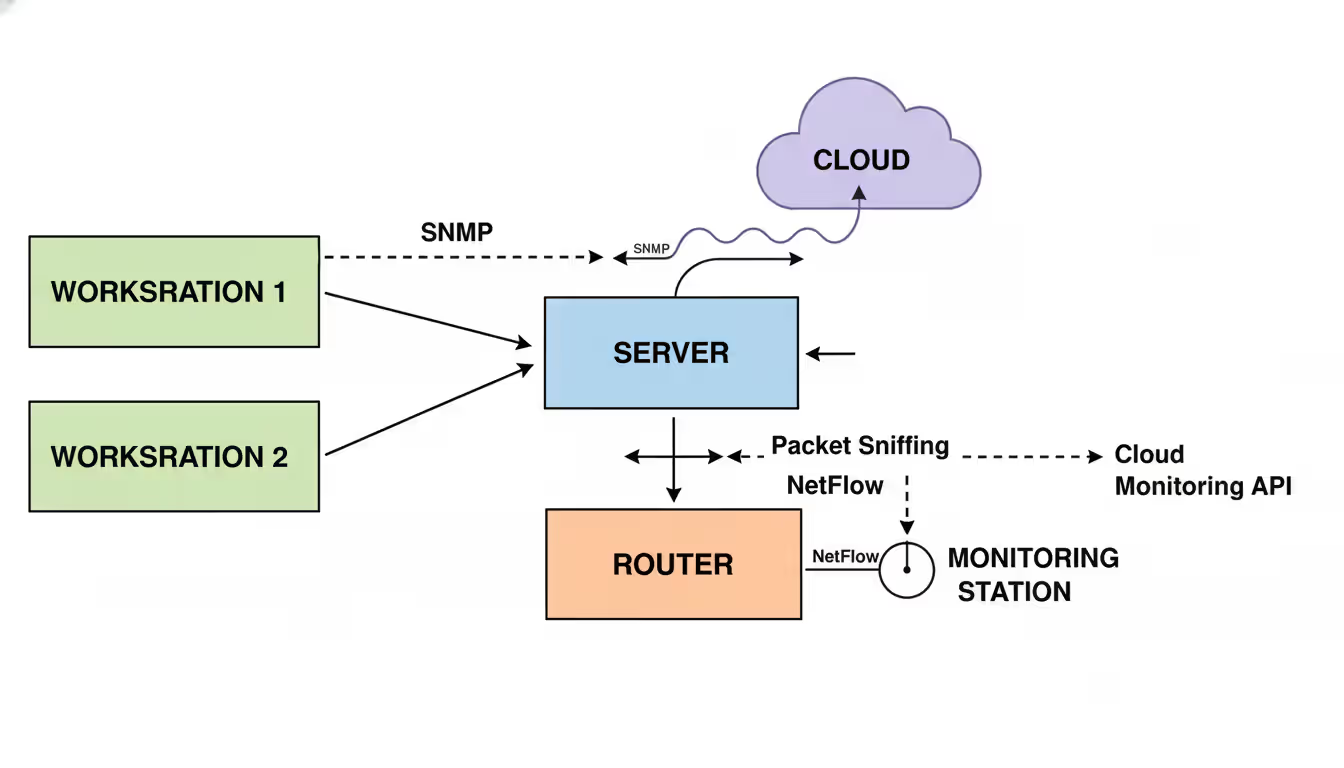
The technology works by analyzing network packets—the small units of data that travel across networks. Most bandwidth monitoring solutions use one of several methods: SNMP (Simple Network Management Protocol) polling, which queries network devices for traffic statistics; packet sniffing, which examines actual data packets passing through; or flow-based monitoring like NetFlow or sFlow, which collects metadata about network conversations without inspecting packet contents.
When you install a bandwidth monitor, it typically connects to your router, switches, or network infrastructure through one of these methods. The software then aggregates data to show you which devices are using bandwidth, what applications or services they're accessing, and when peak usage occurs. Some solutions operate as hardware appliances, while others run as software on existing servers or virtual machines.
Small businesses might deploy a bandwidth monitor to understand why their internet connection slows down every afternoon at 3 PM. IT departments in larger organizations use these tools to justify infrastructure upgrades with concrete usage data. Service providers monitor bandwidth to ensure customers stay within plan limits and to plan capacity expansion.
The distinction between passive and active monitoring matters here. Passive monitoring observes existing traffic without generating additional network load. Active monitoring sends test packets to measure performance characteristics like latency and packet loss, which consumes a small amount of bandwidth itself but provides deeper insight into connection quality.
Author: Trevor Langford;
Source: milkandchocolate.net
Why You Need Bandwidth Monitoring Software
Networks have become more complex, not simpler. Cloud applications, video conferencing, VoIP systems, and remote workers all compete for the same pipe. Without bandwidth monitor software, you're essentially driving blindfolded.
Identifying bottlenecks ranks among the most practical benefits. When users report slow performance, bandwidth monitoring data points directly to the cause—whether it's someone streaming 4K video, a misconfigured backup system flooding the network during business hours, or simply hitting the ceiling of your internet plan. One mid-sized law firm discovered their new cloud-based document management system was consuming 80% of their bandwidth during peak hours, prompting an upgrade before client service deteriorated.
Cost control becomes straightforward with visibility. Many internet service agreements include overage charges that can multiply your monthly bill if you exceed allocated bandwidth. Monitoring software alerts you before crossing thresholds, giving you time to adjust usage patterns or negotiate plan changes. For organizations with metered connections or pay-per-gigabyte arrangements, this visibility translates directly to budget predictability.
Security threats often manifest as unusual bandwidth patterns. A compromised computer participating in a botnet might show abnormal outbound traffic. Ransomware exfiltrating files creates distinctive upload patterns. Bandwidth monitor software that establishes baseline behavior can flag these anomalies hours or days before traditional security tools detect them.
Performance optimization extends beyond just identifying hogs. The data reveals opportunities to implement Quality of Service (QoS) policies that prioritize business-critical applications over recreational traffic. You might discover that automatic software updates are scheduled during your busiest hours, or that guest WiFi users are consuming resources intended for employees.
Before implementing bandwidth monitoring, we were constantly reacting to complaints. Now we spot developing issues during our morning review and address them before they impact patient care systems. The ROI came in the first month when we identified a misconfigured medical imaging workstation that was attempting to sync terabytes of duplicate data to our cloud backup
— Sarah Chen
Key Features to Look for in Bandwidth Monitor Tools
Not all bandwidth monitor tools deliver the same capabilities. Understanding which features matter for your situation prevents expensive mismatches between tool and need.
Real-time tracking forms the foundation. You need current visibility into what's happening now, not just historical reports. Look for dashboards that update at least every minute, with the ability to drill down from overall network usage to individual device or application details. The interface should let you identify top talkers—the devices or applications consuming the most bandwidth—within seconds.
Alert systems separate useful tools from shelf-ware. Configure thresholds for total bandwidth usage, per-device limits, or application-specific consumption. When these thresholds are crossed, the system should notify you through email, SMS, or integration with your existing monitoring infrastructure. The best bandwidth monitor tools let you set different thresholds for different times—higher limits during business hours, tighter restrictions overnight when only automated systems should be active.
Reporting capabilities determine whether you can justify budget requests or policy changes. Monthly bandwidth reports showing trends, peak usage times, and top consumers provide ammunition for infrastructure discussions with management. Exportable data in CSV or PDF formats lets you incorporate network statistics into broader operational reviews.
Device and application-level visibility makes the difference between knowing "the network is slow" and understanding "the accounting department's new cloud backup is saturating the connection." Deep packet inspection (DPI) capabilities identify specific applications even when they use non-standard ports. Some bandwidth monitor tools recognize thousands of applications automatically, from Zoom and Slack to BitTorrent and gaming platforms.
Scalability matters more than most people initially realize. A tool that works perfectly for monitoring 20 devices might collapse under the load of 200. Check whether the solution scales horizontally by adding more servers or vertically by upgrading hardware. Cloud-based bandwidth monitor software often handles scaling automatically, though this comes with ongoing subscription costs.
Historical data storage determines how far back you can analyze trends. Thirty days of detailed data might suffice for troubleshooting, but capacity planning requires months or years of history. Understand the tool's data retention policies and whether older data gets aggregated into summaries or deleted entirely.
How to Choose the Right Bandwidth Monitor Tool for Your Network
Selection methodology prevents buyer's remorse. Start by documenting your actual requirements rather than jumping to product comparisons.
Assess your network size and complexity first. Count the devices you need to monitor: computers, phones, tablets, servers, IoT devices, network printers. A home office with five devices has fundamentally different needs than a company with 500 endpoints across three locations. The bandwidth monitor tool for network environments with multiple sites needs multi-location support and centralized reporting.
Network infrastructure compatibility comes next. If you're running Cisco equipment, tools with native NetFlow support integrate seamlessly. Organizations using Ubiquiti gear benefit from solutions that work well with their management interfaces. Some bandwidth monitor network solutions require installation of agents on individual devices, while others monitor passively at the router or switch level—the latter approach works better for environments with many unmanaged devices.
Budget constraints shape realistic options. Free tools like ntopng or PRTG's free tier (limited to 100 sensors) suit small networks or home users. Mid-market solutions typically range from $500 to $5,000 annually depending on device count. Enterprise bandwidth monitor software can reach tens of thousands annually but includes features like distributed monitoring, advanced analytics, and dedicated support.
Ease of use determines whether the tool gets used consistently or abandoned after initial setup. Request demos or trials that let you import your actual network configuration. Can you generate a useful report within 30 minutes of installation, or does the learning curve require days of training? Check whether the vendor offers documentation, video tutorials, and responsive support.
The selection process benefits from a structured approach:
Define your top three use cases (troubleshooting slowdowns, capacity planning, security monitoring)
List must-have features versus nice-to-have capabilities
Identify budget constraints and whether you prefer subscription or perpetual licensing
Shortlist three to five solutions that match your requirements
Test each with a proof-of-concept on your actual network
Evaluate not just features but vendor stability, update frequency, and user community
Integration capabilities often get overlooked until you need them. Does the bandwidth monitor tool export data to your existing dashboards? Can it trigger actions in your ticketing system? Organizations with mature IT operations benefit from tools that integrate with SIEM platforms, configuration management databases, and automation frameworks.
Common Bandwidth Monitoring Mistakes to Avoid
Implementation failures often stem from predictable mistakes that waste time and money.
Partial monitoring creates blind spots that undermine the entire effort. Monitoring only servers while ignoring workstations means you miss the employee streaming music all day. Tracking wired connections but not WiFi leaves mobile devices invisible. Comprehensive coverage requires monitoring at network chokepoints—typically your internet gateway and core switches—where all traffic passes through.
Ignoring alerts turns your bandwidth monitor into expensive dashboard art. Alert fatigue happens when thresholds are set too sensitively, generating dozens of notifications daily until administrators start ignoring them. Calibrate alerts during a baseline period, setting thresholds at levels that indicate genuine problems rather than normal fluctuations. One IT manager configured alerts for any device exceeding 50 Mbps, resulting in 200 daily notifications. Raising the threshold to 100 Mbps and adding time-of-day conditions reduced alerts to five per day—all actionable.
Author: Trevor Langford;
Source: milkandchocolate.net
Mismatched tools waste resources. Deploying enterprise-grade bandwidth monitor software for a 10-person office is like using a semi-truck for grocery shopping. Conversely, trying to manage a 300-device network with a tool designed for home use leads to performance problems and missing features. Match tool capabilities to actual scale, with room for 20-30% growth.
Lacking baseline data makes interpretation impossible. Is 500 GB of daily traffic normal or excessive? Without historical context, you can't tell. Run your bandwidth monitor for at least two weeks before making decisions based on its data. Capture patterns across different times and days to understand normal variation. Many networks show weekly cycles—high usage Tuesday through Thursday, lighter Fridays, minimal weekends.
Neglecting documentation means knowledge walks out the door when staff changes. Document what you're monitoring, why specific thresholds were chosen, and what actions to take when alerts trigger. Include network diagrams showing where monitoring points are installed. Future administrators will thank you.
Focusing solely on volume while ignoring patterns misses important insights. A device might use modest total bandwidth but show suspicious patterns—like outbound connections to foreign IP addresses at 3 AM. Configure your bandwidth monitor to flag unusual behavior, not just high consumption.
How Bandwidth Monitors Help Detect Security Issues
Security teams increasingly rely on bandwidth monitoring as a detection layer that catches threats other tools miss.
Unusual traffic patterns often indicate compromise before traditional antivirus or intrusion detection systems react. A workstation that typically generates 100 MB of daily traffic suddenly uploading 50 GB overnight deserves investigation. This pattern matches data exfiltration—attackers stealing files before encrypting them with ransomware. Bandwidth monitor network tools that establish per-device baselines can automatically flag these anomalies.
DDoS attacks show distinctive signatures in bandwidth data. If your organization becomes a DDoS target, you'll see sudden spikes in inbound traffic, often from diverse geographic sources. More insidiously, compromised internal devices participating in DDoS attacks against external targets generate unusual outbound traffic patterns. One university discovered their IoT devices had been compromised and were participating in a botnet only after their bandwidth monitor flagged abnormal traffic from the building automation system.
Unauthorized devices connecting to your network create security risks and bandwidth costs. A bandwidth monitor reveals devices you didn't know existed—the smart TV someone connected to the corporate network, the unauthorized WiFi access point in the sales department, or the contractor's equipment still pulling updates months after their project ended. MAC address tracking combined with bandwidth monitoring helps maintain device inventory.
Command-and-control traffic from malware often uses small, regular connections that total modest bandwidth but occur at predictable intervals. While each connection might be just a few kilobytes, the regularity stands out when you review connection patterns. Bandwidth monitoring tools with flow analysis can identify these "beaconing" patterns that indicate compromised systems checking in with attackers.
Insider threats sometimes manifest as unusual file transfers. An employee downloading unusually large volumes from file servers, especially outside normal working hours, might be preparing to leave with proprietary data. Bandwidth monitoring combined with file access logs provides early warning of potential data theft.
The key advantage bandwidth monitors bring to security is speed of detection. While forensic analysis might eventually uncover threats through log correlation and endpoint inspection, bandwidth anomalies often surface within hours of compromise. This speed advantage gives security teams time to contain threats before significant damage occurs.
Author: Trevor Langford;
Source: milkandchocolate.net
Frequently Asked Questions About Bandwidth Monitoring
What is the difference between bandwidth monitoring and network monitoring?
Bandwidth monitoring specifically tracks data volume and transfer speeds—how much data moves through your network and how fast. Network monitoring encompasses broader metrics including device availability, CPU utilization, memory usage, packet loss, and latency. Think of bandwidth monitoring as a subset of network monitoring focused exclusively on data flow. Many comprehensive network monitoring platforms include bandwidth monitoring as one component alongside other metrics.
Can I monitor bandwidth on a home network?
Yes, and it's often simpler than monitoring business networks. Most modern routers include basic bandwidth monitoring showing total usage and sometimes per-device consumption. For more detailed analysis, free tools like GlassWire or your router manufacturer's mobile app provide visibility into which devices and applications use the most data. This helps identify whether your teenager's gaming or your spouse's video calls are consuming your internet plan's monthly allocation.
Does bandwidth monitoring slow down my network?
Properly implemented bandwidth monitoring has negligible performance impact—typically less than 1% of total bandwidth and minimal CPU overhead. Passive monitoring methods like SNMP polling or flow analysis add virtually no load. Only deep packet inspection (DPI) that examines every packet's contents creates measurable overhead, and even then, modern hardware handles this efficiently. If bandwidth monitoring noticeably slows your network, the tool is misconfigured or your infrastructure needs upgrading regardless.
How much does bandwidth monitor software cost?
Pricing varies dramatically based on scale and features. Free options like PRTG's limited version or open-source solutions cost nothing but require technical expertise to implement. Small business tools range from $10 to $100 monthly for cloud-based services monitoring 10-50 devices. Mid-market solutions typically cost $500-$3,000 annually for 100-500 devices. Enterprise bandwidth monitor software with advanced analytics, distributed monitoring, and dedicated support can reach $10,000-$50,000 annually for large networks. Many vendors price per device, per location, or per bandwidth volume monitored.
What happens if I exceed my bandwidth limit?
Consequences depend on your service agreement. Consumer internet plans might throttle your speed for the remainder of the billing period, reducing you from advertised speeds to much slower connections. Business plans often include overage charges—typically $5-$50 per additional gigabyte beyond your plan's allocation, which accumulates quickly. Some providers simply cut off service until the next billing cycle or until you purchase additional bandwidth. A bandwidth monitor tool prevents surprises by alerting you before crossing thresholds, giving you time to adjust usage or contact your provider about plan changes.
Do I need technical skills to use a bandwidth monitor tool?
Basic bandwidth monitoring requires minimal technical knowledge—if you can install software and access your router's admin interface, you can deploy simple monitoring tools. Cloud-based solutions with automatic device discovery work almost immediately after installation. However, advanced features like configuring SNMP on network equipment, setting up flow exports, or interpreting detailed traffic analysis benefit from networking knowledge. Most vendors offer different interfaces: simplified dashboards for managers who want high-level visibility and detailed configuration options for network administrators who need granular control.
Bandwidth monitoring transforms network management from guesswork into data-driven decision making. The visibility it provides helps you optimize performance, control costs, and detect security threats before they escalate into crises.
Start with clear objectives. Whether you're troubleshooting current problems, planning infrastructure upgrades, or establishing security baselines, define what success looks like before selecting tools. Match the bandwidth monitor to your network's scale and complexity, remembering that the best solution is the one you'll actually use consistently.
Implementation succeeds when you establish baselines first, calibrate alerts to avoid fatigue, and document your configuration for future reference. Review bandwidth data regularly—weekly for small networks, daily for critical infrastructure—to spot developing trends before they become emergencies.
The investment in bandwidth monitoring pays returns through fewer user complaints, better capacity planning, faster incident response, and concrete data for budget discussions. Networks have become too critical to organizational success to manage blindly. A bandwidth monitor gives you the visibility needed to keep everything running smoothly.
A reliable wireless connection has become as essential as electricity. This comprehensive guide covers wifi network design, installation, monitoring, and troubleshooting. Learn how to choose equipment, optimize performance, and decide between DIY and professional installation for your home or business
A virtual network is a software-defined networking environment that replicates physical network infrastructure without dedicated hardware. This guide covers core components, virtual network functions, gateways, security best practices, cloud provider services, and a practical 6-step setup process
MQTT brokers route messages between IoT devices using publish-subscribe architecture. This guide covers selecting the right broker, comparing free options like Mosquitto and EMQX, testing online brokers, and avoiding security and scalability mistakes that derail IoT projects
Choosing secure cloud storage requires understanding encryption types, privacy policies, and security features that actually protect your personal files. This guide compares top zero-knowledge providers and explains the technical differences between genuine privacy protection and basic security
The content on this website is provided for general informational purposes only. It is intended to offer insights, commentary, and analysis on cloud computing, network infrastructure, cybersecurity, and IT solutions, and should not be considered professional, technical, or legal advice.
All information, articles, and materials presented on this website are for general informational purposes only. Technologies, standards, and best practices may vary depending on specific environments and may change over time. The application of any technical concepts depends on individual systems, configurations, and requirements.
This website is not responsible for any errors or omissions in the content, or for any actions taken based on the information provided. Users are encouraged to seek qualified professional advice tailored to their specific IT infrastructure, security, and business needs before making decisions.