More American companies now run their core operations through internet-based platforms than through their own server rooms. For IT directors and business owners trying to pick the right setup, you need to weigh what you're getting in speed and flexibility against what you're spending and risking.
These platforms fundamentally change how you buy and use technology. Rather than cutting checks for perpetual licenses and racking servers in climate-controlled rooms, you're logging into applications through Chrome or Safari and paying monthly bills. The heavy lifting—patches, backups, hardware failures—becomes someone else's problem while you get the ability to expand or contract your setup in ways that physical equipment never allowed.
What Are Cloud Software Services
When you use cloud software services, you're tapping into computing power, storage, and applications that live in someone else's data center. You interact with everything through your web browser or by writing code that talks to their systems. No DVDs to install. No server closets to cool.
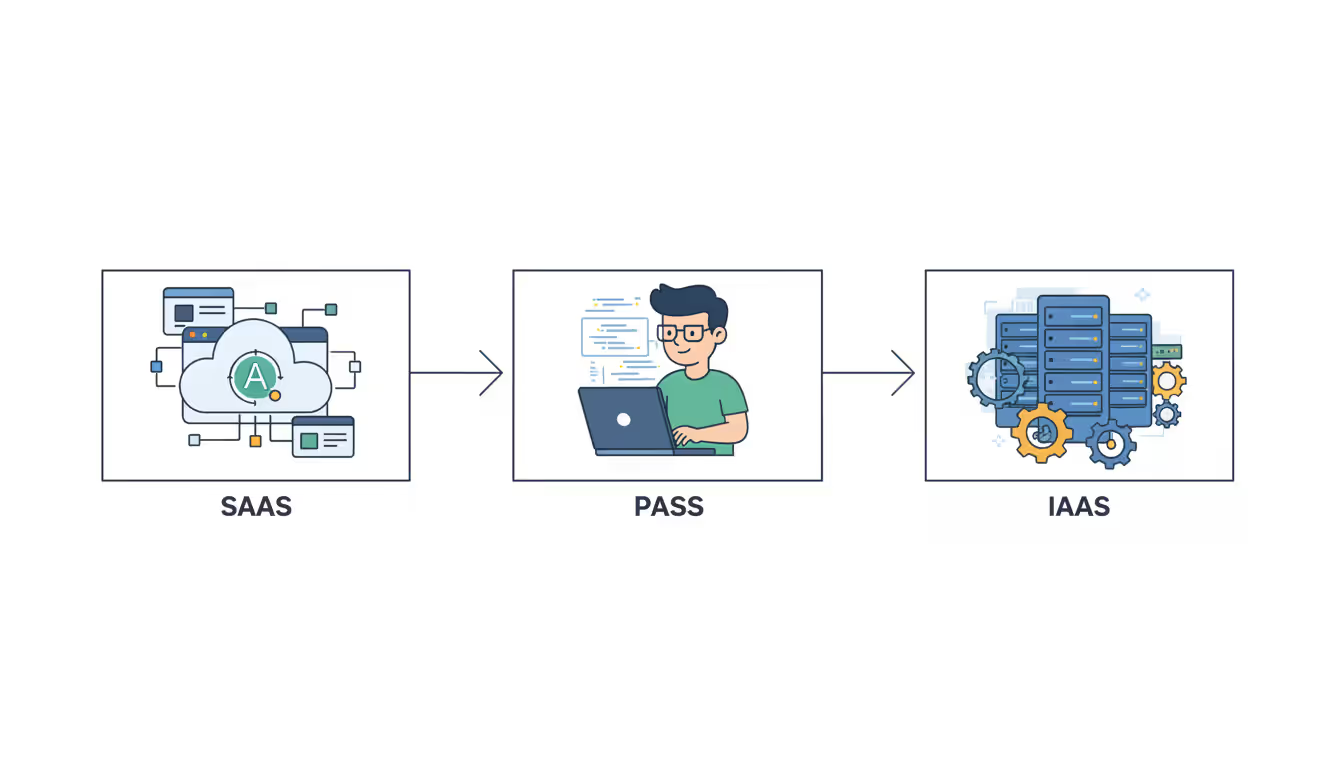
The industry splits these services into three main categories:
Software as a Service (SaaS) delivers ready-to-use applications. You create an account, invite your team, and start working. The company running it handles literally everything behind the scenes—updates roll out automatically, security patches apply overnight, servers stay running. Salesforce manages your customer relationships this way. Microsoft 365 powers your email and documents. Slack keeps your team chatting. You never think about the infrastructure.
Platform as a Service (PaaS) hands developers a ready-made environment for building their own applications. Picture Heroku or Google App Engine—your programmers write code and push it live without ever configuring a server. AWS Elastic Beanstalk does the same thing. Your team creates features while the platform figures out how many servers to spin up, where to route traffic, and how to handle crashes. It's like having an operations team you never hired.
Infrastructure as a Service (IaaS) rents you the building blocks—virtual computers, disk space, networking. You decide what operating system runs on those virtual machines, which applications to install, how to configure everything. Amazon EC2 pioneered this approach. Azure and Google Compute Engine offer similar capabilities. The physical equipment sits in their facilities, but you control almost everything else about how it runs.
A few traits separate cloud platforms from the software you install yourself. Elasticity means you can double your capacity Tuesday morning and cut it in half Thursday afternoon—try doing that with physical servers. Multi-tenancy packs hundreds or thousands of customers onto shared equipment while keeping everyone's data separated. Metered billing tracks exactly how much processing power, storage, and bandwidth you consume so you pay for actual usage rather than estimated needs. Universal access lets employees connect from their phones, laptops, or tablets anywhere with decent internet.
Cloud providers split security duties with their customers, and where that line falls depends on what you're renting. They lock down their buildings, guard their network equipment, and patch the virtualization software that carves physical servers into virtual ones. You protect your data, manage who gets access to what, and configure security settings correctly. SaaS vendors shoulder most of the burden. IaaS customers handle almost everything themselves.
Author: Nicole Bramwell;
Source: milkandchocolate.net
How Cloud Software Development Works
Teams building cloud applications work in short cycles—typically two weeks from start to finish—shipping small improvements constantly instead of massive releases twice a year.
Agile practices thrive here because the infrastructure makes frequent updates practical. Developers commit their changes to GitHub or GitLab dozens of times daily. Automated tests run against every change, checking whether new code breaks existing features. Continuous integration servers compile fresh builds whenever tests pass. Continuous deployment pipelines push those builds live without anyone clicking a "deploy" button.
Multi-tenant architecture creates interesting puzzles. One copy of your application serves thousands of different companies, so developers need bulletproof data isolation while everyone shares the same code. Most teams add a tenant identifier to every database table and make absolutely sure queries filter by it. Some platforms give each customer their own database entirely, trading higher infrastructure costs for better separation.
API-first thinking means building the underlying service before creating screens for humans. Development teams design and document how other systems will talk to theirs, then build interfaces on top of that foundation. This makes it straightforward to launch mobile apps, enable partner integrations, or let customers extend the platform. REST APIs using JSON became the standard years ago, though GraphQL keeps gaining ground when you need to query complex, nested data efficiently.
Microservices architectures chop monolithic applications into specialized components. Authentication runs separately from billing. Notifications operate independently from your reporting engine. Each piece scales based on its own demands rather than forcing you to scale the entire application as one unit.
Docker packages applications with their dependencies—libraries, configuration files, runtime environments—guaranteeing identical behavior on your laptop, in staging, and in production. Kubernetes then manages thousands of these containers, automatically restarting the ones that crash and balancing traffic across healthy instances.
Cloud Software Deployment Models Explained
Author: Nicole Bramwell;
Source: milkandchocolate.net
Where you run your workloads depends on regulatory requirements, control preferences, and budget realities. Each option trades off differently.
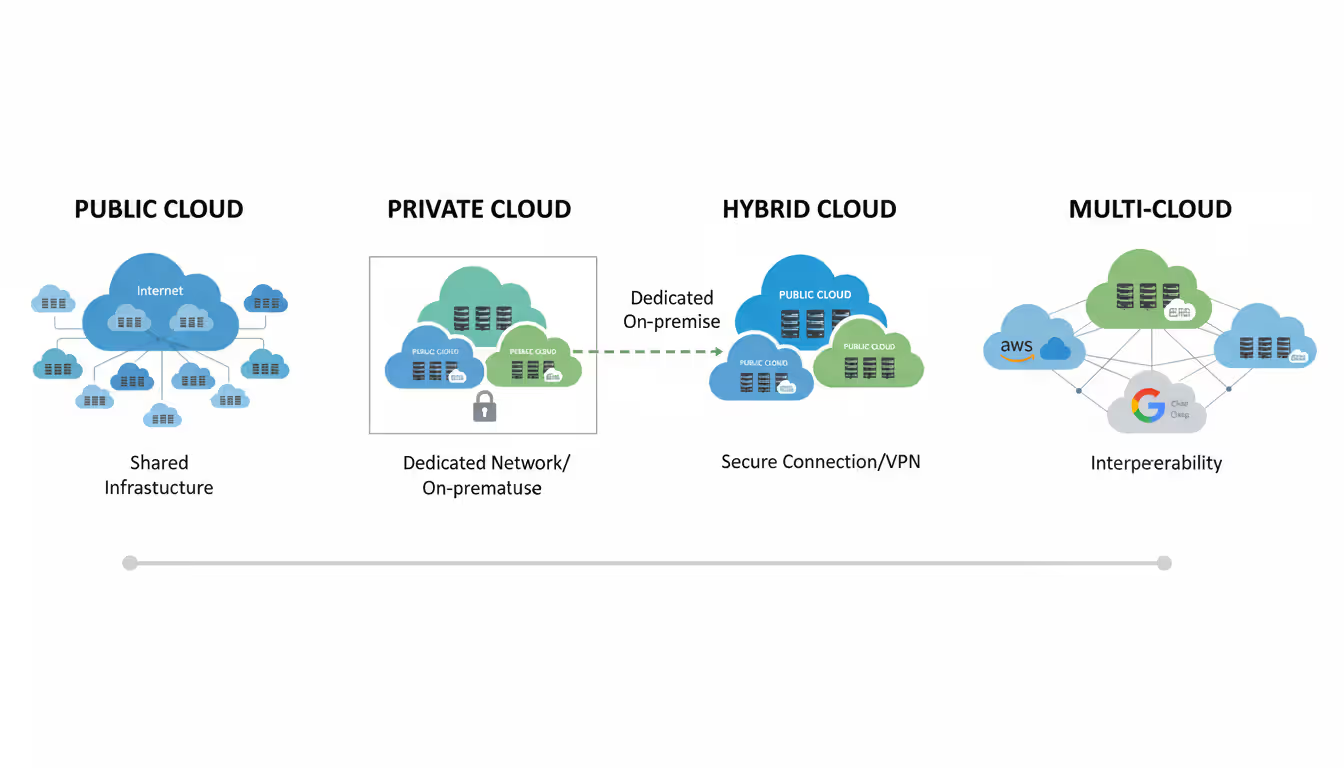
Public cloud means sharing physical infrastructure with other companies, though virtualization keeps everyone logically separated. AWS, Azure, and Google Cloud dominate this space. You avoid buying any hardware or leasing data center space, and you can scale almost infinitely—a three-person startup can serve ten million users without changing providers. You surrender some control over security configurations, and regulated industries sometimes struggle with compliance requirements on shared infrastructure.
Private cloud dedicates infrastructure to your organization alone. Some companies build these themselves using VMware or OpenStack in their own facilities. Others rent dedicated equipment from providers who guarantee no one else touches that hardware. You get maximum control over security policies, network architecture, and physical specifications. Banks and hospitals often go this route to satisfy regulators. Expect higher costs and harder scaling. You're forecasting capacity months ahead and provisioning accordingly, risking wasted money on idle servers or painful slowdowns when you underestimate.
Hybrid cloud mixes public and private, letting work shift between them. A clothing retailer might run its website on public infrastructure that scales massively during holiday shopping, while processing credit cards on private systems that meet payment card industry requirements. You get flexibility at the cost of complexity—managing two different platforms, keeping them connected securely, synchronizing data across the boundary.
Multi-cloud spreads your operations across several public providers. Maybe you run compute workloads on AWS, machine learning jobs on Google Cloud, and productivity applications through Azure. You avoid getting trapped with one vendor and can use each provider's specialty areas. Managing expertise across multiple platforms gets expensive, though. Cost tracking becomes harder. Integrations multiply.
Deployment Model
Cost
Scalability
Security Control
Management Complexity
Best Use Cases
Public
Pay only for what you consume; no equipment purchases
Grows or shrinks immediately based on demand
Provider secures infrastructure; you control access and data
Minimal hands-on management required
Startups, unpredictable traffic patterns, testing new ideas
Private
Major upfront hardware investment and ongoing maintenance
Limited by capacity you've already installed
You control every security decision
Requires dedicated operations staff
Financial services, healthcare, steady workloads with strict regulations
Hybrid
Mix of both cost models
Handle peak loads by overflowing to public infrastructure
Keep sensitive data private while leveraging public benefits
Coordination across two distinct environments
Retail with seasonal spikes, meeting compliance while staying flexible
Multi-Cloud
Shop for best pricing per service; avoid bulk commitment
No dependency on single provider's capacity or availability
Security approach varies by platform
Most demanding; different tools and processes per vendor
Large enterprises reducing vendor leverage, requiring absolute uptime
Small operations with lean IT teams usually do best in public cloud—less to manage means more time building products. Mid-sized companies facing compliance hurdles often split workloads across hybrid setups. Enterprises frequently adopt multi-cloud to negotiate harder on pricing and eliminate single points of failure.
Types of Cloud Software Hosting Options
The layer underneath your application dramatically affects how fast it runs, how reliably it stays up, and what it costs you monthly.
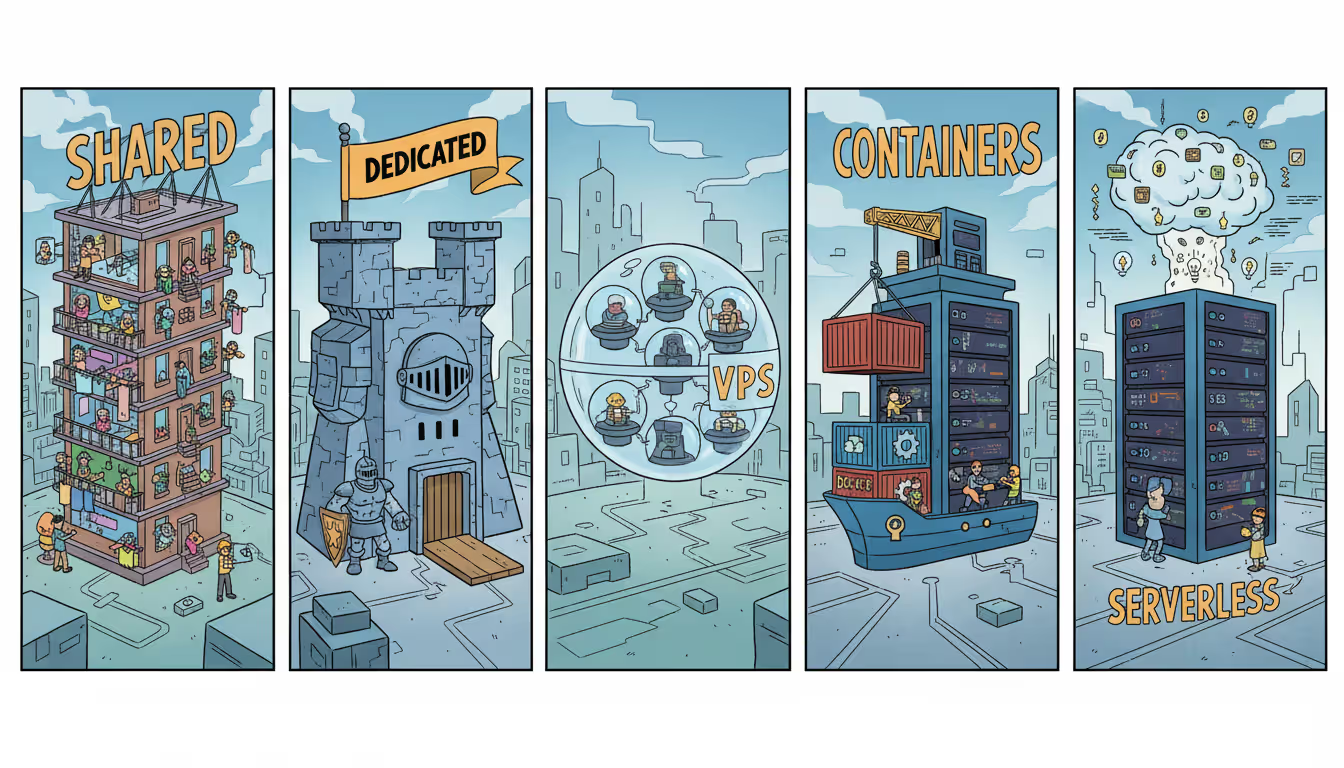
Shared hosting crams multiple websites or applications onto the same servers. Budget hosting companies offer this for $5 to $50 monthly. Great for hobby projects or staging environments. Terrible for anything important because when another customer's site gets hammered with traffic, your application slows down too. One viral TikTok about somebody else's blog can make your checkout process crawl.
Dedicated hosting reserves an entire physical machine for you exclusively. Nobody else's code runs on that hardware. Performance stays predictable, and you configure the server however you want. Monthly costs range from a few hundred to several thousand dollars depending on specs. Makes sense when you have consistent, heavy resource needs or compliance rules prohibiting multi-tenant setups.
Virtual private servers (VPS) carve physical machines into isolated virtual ones. Each VPS gets guaranteed CPU cores, RAM, and disk space. Your operating system and applications run independently from other customers sharing the underlying hardware. Performance beats shared hosting reliably, and prices typically fall between $20 and $200 per instance monthly. Works well for small-to-medium applications needing stable performance without dedicated hardware expense.
Containerized environments through Docker and Kubernetes have become the default for modern applications. Containers boot in seconds, pack efficiently onto servers, and scale horizontally by launching additional copies. You pay only for actual computing resources containers consume. Kubernetes automatically handles placement across servers, networking between components, and restarting containers that crash. Particularly effective for microservices architectures and applications where traffic varies throughout the day.
Serverless computing eliminates servers from your thinking entirely. You write functions that execute when triggered—an API request arrives, a file uploads to storage, a database record changes. AWS Lambda pioneered this model. Azure Functions and Google Cloud Functions work similarly. The provider automatically allocates whatever resources your function needs, runs it, bills you for actual execution time (measured in milliseconds), then shuts everything down. No servers to patch or configure. Scales automatically from zero to thousands of concurrent executions. Cold starts can add 100 to 1,000 milliseconds when a function hasn't run recently. Works brilliantly for event-driven tasks and irregular workloads.
Performance varies considerably across these options. Dedicated servers and well-configured containers deliver the most predictable response times. Shared hosting introduces wild variability. Serverless functions might lag initially but run fast once warmed up.
Matching hosting type to workload pattern drives cost optimization. Steady, predictable traffic justifies reserved instances or dedicated machines with flat monthly pricing. Spiky, unpredictable traffic benefits from autoscaling containers or serverless functions that cost nothing during quiet hours. Common waste: running containerized apps on oversized cloud instances that sit mostly idle overnight and weekends.
Author: Nicole Bramwell;
Source: milkandchocolate.net
How to Choose the Best Cloud Software for Your Business
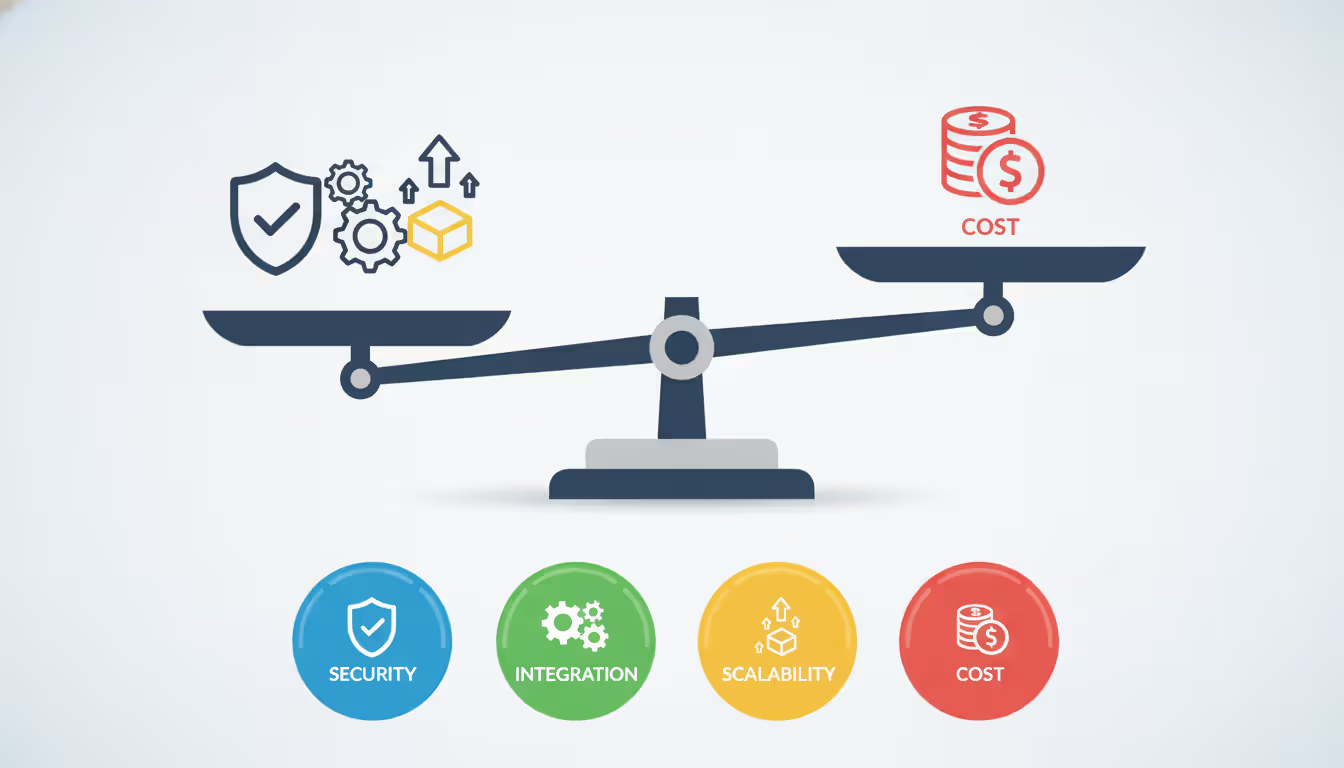
Picking the right platform requires evaluating technical capabilities alongside business needs and vendor viability. Hasty decisions often lead to painful migrations later.
Key Features to Look For
Scalability mechanisms determine whether your platform grows alongside your business. Vertical scaling means adding more RAM, faster CPUs, or bigger disks to existing servers. Eventually you hit limits—the biggest instance available maxes out. Horizontal scaling adds additional servers to spread the load. Better platforms handle horizontal scaling without requiring application rewrites. During vendor demos, ask point-blank: "What happens when we get ten times our current traffic?" Watch for hand-waving and vague assurances.
Security capabilities protect your data and help satisfy regulatory requirements. Look for encryption protecting stored information and data traveling across networks, granular permission systems controlling who sees what, comprehensive audit trails showing who did what when, and intrusion detection monitoring for suspicious activity. Certifications prove more than promises—SOC 2 Type II demonstrates actual operational security controls, HIPAA certification enables handling patient data, and GDPR compliance addresses European privacy regulations. Verify certifications directly with auditing firms rather than believing vendor marketing.
Integration capabilities determine how easily the platform connects with your existing systems. Modern options provide RESTful APIs, webhook notifications when events occur, and pre-built connectors for popular applications like Salesforce, QuickBooks, or Shopify. Poor integration forces manual data entry or expensive custom development. Request API documentation during your evaluation and have developers review it for completeness and clarity.
Pricing models significantly impact your total costs. Subscription pricing charges monthly or annually based on users, features, or data volume. Usage-based pricing bills for actual consumption—server hours, API calls, gigabytes stored or transferred. Many providers combine both approaches with base subscriptions plus overage charges. Understand billing increments because rounding matters. Some providers bill by the hour, rounding up partial hours. Others charge per second. Watch for hidden fees: data transfer costs, premium support charges, required add-ons.
Vendor lock-in risks emerge from proprietary features, non-standard APIs, and restrictive data export policies. Assess migration difficulty before signing contracts. Can you export your data in CSV, JSON, or other standard formats? Do their APIs use industry-standard protocols like REST and OAuth, or custom approaches? Proprietary database systems or programming languages multiply switching costs dramatically.
Author: Nicole Bramwell;
Source: milkandchocolate.net
Common Mistakes When Selecting a Provider
Chasing the lowest price ignores total ownership costs. That bargain platform requiring constant workarounds, extensive customization, and suffering through frequent outages will cost more than premium options that just work. Calculate actual costs including implementation time, staff training, integration development, and ongoing troubleshooting.
Overlooking compliance requirements creates legal exposure. Healthcare organizations cannot store patient information in systems lacking proper HIPAA safeguards. Payment processors need PCI DSS certification before handling credit card data. Government contractors require FedRAMP authorization. Adding compliance after deployment costs exponentially more than selecting compliant platforms initially.
Dismissing vendor financial health risks business continuity. Startups offer innovative features but may get acquired or shut down. Research recent funding rounds, revenue trajectory, and customer retention rates. Established vendors provide stability but sometimes innovate glacially.
Skipping real-world testing produces unpleasant surprises after you've committed. Vendors demonstrate their platforms under ideal conditions with clean sample data. Actual performance with your data volumes, integration requirements, and user workflows often differs substantially. Demand proof-of-concept testing with realistic scenarios before signing anything.
Organizations that treat cloud selection as purely a technology decision consistently underestimate migration complexity and ongoing operational costs. The most successful cloud adoptions involve business stakeholders defining requirements before IT evaluates technical capabilities
— Sarah Chen
Cloud Software Security and Compliance Considerations
Security duties get divided between providers and customers in ways that shift based on service type. Confusion about these boundaries creates vulnerabilities.
Providers secure everything physical—data center buildings, network equipment, storage hardware, and the servers themselves. They patch hypervisors that create virtual machines, maintain redundant power and cooling, and implement physical access controls. Customers cannot inspect or audit this layer directly. You trust provider certifications and third-party audit reports.
Customers secure everything above that foundation. This includes operating systems on IaaS virtual machines, application code, stored data, and user access controls. Misconfigured security groups exposing databases to the entire internet cause shockingly frequent breaches. Default administrative passwords create easy entry points for attackers. Excessive user permissions violate basic least-privilege principles.
Data encryption scrambles information so attackers cannot read it even when accessing storage systems. Encryption at rest uses algorithms like AES-256 to protect stored data. Encryption in transit uses TLS protocols to protect information moving between users and cloud platforms or between cloud services. Verify platforms enforce current TLS versions—1.2 minimum, preferably 1.3—and reject outdated protocols that attackers can crack.
Access controls restrict who can view or modify resources. Instead of assigning permissions individually, teams typically use role-based systems where job functions determine access. Your billing analyst sees invoices but cannot touch production databases. Multi-factor authentication requires something you know (password) plus something you have (phone or hardware key). Enabling MFA blocks most credential-based attacks immediately.
Audit logging records a complete history of activities in your environment. You'll capture login attempts both successful and failed, configuration changes, data access patterns, and API calls. Most platforms disable detailed logging by default since storing all those records costs them money. You must enable comprehensive logging manually, then retain logs according to industry requirements. HIPAA mandates six-year retention. Other regulations specify different periods.
Compliance certifications prove adherence to established security frameworks. SOC 2 Type II reports verify security, availability, and confidentiality controls over an extended audit period. HIPAA certification allows handling protected health information. PCI DSS certification permits processing payment card data. GDPR compliance demonstrates European privacy regulation adherence. ISO 27001 certification shows mature information security management. Verify certifications cover the specific services you plan to use since providers often certify some offerings while excluding others.
Under the shared responsibility model, breaches can result from provider failures or customer mistakes. Providers rarely compensate customers for data loss or breaches stemming from customer misconfigurations. Service level agreements carefully limit liability, so read them thoroughly before signing.
Frequently Asked Questions About Cloud Software Services
What is the difference between cloud software and traditional software?
Traditional software means purchasing perpetual licenses, installing programs on your own hardware, and manually applying every security patch and version update as they release. Your company owns the physical servers, maintains them, and budgets for replacement every three to five years when they become obsolete. Cloud software reverses this entirely—you pay monthly subscriptions, access applications through web browsers without installing anything locally, and the vendor automatically handles maintenance, updates, and infrastructure management. Essentially you shift from capital expenditures buying and maintaining equipment to operational expenses renting software as an ongoing service.
How much do cloud software services typically cost?
Pricing spans an enormous range depending on what you're using. SaaS applications typically charge $10 to $300+ per user monthly based on feature sets. A 100-employee company might spend anywhere from $3,000 to $30,000 monthly for productivity software, CRM platforms, and collaboration tools combined. PaaS billing depends on your application's actual consumption—compute time, database queries, data transfers—which might run a few hundred dollars monthly for modest applications or thousands for busy ones. IaaS charges for virtual machines, storage space, and bandwidth consumed. Small web applications might cost $50 monthly while enterprise workloads reach six or seven figures. Most vendors provide online calculators where you estimate usage and get projected costs.
Can I migrate my existing applications to the cloud?
Most applications can move to cloud infrastructure, though some require more effort than others. Straightforward web applications often migrate smoothly—provision cloud virtual machines and configure them similarly to your physical servers. Legacy applications built around specific hardware configurations or unusual dependencies require careful planning and potentially significant modifications. Many companies begin with "lift and shift" migrations, moving applications to cloud servers without changing code. Others redesign applications to leverage cloud-native features like automatic scaling and managed databases. Expect straightforward migrations to take weeks, while complex enterprise systems might need months or years. Carefully map dependencies, measure data volumes, and determine acceptable downtime windows before starting.
What happens if my cloud provider experiences downtime?
During provider outages, applications running on affected infrastructure become unavailable until restoration. Major providers commit to 99.9% to 99.99% uptime, translating to roughly 8 to 52 minutes of acceptable monthly downtime. Service level agreements typically credit a percentage of monthly fees when downtime exceeds commitments, though these credits rarely compensate for lost revenue or productivity. Organizations requiring absolute uptime deploy across multiple geographic regions or even multiple providers to maintain availability when one location fails. Subscribe to provider status pages and configure alerts so you learn about incidents immediately rather than from confused users.
Is cloud software secure enough for sensitive business data?
Major providers invest far more in security infrastructure than individual companies could economically justify—dedicated security teams, advanced threat detection systems, rigorous compliance audits. Security ultimately depends on your configuration choices, though. Publicly accessible storage containers, weak access controls, and unencrypted sensitive data create vulnerabilities regardless of underlying platform security. For genuinely sensitive information, verify providers hold relevant certifications for your industry, enable encryption for data at rest and in transit, implement least-privilege access controls, and activate detailed audit logging. Healthcare organizations, financial institutions, and government agencies successfully use cloud platforms while meeting strict security requirements—proper implementation makes the difference.
How long does cloud software deployment take?
SaaS applications typically go live within hours or days—create accounts, configure basic settings, import data, train users. Timelines extend when migrating data from legacy systems, integrating with existing applications, or customizing complex workflows. PaaS deployment duration depends entirely on your application's complexity. Simple applications deploy within days while sophisticated systems require weeks or months of development work. IaaS migration timelines vary dramatically. Moving a handful of virtual servers might take days. Relocating entire data centers demands months of planning, testing, and phased execution. Most organizations underestimate deployment time because they count only technical migration while forgetting user training, process redesign, and integration work.
Cloud platforms have evolved from experimental technology into essential infrastructure powering businesses from solo consultants to Fortune 500 enterprises. The ability to scale resources dynamically, access enterprise-grade security capabilities, and convert capital expenses into operational costs creates genuine advantages over traditional software deployment.
Success demands understanding differences between service models, carefully matching deployment options to business requirements, and recognizing that security remains a shared responsibility requiring active customer participation. Organizations investing time in thorough vendor evaluation, implementing robust security configurations, and planning migrations carefully realize substantial benefits. Those rushing into cloud adoption without addressing compliance needs, integration requirements, and operational changes frequently face expensive corrections later.
The landscape keeps evolving. Serverless computing, edge processing, and artificial intelligence integration represent current innovation frontiers. Staying informed about emerging capabilities while maintaining focus on fundamentals—security, scalability, and reliability—positions organizations to leverage cloud platforms effectively for years ahead.
A reliable wireless connection has become as essential as electricity. This comprehensive guide covers wifi network design, installation, monitoring, and troubleshooting. Learn how to choose equipment, optimize performance, and decide between DIY and professional installation for your home or business
A virtual network is a software-defined networking environment that replicates physical network infrastructure without dedicated hardware. This guide covers core components, virtual network functions, gateways, security best practices, cloud provider services, and a practical 6-step setup process
MQTT brokers route messages between IoT devices using publish-subscribe architecture. This guide covers selecting the right broker, comparing free options like Mosquitto and EMQX, testing online brokers, and avoiding security and scalability mistakes that derail IoT projects
Choosing secure cloud storage requires understanding encryption types, privacy policies, and security features that actually protect your personal files. This guide compares top zero-knowledge providers and explains the technical differences between genuine privacy protection and basic security
The content on this website is provided for general informational purposes only. It is intended to offer insights, commentary, and analysis on cloud computing, network infrastructure, cybersecurity, and IT solutions, and should not be considered professional, technical, or legal advice.
All information, articles, and materials presented on this website are for general informational purposes only. Technologies, standards, and best practices may vary depending on specific environments and may change over time. The application of any technical concepts depends on individual systems, configurations, and requirements.
This website is not responsible for any errors or omissions in the content, or for any actions taken based on the information provided. Users are encouraged to seek qualified professional advice tailored to their specific IT infrastructure, security, and business needs before making decisions.