MQTT has become the backbone of IoT communication, connecting billions of devices worldwide. At the heart of every MQTT deployment sits the broker—a piece of infrastructure that routes messages between publishers and subscribers. Whether you're building a smart home system, industrial monitoring platform, or connected vehicle network, understanding how to select, deploy, and configure an MQTT broker determines whether your project scales smoothly or collapses under load.
What Is an MQTT Broker and How Does It Work
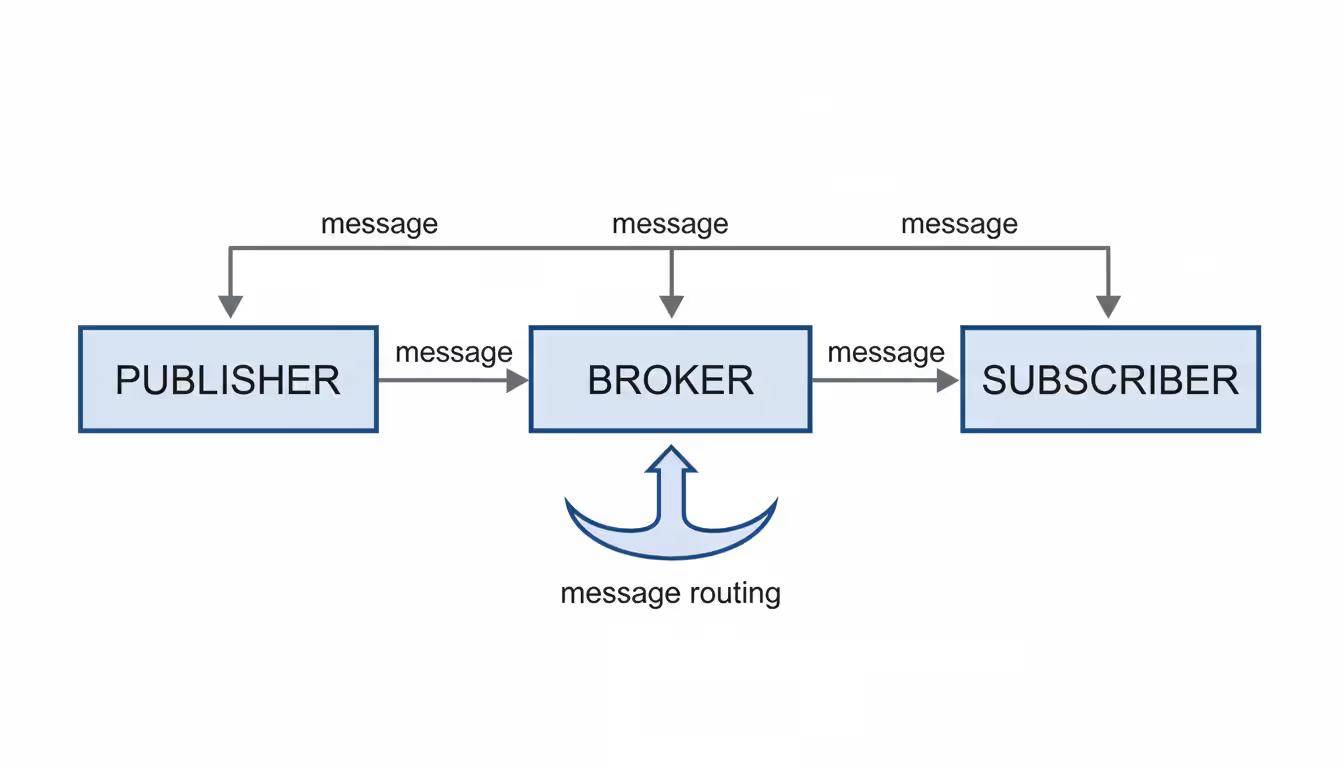
An MQTT broker is a server that receives messages from publishing clients and routes them to subscribing clients based on topic filters. Unlike traditional request-response protocols, MQTT uses a publish-subscribe pattern where clients never communicate directly. Instead, they interact through the broker, which acts as a central message hub.
When a temperature sensor publishes data to the topic "home/livingroom/temperature", it sends that message to the broker. Any client subscribed to that exact topic—or a wildcard pattern that matches it—receives the message instantly. The broker maintains persistent connections with clients, tracks subscriptions, and handles message delivery according to Quality of Service (QoS) levels.
The architecture provides natural decoupling. Publishers don't need to know which subscribers exist, and subscribers don't need to know the source of messages. This makes MQTT particularly effective for scenarios where devices come online sporadically or where you need to add new data consumers without modifying existing publishers.
MQTT brokers handle three QoS levels. QoS 0 delivers messages at most once with no acknowledgment—fast but unreliable. QoS 1 guarantees at least one delivery using acknowledgments, though duplicates may occur. QoS 2 ensures exactly-once delivery through a four-step handshake, adding latency but eliminating duplicates. Your broker must track message state for QoS 1 and 2, which affects memory and storage requirements.
Most brokers also support retained messages (the last message on a topic is stored for new subscribers), last will and testament (automatic notification when a client disconnects unexpectedly), and persistent sessions (subscription and message state survives disconnections).
Author: Rachel Denholm;
Source: milkandchocolate.net
How to Choose the Right MQTT Broker
Selecting the best MQTT broker for your project requires evaluating several technical and operational factors. The wrong choice creates technical debt that becomes expensive to reverse once you've deployed thousands of devices.
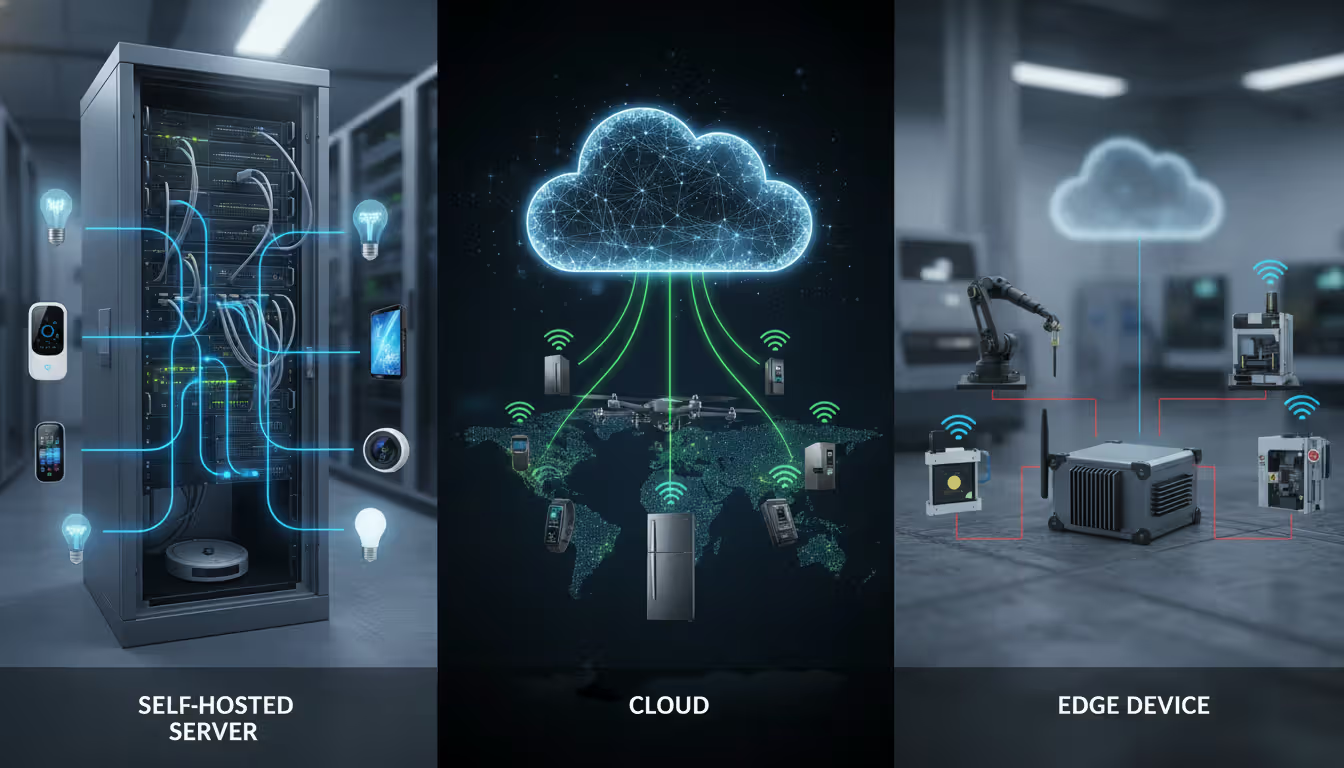
Deployment model matters more than features. Self-hosted brokers give you complete control over data, networking, and configuration but require infrastructure management. Cloud-hosted brokers eliminate operational overhead but introduce vendor dependencies and recurring costs. Edge brokers run on local gateways, reducing latency and enabling offline operation but complicating synchronization when connectivity returns.
Scalability isn't just about connection count. A broker that handles 100,000 concurrent connections might choke on 10,000 connections if each publishes at high frequency. Evaluate message throughput (messages per second), topic count limits, and memory consumption per connection. Some brokers use single-threaded event loops that scale vertically, while others distribute load across cores or cluster nodes.
Protocol support expands your options. Pure MQTT brokers speak MQTT 3.1.1 and 5.0 over TCP. Many now add WebSocket support for browser clients, MQTT-SN for constrained networks, and bridges to other protocols like AMQP or CoAP. If you're integrating with existing systems, protocol flexibility prevents you from building custom translation layers.
Security capabilities vary dramatically. Basic brokers offer username/password authentication and TLS encryption. Enterprise options add OAuth 2.0, JWT tokens, client certificate validation, access control lists per topic, and audit logging. If you're handling health data or financial information, compliance requirements may dictate which security features are mandatory.
Persistence and clustering determine reliability. In-memory brokers deliver maximum performance but lose all state during restarts. Disk-backed persistence survives crashes but adds I/O overhead. Clustering provides high availability through redundancy, though different brokers use incompatible clustering protocols—switching later means architectural changes.
Author: Rachel Denholm;
Source: milkandchocolate.net
Free MQTT Brokers Worth Trying
Several production-quality MQTT brokers offer free tiers or open-source licenses that work well for development, small deployments, and even some production use cases.
Eclipse Mosquitto remains the reference implementation for MQTT. This lightweight broker handles tens of thousands of connections on modest hardware. It supports MQTT 3.1.1 and 5.0, TLS encryption, username/password authentication, and access control through configuration files. Mosquitto runs on Linux, Windows, macOS, and even Raspberry Pi devices. The main limitation is single-threaded operation—it won't use multiple CPU cores. For small to medium deployments or edge installations, Mosquitto provides a reliable mqtt broker free option with minimal resource requirements.
HiveMQ Community Edition offers a more feature-rich alternative. Built on Java, it uses a multi-threaded architecture that scales across cores. The community edition supports clustering (though limited to three nodes), WebSocket connections, and extensive metrics through JMX. HiveMQ's web-based control center simplifies monitoring and troubleshooting. The trade-off is higher memory usage—expect 512MB minimum compared to Mosquitto's 50MB footprint. HiveMQ Community Edition works well for development environments that mirror production complexity.
EMQX targets high-scale deployments with its Erlang-based architecture. The open-source version handles millions of concurrent connections through horizontal clustering. EMQX includes a REST API for management, rule engine for message processing, and built-in authentication backends for databases and HTTP services. It's more complex to configure than Mosquitto but delivers enterprise capabilities without licensing costs. EMQX suits projects that anticipate rapid growth or need advanced features like message transformation.
VerneMQ takes a different approach with its focus on clustering and extensibility. Built on Erlang/OTP like EMQX, it emphasizes distributed operation and plugin development. VerneMQ's Lua scripting support enables custom authentication, authorization, and message routing logic without modifying core code. The learning curve is steeper, but the flexibility helps when standard broker features don't match your requirements.
Each broker has sweet spots. Mosquitto excels at edge deployments and development. HiveMQ Community Edition bridges the gap between simplicity and enterprise features. EMQX handles massive scale. VerneMQ enables deep customization. Match the broker to your team's skills and project requirements rather than chasing feature checklists.
Online MQTT Brokers for Quick Testing
Public test brokers let you experiment with MQTT without installing anything. Several organizations maintain mqtt broker online services for development and prototyping.
test.mosquitto.org provides the most widely used public broker. It offers unencrypted connections on port 1883 and encrypted connections on port 8883 and 8884 (with different certificate configurations). Since it's completely open, anyone can publish and subscribe to any topic. Use it for learning MQTT mechanics or testing client libraries, but never for data you care about. Messages are visible to everyone, and the broker may restart without notice.
broker.hivemq.com serves a similar purpose with HiveMQ's infrastructure. It supports WebSocket connections, making it useful for browser-based MQTT experimentation. Like Mosquitto's test broker, it's completely public—appropriate for testing but not for anything resembling real data.
mqtt.eclipseprojects.io runs on Eclipse Foundation infrastructure. It's another Mosquitto instance with similar characteristics to test.mosquitto.org. The Eclipse broker tends to be slightly less congested, though both experience heavy traffic during working hours in US and European time zones.
Cloud platforms also offer online mqtt broker services with free tiers. AWS IoT Core provides a managed MQTT broker integrated with AWS services. The free tier includes one million messages per month. Azure IoT Hub offers similar capabilities with 8,000 messages per day on the free tier. Google Cloud IoT Core was deprecated in 2023, pushing users toward third-party solutions or self-hosted options on Google Cloud Platform.
The key distinction between public test brokers and cloud services is isolation. Test brokers are shared playgrounds where your data mingles with everyone else's. Cloud services provide dedicated instances with authentication, though you're locked into that vendor's ecosystem.
Security considerations for online brokers are straightforward: never send credentials, personal information, or production data to public test brokers. Assume every message is logged and visible. Even on cloud platforms with authentication, verify that TLS is enforced and certificates are validated. Several high-profile IoT breaches started with developers using test credentials in production.
When to use online brokers versus self-hosted depends on your development phase. Public brokers work fine for learning MQTT and testing client code. Once you're handling real sensor data or controlling actuators, switch to a dedicated broker you control. The transition is simple since MQTT clients just need a different hostname and credentials.
Broker Name
Deployment Type
Free Tier Availability
Max Connections
Key Features
Best For
Eclipse Mosquitto
Self-hosted
Fully open source
~100K (single node)
Lightweight, low memory, TLS support
Edge devices, small deployments, learning
HiveMQ Community Edition
Self-hosted
Free (3-node cluster limit)
~200K (clustered)
Web console, WebSocket, metrics
Development environments, medium scale
EMQX
Self-hosted / Cloud
Open source + paid tiers
2M+ (clustered)
Rule engine, REST API, horizontal scaling
High-scale IoT, enterprise projects
VerneMQ
Self-hosted
Fully open source
1M+ (clustered)
Lua scripting, plugin system, clustering
Custom logic, advanced use cases
AWS IoT Core
Cloud
1M messages/month
Device-dependent
AWS integration, device shadows, rules
AWS-centric architectures
Azure IoT Hub
Cloud
8K messages/day
500 devices
Azure integration, device twins, routing
Azure-centric architectures
test.mosquitto.org
Public test
Unlimited
Shared resource
No authentication, public access
Learning, quick tests only
Setting Up and Testing Your MQTT Broker
Getting hands-on experience with an mqtt broker test environment takes less than 30 minutes. The following steps use Mosquitto since it's the simplest path to a working broker.
Installing a Local MQTT Broker
On Ubuntu or Debian Linux, install Mosquitto through the package manager:
The package manager installs both the broker and command-line client tools. Mosquitto starts automatically as a system service. On macOS, use Homebrew:
Windows users can download the installer from mosquitto.org. The installer includes the broker and clients. After installation, start the broker from the Services control panel or run it manually.
By default, Mosquitto listens on port 1883 without authentication. This configuration works for local testing but requires hardening before exposing the broker to networks.
To enable basic authentication, create a password file:
Restart the broker to apply changes. Now all clients must provide valid credentials.
Running Your First Connection Test
With the broker running, test connectivity using the Mosquitto command-line clients. Open two terminal windows. In the first, subscribe to a test topic:
mosquitto_sub -h localhost -t test/topic
The subscriber waits for messages. In the second terminal, publish a message:
Most MQTT client libraries for Python, JavaScript, Java, and other languages follow similar connection patterns. The MQTT.js library for Node.js connects like this:
Testing wildcard subscriptions reveals how topic hierarchies work. Subscribe to test/# to receive all messages under the test namespace. Subscribe to test/+/sensor to match any single level between test and sensor.
Common MQTT Broker Mistakes to Avoid
Author: Rachel Denholm;
Source: milkandchocolate.net
Deploying an MQTT broker without understanding common pitfalls leads to security breaches, performance problems, and maintenance headaches.
Running brokers without authentication tops the list. Default Mosquitto installations accept anonymous connections. Shodan and similar search engines catalog thousands of exposed MQTT brokers with no security. Attackers use them for botnets, data exfiltration, and cryptocurrency mining. Always enable authentication, even for internal networks. Defense-in-depth assumes network security will eventually fail.
Ignoring TLS encryption exposes credentials and data. MQTT sends usernames and passwords in plaintext without TLS. On shared networks or cloud infrastructure, this means anyone with packet capture access can steal credentials. The performance overhead of TLS is negligible on modern hardware—there's no excuse to skip it.
Poor topic structure creates scaling problems. Topics like data or sensor/value become unmaintainable with dozens of devices. Use hierarchical naming: building/floor/room/device/metric. This enables targeted subscriptions and access control. Avoid starting topics with slashes—/sensor/temp and sensor/temp are different topics, causing confusion.
Misunderstanding QoS levels wastes resources. QoS 2 sounds appealing but doubles message overhead. Use QoS 0 for high-frequency telemetry where occasional loss is acceptable. Reserve QoS 1 for commands and alerts. QoS 2 rarely justifies its cost—most applications tolerate duplicate messages better than the latency QoS 2 introduces.
Retained messages accumulate unexpectedly. Publishing with the retain flag stores the message on the broker permanently (until overwritten). Thousands of retained messages consume memory and slow broker startup. Use retention intentionally for state information, not for every sensor reading.
Underestimating connection overhead causes capacity problems. Each MQTT connection consumes file descriptors, memory for buffers, and CPU for keepalive processing. A broker handling 50,000 connections needs sufficient file descriptor limits (check ulimit -n on Linux), adequate RAM, and proper kernel tuning. Plan for 1-2KB of memory per connection as a baseline.
Skipping monitoring leads to blind spots. Track connection count, message rate, queue depths, and error rates. Mosquitto exposes metrics through $SYS topics. HiveMQ and EMQX provide REST APIs and Prometheus exporters. Set up alerts before problems affect users—a sudden drop in connections often indicates network issues or broker crashes.
Neglecting session cleanup causes memory leaks. Persistent sessions store subscription state and queued messages for disconnected clients. If clients never reconnect or use random client IDs, these sessions accumulate. Configure session expiry timeouts and monitor session counts.
MQTT was designed to be simple enough that you could implement it on the smallest devices, but robust enough to be the backbone of critical infrastructure. The broker's job is to be boring—reliably moving messages without getting in the way
— As Andy Stanford-Clark
Frequently Asked Questions About MQTT Brokers
What is the difference between MQTT broker and MQTT client?
The broker is the server that routes messages between clients. Clients are applications or devices that connect to the broker to publish or subscribe to messages. A temperature sensor is a client that publishes data. A dashboard is a client that subscribes to data. Both connect to the same broker, which handles message routing. Clients never communicate directly—all messages flow through the broker.
Do I need to pay for an MQTT broker?
Not necessarily. Open-source brokers like Mosquitto, EMQX, and VerneMQ are free to use without licensing costs. You only pay for the infrastructure to run them (servers, bandwidth, storage). Cloud-hosted brokers typically offer free tiers for development and charge based on message volume or connection count for production use. Free tiers work well for small projects, but high-scale deployments usually justify paid options for support and advanced features.
Can I use a public MQTT broker for production?
No. Public test brokers like test.mosquitto.org have no security, reliability guarantees, or data privacy. They're shared resources that anyone can access. Using them for production means your data is visible to everyone and the broker may disappear without notice. Always use a dedicated broker—either self-hosted or a cloud service with authentication—for anything beyond learning and testing.
What ports does an MQTT broker use?
Standard MQTT uses port 1883 for unencrypted connections and port 8883 for TLS-encrypted connections. WebSocket connections typically use port 8083 (unencrypted) or 8084 (encrypted). These are conventions, not requirements—you can configure brokers to listen on any port. If your broker sits behind a firewall, ensure these ports are open for client connections.
How many clients can connect to an MQTT broker?
This depends on the broker implementation and available resources. Mosquitto handles tens of thousands of connections on a single server. Clustered brokers like EMQX and VerneMQ scale to millions by distributing load across nodes. Practical limits depend on message frequency, QoS levels, and hardware. A server with 16GB RAM might support 50,000 idle connections but only 10,000 if each publishes 10 messages per second. Test under realistic conditions to determine actual capacity.
Is MQTT secure by default?
No. Default MQTT configurations often allow anonymous connections without encryption. Security requires explicit configuration: enabling authentication (username/password, certificates, or tokens), enforcing TLS encryption, and setting up access control lists to restrict which clients can access which topics. MQTT 5.0 added enhanced authentication mechanisms, but you must configure them. Never assume a broker is secure without verifying the configuration.
MQTT brokers form the nervous system of IoT infrastructure, enabling reliable communication between distributed devices and applications. Choosing the right broker requires balancing deployment complexity, scalability needs, and security requirements against your team's capabilities and budget constraints.
Start with open-source options like Mosquitto for learning and small deployments. Evaluate HiveMQ Community Edition or EMQX when you need clustering and advanced features. Reserve cloud-hosted brokers for scenarios where operational simplicity outweighs vendor lock-in concerns. Whatever you choose, prioritize security from day one—authentication and encryption aren't optional extras but fundamental requirements.
The MQTT ecosystem continues evolving, with MQTT 5.0 bringing improved error handling, message expiry, and user properties. Broker implementations add features like rule engines, protocol bridges, and edge computing capabilities. Stay focused on your actual requirements rather than chasing features. A simple, well-configured broker beats a complex one that nobody understands.
Test thoroughly before production deployment. Simulate realistic load patterns, verify failover behavior, and ensure monitoring catches problems before users notice. The best broker is one that works reliably while staying invisible to your application developers and end users.
A reliable wireless connection has become as essential as electricity. This comprehensive guide covers wifi network design, installation, monitoring, and troubleshooting. Learn how to choose equipment, optimize performance, and decide between DIY and professional installation for your home or business
A virtual network is a software-defined networking environment that replicates physical network infrastructure without dedicated hardware. This guide covers core components, virtual network functions, gateways, security best practices, cloud provider services, and a practical 6-step setup process
Choosing secure cloud storage requires understanding encryption types, privacy policies, and security features that actually protect your personal files. This guide compares top zero-knowledge providers and explains the technical differences between genuine privacy protection and basic security
Network visibility isn't optional anymore—it's essential. Whether you manage corporate infrastructure or a home network, knowing how to map your network gives you control, security, and troubleshooting power. This comprehensive guide covers network mapping tools, step-by-step processes, and platform-specific instructions
The content on this website is provided for general informational purposes only. It is intended to offer insights, commentary, and analysis on cloud computing, network infrastructure, cybersecurity, and IT solutions, and should not be considered professional, technical, or legal advice.
All information, articles, and materials presented on this website are for general informational purposes only. Technologies, standards, and best practices may vary depending on specific environments and may change over time. The application of any technical concepts depends on individual systems, configurations, and requirements.
This website is not responsible for any errors or omissions in the content, or for any actions taken based on the information provided. Users are encouraged to seek qualified professional advice tailored to their specific IT infrastructure, security, and business needs before making decisions.