Large companies can't treat cloud computing like a personal Dropbox account scaled up. When you're supporting 5,000 employees across three continents, handling customer data under GDPR, and keeping your ERP system running 24/7, you need infrastructure that won't buckle under pressure.
Here's what's changed recently: IT budgets now dedicate roughly a third of spending to cloud services—that's 32% on average, compared to just 18% two years ago. But this isn't simply about moving servers offsite. Companies are fundamentally rethinking how they build and run technology systems.
What Is Enterprise Cloud and How Does It Work
Think of enterprise cloud as cloud computing's professional athlete version—same basic concept, but trained for Olympic-level performance. It's built for organizations dealing with complexity that would overwhelm standard cloud offerings.
The difference between enterprise cloud and what small businesses use? Consider scale first. Where a local bakery might handle 200 online orders daily, a national retailer processes 40,000 transactions per minute during peak shopping hours. That retailer needs guaranteed response times, not "usually pretty fast" performance.
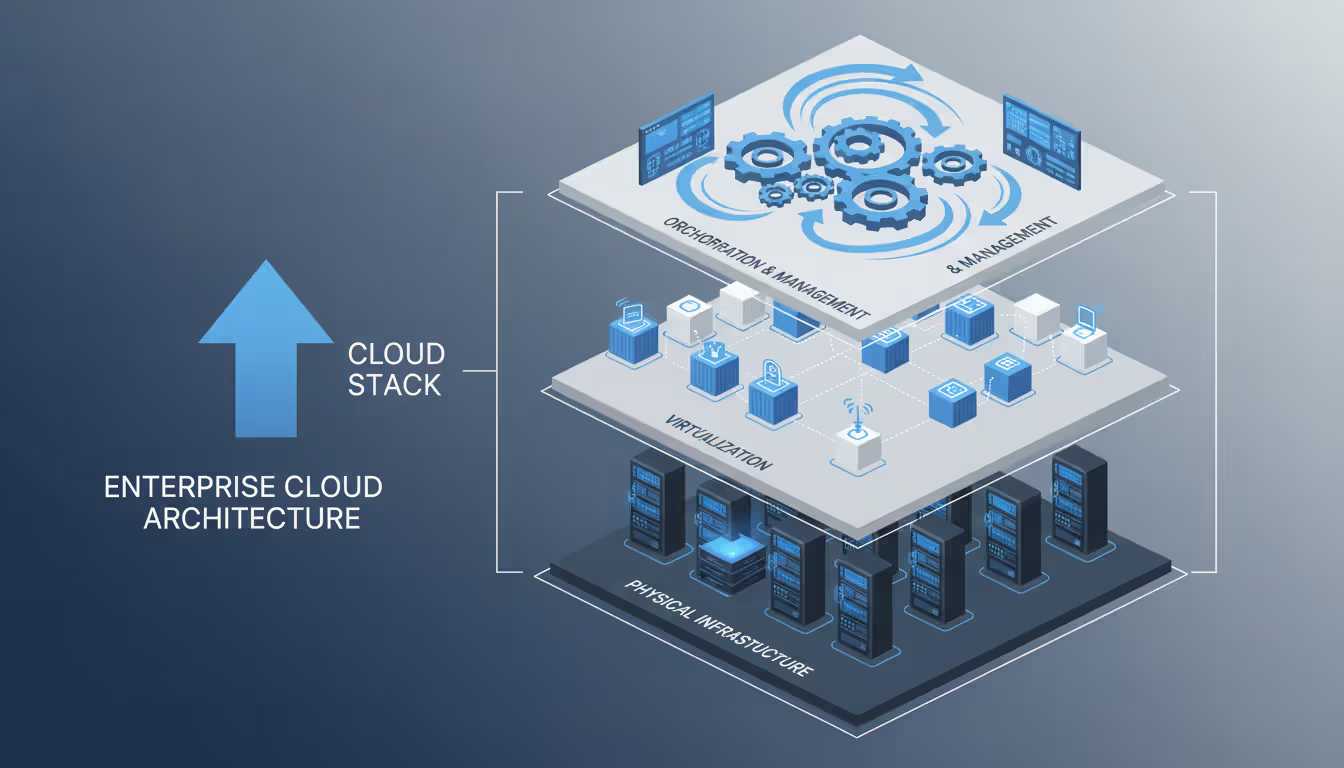
Here's how the technical architecture actually functions. Massive data centers filled with rack-mounted servers form the base layer. Picture warehouses containing 50,000+ physical machines, all networked together. Virtualization technology slices these physical resources into hundreds of isolated environments. One company's payroll system runs alongside another's inventory database, completely separated despite sharing the same hardware.
Sitting above everything, you'll find orchestration platforms that handle the grunt work—spinning up new servers, moving workloads when hardware fails, adjusting capacity based on demand. This happens automatically, in seconds.
Author: Evan Crossfield;
Source: milkandchocolate.net
What makes enterprise cloud actually different from regular cloud services breaks down into five key areas:
Scale and performance guarantees: Your Black Friday sale can't wait for servers to "warm up." Financial trades settle in milliseconds, not minutes. Enterprise agreements specify exact performance metrics—if the provider misses them, you get compensated.
Multi-tenancy with isolation: Your marketing team and finance department might share infrastructure, but their workloads never interfere with each other. Strong separation ensures one runaway process doesn't crash everyone else's applications.
Compliance frameworks: HIPAA for healthcare, PCI-DSS for payment processing, SOC 2 for data security—these aren't optional extras you configure later. They're baked into how the infrastructure operates from day one.
Enterprise integration: That SAP system you installed in 2008? It needs to talk to your shiny new cloud applications. Enterprise platforms include pre-built connectors for the software large companies actually use.
Dedicated support: When production goes down at 2 AM Saturday, you don't wait for email responses. You get a phone number that connects you to senior engineers within minutes, plus an account team that already knows your environment.
Watch what happens when someone requests cloud resources: The system authenticates their identity, verifies they're allowed to perform this action, finds available capacity, configures security rules, sets up networking, provisions the resource, and logs everything for auditors. Total elapsed time? Usually under 30 seconds.
Types of Enterprise Cloud Solutions
Most organizations mix and match different service types depending on what each application needs.
Infrastructure as a Service (IaaS)
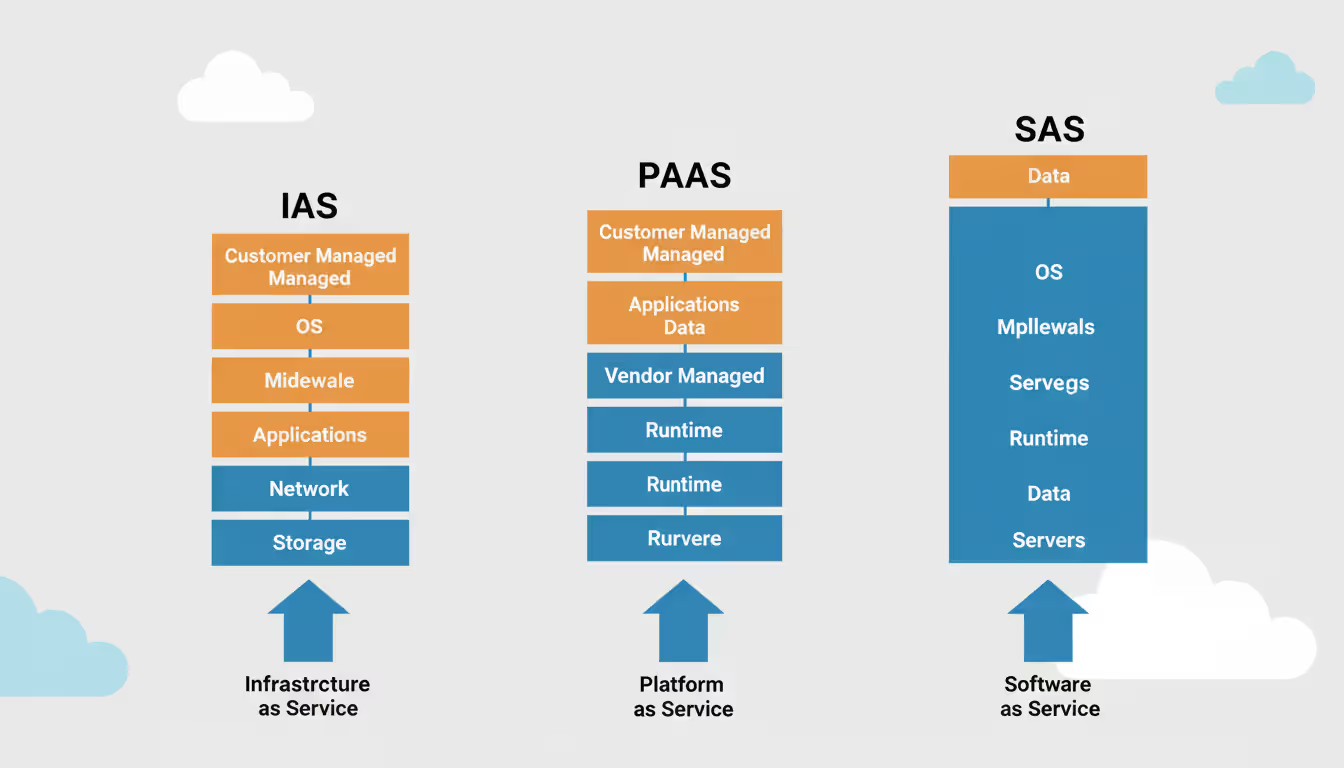
IaaS means renting raw computing power instead of buying physical servers. You get virtual machines that act like dedicated hardware, but they're actually software running on the provider's equipment.
Take a manufacturing company running their ERP system. They might rent 40 virtual servers configured exactly like their old on-premises setup—same operating system, same database version, same middleware. During month-end financial closing when processing spikes, they temporarily add 20 more servers, then release them when the rush ends.
You'll pay based on what you actually consume. Virtual CPUs cost a few cents per hour. Memory adds more. Storage ranges from bargain-basement hard drives at $0.02 per gigabyte monthly to high-speed NVMe drives at $0.35. Moving data out to the internet? That'll cost you, though bringing data in stays free.
The catch: flexibility requires effort. Your team patches operating systems, manages security settings, schedules backups, and monitors everything. It's your server—you just don't own the physical box.
Author: Evan Crossfield;
Source: milkandchocolate.net
Platform as a Service (PaaS)
PaaS handles the server stuff so developers can focus on writing code. Instead of worrying about operating systems and database maintenance, your team deploys applications to a managed environment that handles the boring parts automatically.
Imagine a software team building a customer portal. Using PaaS, they package their application in containers and push it to the platform. The service automatically distributes traffic across multiple instances, scales up when users surge, applies security patches overnight, backs up databases, and restarts failed components. Developers just write business logic.
Common PaaS examples include managed Kubernetes (for container orchestration), serverless computing (run code without managing servers at all), and database-as-a-service offerings. You trade some control for dramatically reduced operational burden.
Software as a Service (SaaS)
SaaS puts complete applications in your web browser. You don't install anything, patch anything, or maintain anything—you just log in and use it.
Email systems, Salesforce, Workday, DocuSign—these run entirely as services. A healthcare network might use separate SaaS products for electronic health records, appointment scheduling, medical billing, and patient communications. Each vendor maintains their application; the hospital just manages user accounts and settings.
Zero maintenance sounds great, and it is. But you're stuck with the features the vendor builds. Need custom functionality? You're submitting feature requests and hoping.
Deployment models add another decision layer:
Public cloud means shared infrastructure owned by AWS, Microsoft, Google, or similar giants. You're running on the same physical servers as other companies, separated only by software controls. This delivers the best pricing and fastest setup, though some industries worry about regulatory compliance or data control.
Private cloud dedicates infrastructure exclusively to your organization—either in your own data center or in space you lease from a provider. Banks and defense contractors often require this level of control. You'll pay significantly more but gain isolation and customization options public clouds can't match.
Hybrid cloud connects your on-premises systems with public cloud resources through secure networks. Hospitals commonly keep patient records on-premises while running data analytics in the cloud. Making this work smoothly requires careful planning—security policies, data synchronization, and identity management must span both environments.
Multi-cloud distributes work across multiple providers. Maybe you use AWS in North America, Google Cloud in Europe (for GDPR compliance), and Azure for applications tightly integrated with Microsoft products. This prevents vendor lock-in but multiplies management complexity.
Key Components of Enterprise Cloud Infrastructure
Knowing what's under the hood helps you make smarter decisions about providers and architecture.
Compute resources run your actual applications. Virtual machines behave like traditional servers—familiar, but you manage the whole software stack. Containers package apps with their dependencies, making deployment consistent anywhere. Serverless functions execute code on-demand without you thinking about servers at all. Pick based on workload: VMs for traditional apps, containers for modern microservices, serverless for event-triggered tasks.
Storage systems fall into three camps. Block storage mimics hard drives attached directly to servers—necessary for databases needing fast, consistent access. File storage provides network shares for documents and application files teams need to access simultaneously. Object storage holds massive quantities of unstructured data—images, videos, log files, backups—at the lowest cost per gigabyte.
Here's a mistake we see constantly: companies store everything on expensive, high-performance block storage when 70% of their data could live in cheap object storage. A media company was spending $18,000 monthly storing archived videos on premium storage when moving them to object storage would cost $1,200 for the same data.
Networking pieces connect everything and control traffic flow. Virtual private clouds establish your own isolated network space within the provider's infrastructure. Subnets divide resources by function—web servers in one subnet, databases in another. Load balancers spread incoming requests across multiple servers so no single machine gets overwhelmed. CDNs cache static content in locations worldwide, serving users from nearby servers instead of your origin.
Network design directly impacts your monthly bill. Transferring data between cloud regions costs money. Sending data out to the internet costs even more. Companies not monitoring network flows sometimes face surprise bills when a misconfigured application starts moving terabytes unnecessarily.
Security layers protect everything from infrastructure to data. IAM systems define who can access which resources and what actions they're permitted. Encryption scrambles data stored on disk and traveling across networks. Firewalls and security groups act like bouncers, blocking traffic that doesn't meet your rules. Intrusion detection watches for suspicious patterns suggesting attacks. Key management services securely store and rotate encryption keys.
Remember: providers secure the physical infrastructure, but you secure everything you put in the cloud. Most breaches trace back to misconfigured settings—storage buckets left publicly readable, overly permissive access rules, unencrypted sensitive data. The tools work great when configured correctly.
Virtualization and orchestration make cloud computing possible at all. Hypervisors transform physical servers into multiple virtual machines. Container runtimes execute packaged applications. Platforms like Kubernetes automatically deploy containers, restart failures, and scale applications based on traffic.
These pieces fit together through APIs and management dashboards. Well-designed infrastructure balances cost against performance, security, and how much operational work your team can realistically handle.
The enterprises extracting real value from cloud aren't just moving applications—they're transforming how they operate. Winning providers deliver strategic guidance on modernization, not just cheap compute hours
— Gartner VP analyst Sid Nag
How to Choose Enterprise Cloud Service Providers
Picking the wrong provider creates problems you'll spend years untangling. Evaluate candidates thoroughly across multiple dimensions.
Compliance certifications matter more than checkboxes on a sales sheet. Verify current audit reports for regulations affecting your business. Healthcare organizations absolutely need HIPAA compliance. Anyone processing credit cards requires PCI-DSS. European operations demand GDPR compliance with data centers in appropriate locations.
Dig deeper than marketing materials. Certifications might cover only certain data center regions, not everywhere the provider operates. One financial services firm discovered their chosen provider's compliance only applied to U.S. East Coast data centers, not the European regions where they planned to operate.
Service-level agreements define what "reliable" actually means and what happens when things break. A 99.9% uptime SLA permits 43 minutes of monthly downtime. For critical systems, you might need 99.99% (4 minutes monthly) or 99.999% (26 seconds monthly). Better SLAs cost more—significantly more.
Read the exclusions carefully. Most SLAs don't count scheduled maintenance, problems caused by your configurations, or internet issues beyond the provider's network. Understand the claims process—what documentation you need, how quickly you must report outages, what compensation you'll actually receive.
Support tiers range from "email us and wait" to "dedicated engineer who knows your name." Basic support might promise responses within 24 business hours. Premium tiers offer phone access to senior engineers in under 15 minutes. Enterprise support often includes a technical account manager who proactively reviews your architecture and suggests optimizations.
A manufacturing client learned this the hard way. Production database crashed Friday at 6 PM. Basic support meant waiting until Monday morning. That weekend outage cost $340,000 in lost production—more than they'd have spent on premium support for the next decade.
Scalability needs testing both directions. Can you handle sudden traffic spikes? How quickly do new resources provision? Can you scale down during quiet periods to control costs?
Don't trust marketing claims. During your pilot, simulate load increases. Measure how fast capacity comes online and whether performance stays consistent. One retailer discovered their chosen platform took 12 minutes to provision additional capacity—unacceptable when their flash sales drove traffic up 10x in under two minutes.
Integration capabilities determine whether cloud services will play nicely with your existing systems. Pre-built connectors for your ERP, CRM, and data warehouse save months of custom development. Can you extend on-premises Active Directory into the cloud for unified identity management? How do legacy applications that can't move to cloud communicate with cloud-native services?
Pricing models vary wildly and dramatically affect total cost. Some providers bill by the hour, others per second (which matters for short-lived workloads). Reserved instances offer 30-70% discounts in exchange for long-term commitments. Spot instances provide 70-90% discounts for interruptible workloads. Network transfer pricing differs 10x between some providers.
Build realistic cost models using your actual usage patterns. Generic calculators lie. As a rough guide: cloud often costs more than on-premises for steady-state workloads when you count only infrastructure dollars. But factor in data center costs, hardware refresh cycles, and IT staff time—cloud frequently wins. The real value comes from speed and agility, not necessarily raw cost savings.
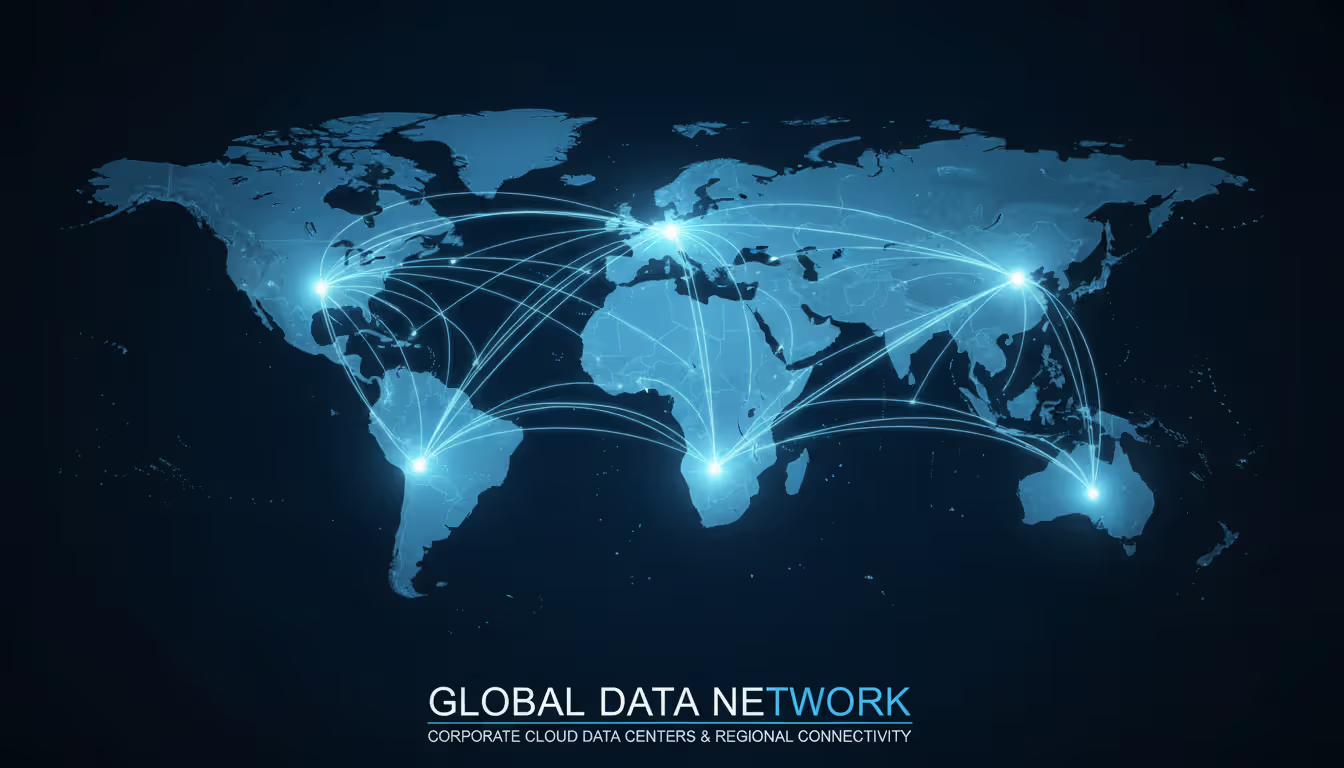
Geographic presence impacts performance and regulatory compliance. Users in Singapore won't tolerate applications hosted only in Virginia—latency ruins the experience. Meanwhile, data residency laws might prohibit storing European citizen data on U.S. servers.
Map where your users work and which regulations apply before comparing providers. You need data centers in the right locations, not just “global coverage.”
Enterprise Cloud Management Best Practices
Author: Evan Crossfield;
Source: milkandchocolate.net
Migrating to cloud is straightforward. Managing it well over time separates success stories from budget disasters.
Governance frameworks prevent chaos. Without clear rules, teams spin up resources that violate security policies, duplicate existing services, or rack up unnecessary charges. Establish who needs approval for what. Define naming standards so resources remain identifiable six months later. Require tags for tracking costs by department or project.
A pharmaceutical company discovered 47 separate development environments for the same project because teams didn't communicate. Proper governance with central visibility would've caught this after environment number three.
Cost optimization demands constant vigilance. Cloud bills grow unless actively managed—we've seen monthly costs double in six months despite unchanged usage patterns (spoiler: forgotten resources left running).
Start with right-sizing. Match resource specifications to actual requirements instead of guessing. Most organizations over-provision by 30-40%, "just to be safe." Implement auto-scaling that adjusts capacity based on real demand. Schedule development and testing environments to shut down nights and weekends—why pay for servers nobody uses? Archive infrequently accessed data to cheaper storage tiers.
Set up billing alerts before costs surprise you. One retailer received a $180,000 bill after a developer left a high-capacity database cluster running through a month-long vacation. A $500 alert threshold would've caught this in two days.
Monitoring and observability show what's actually happening across your infrastructure. Track performance—response times, error rates, resource utilization. Collect logs from applications and systems. Configure alerts for conditions requiring human attention.
Modern observability goes beyond "is it up or down." When something breaks, you need to understand why. Good tools correlate metrics, logs, and request traces to show how problems propagate through distributed systems.
Access control follows least privilege—users and applications get exactly the permissions they need, nothing more. Implement multi-factor authentication for administrative access. Rotate credentials regularly. Review access logs for unusual patterns suggesting compromised accounts or insider threats.
Federate identity management so people authenticate once centrally, then access multiple services. This beats managing separate usernames and passwords for each system.
Automation eliminates manual work and the mistakes that come with it. Define infrastructure as code in version-controlled templates. Automate testing, deployment, and rollback procedures. Script routine maintenance tasks.
A financial services firm cut deployment time from three weeks to 45 minutes through automation while simultaneously reducing configuration errors by 89%. Humans make mistakes under time pressure; scripts execute consistently.
Backup and disaster recovery protect against data loss and extended outages. Cloud providers offer infrastructure redundancy, but that won't save you from accidental deletions, application bugs, or ransomware encrypting your data.
Test recovery procedures quarterly. Discovering your backup strategy doesn't work during a real emergency makes bad days catastrophically worse. One healthcare provider tested backups for the first time during a ransomware attack—and learned the backups were corrupted and useless.
Common Use Cases Across Industries
Enterprise cloud serves specific business needs across virtually every sector.
Data analytics and business intelligence leverage cloud scalability better than almost any other workload. A retail chain analyzes point-of-sale data from 3,000 stores to optimize inventory and pricing. During November and December, they scale analytics clusters to triple capacity, processing three months of data in one week. Come January, they scale back down. On-premises infrastructure would either sit idle 10 months yearly or lack capacity when needed most.
Disaster recovery becomes economically feasible for mid-sized organizations. A regional hospital maintains a warm standby environment in the cloud, continuously replicating critical systems. When their primary data center flooded, they restored operations in four hours. This cloud approach costs 60% less than maintaining a second physical data center while delivering faster recovery.
DevOps and continuous delivery accelerate software development dramatically. A software vendor provisions isolated development and testing environments on demand—developers get clean environments in minutes instead of waiting days for hardware. Code commits automatically trigger build, test, and deployment pipelines. The company now releases updates weekly instead of quarterly, responding faster to customer feedback and competitive pressure.
Collaboration and remote work depend heavily on cloud-based tools. A global consulting firm moved to cloud document management, video conferencing, and project management platforms. Consultants access client data securely from anywhere—airports, client offices, home. IT maintains centralized control over security and compliance without managing thousands of individual devices.
Legacy application modernization extends the life of systems too complex or risky to replace. A manufacturer couldn't replace their 15-year-old custom inventory system—too many business processes depended on its quirks. Instead, they moved it to cloud infrastructure and built modern APIs for integration. The cloud environment delivered better performance and reliability than their aging on-premises servers while buying time to plan proper replacement.
Enterprise cloud printing solves a niche but important challenge for distributed organizations. Rather than managing print servers and drivers across hundreds of locations, companies route print jobs through cloud services. Users print from any device to any location. IT manages the entire print infrastructure centrally, reducing support costs while improving security by eliminating direct device-to-printer connections that bypass security controls.
Regulatory compliance and data sovereignty actually drive cloud adoption in financial services. Banks use private cloud environments meeting strict regulatory requirements while gaining cloud benefits like rapid provisioning and automated compliance reporting. The infrastructure maintains detailed audit trails regulators can review without exposing sensitive customer data.
Author: Evan Crossfield;
Source: milkandchocolate.net
Comparison of Top Enterprise Cloud Service Providers
Provider
Deployment Options
Key Strengths
Typical Pricing Model
Best For
AWS
Public, private (Outposts), hybrid
Widest service selection, mature ecosystem, most global regions
Enterprises with mainframe workloads or stringent compliance requirements
Frequently Asked Questions About Enterprise Cloud
What is the difference between enterprise cloud and public cloud?
Enterprise cloud describes services designed for large organizations with complex requirements—enhanced SLAs, dedicated support, compliance certifications, and integration capabilities. Public cloud refers to the deployment model where infrastructure is shared among multiple customers. These aren't mutually exclusive. You can use public cloud infrastructure with enterprise-grade service levels. Think of public cloud as the infrastructure type, enterprise cloud as the premium service tier built on top. A small startup might use basic public cloud services, while a Fortune 500 company uses enterprise cloud services running on the same public cloud infrastructure but with significantly different capabilities and support.
How much does enterprise cloud cost?
Expect enormous variation based on workload characteristics and usage patterns. Mid-sized enterprises commonly spend $50,000 to $500,000 annually. Large organizations with extensive workloads easily exceed $10 million yearly. Major cost drivers include compute hours consumed, storage capacity and performance tier, data transfer (especially between regions or out to internet), and support level selected. Organizations typically achieve 20-30% total cost of ownership savings versus on-premises infrastructure when accounting for hardware, data center facilities, power, and personnel costs—though results depend heavily on optimization discipline. Rather than relying on generic estimates, build detailed cost models using your specific requirements, expected usage patterns, and realistic assumptions about optimization efforts.
Is enterprise cloud secure for regulated industries?
Yes, when implemented properly. Leading enterprise cloud service providers maintain certifications for HIPAA, PCI-DSS, SOC 2, FedRAMP, and industry-specific regulatory frameworks. However, security operates on a shared responsibility model—providers secure underlying infrastructure while you must configure access controls correctly, encrypt sensitive data appropriately, and implement proper security policies. Healthcare, financial services, and government agencies successfully operate in enterprise cloud environments, frequently achieving better security posture than they maintained on-premises due to provider investments in security expertise and tools that individual organizations cannot economically match. The key: understanding exactly which security responsibilities belong to the provider versus your team, then executing your part correctly.
How long does enterprise cloud migration take?
Migration timelines span anywhere from three months for straightforward applications to three years for complex enterprise application portfolios. Individual applications might migrate in weeks, but enterprises typically execute phased migrations over 12-24 months. Duration depends on application complexity, data volumes needing transfer, integration requirements with other systems, testing thoroughness, and staff availability. Organizations rushing migration without adequate planning commonly face performance degradation, cost overruns, or security vulnerabilities. Realistic planning rule: expect 20% longer than initial estimates and migrate non-critical applications first to develop expertise before tackling mission-critical systems. One financial services firm planned six months, actually required eleven—but avoided the disasters their overly aggressive competitors experienced.
Can enterprise cloud integrate with on-premises systems?
Absolutely—hybrid cloud architectures specifically address this requirement. Organizations routinely maintain certain systems on-premises while operating others in cloud, with secure connections enabling communication between environments. Integration methods include VPN tunnels for encrypted connectivity, dedicated network circuits for higher performance, API gateways for application communication, and data synchronization tools for keeping information current across locations. Many enterprises operate indefinitely in hybrid mode rather than moving everything cloud-side, keeping sensitive data or specialized equipment on-premises while leveraging cloud scalability and modern development capabilities. Success requires planning integration points during initial architecture design rather than treating them as afterthoughts. Retrofitting integration into poorly planned migrations costs three to five times more than building it in from the start.
What happens if we want to change cloud providers?
Switching providers remains possible but involves substantial effort and cost. Challenges include rewriting infrastructure-as-code templates for different platforms, reconfiguring applications for alternative services, migrating potentially massive data volumes, and retraining staff on unfamiliar tools and interfaces. To reduce lock-in risk, adopt open standards and portable technologies wherever practical—containerized applications instead of provider-specific runtimes, standard APIs rather than proprietary ones, provider-agnostic management tools. Some organizations implement multi-cloud strategies from the beginning, though this multiplies management complexity significantly. Realistic assessment: changing providers requires months of effort and costs substantial money in migration work and temporary dual operations. Choose carefully upfront, but maintain awareness that switching remains possible—this provides negotiating leverage and motivates providers to maintain service quality.
Enterprise cloud fundamentally reshapes how organizations architect and operate technology infrastructure. The decision extends well beyond simple cost comparison—cloud enables capabilities on-premises infrastructure struggles to match, from instant global scale to rapid experimentation and innovation.
Success demands more than signing provider contracts. Organizations must develop new skills in cloud architecture, financial management, and distributed security. Governance frameworks need balancing agility against appropriate controls. Choosing the right combination of IaaS, PaaS, and SaaS to match different workload requirements takes careful analysis.
Your provider selection, deployment model choices, and management practices will influence technology capabilities for years ahead. Start from clear business objectives rather than technology preferences. Understand compliance requirements before evaluating providers. Build organizational expertise through pilot projects before committing business-critical workloads.
Cloud computing evolves constantly. New services, pricing approaches, and capabilities emerge monthly. Organizations treating cloud adoption as continuous transformation rather than one-time projects position themselves to leverage these advances while avoiding technical debt from hasty implementations.
Enterprises extracting maximum value from cloud investments focus less on infrastructure details, more on how cloud enables business strategy—accelerating product development, improving customer experiences, enabling data-driven decisions, and building operational resilience. The technology matters less than what you accomplish with it.
Every network device carries a unique MAC address identifier. This guide shows you how to find MAC addresses using command-line tools, system settings, and vendor lookup databases. Includes step-by-step instructions for Windows Command Prompt, macOS, Linux, and mobile devices
Migrating to the cloud doesn't always require reimagining your entire infrastructure. Lift and shift migration moves applications to the cloud with minimal modifications—a pragmatic approach for organizations facing data center deadlines or managing legacy systems
Network failures don't announce themselves politely. For small and medium businesses, disruptions translate directly into lost revenue and damaged reputation. This guide explains IT network support services, when you need professional help, and how to choose between in-house teams and managed providers
Building your own cloud storage gives you complete control over your data while potentially saving money compared to subscription services. This comprehensive guide covers hardware requirements, software platforms like Nextcloud, step-by-step installation, security best practices, and common mistakes to avoid
The content on this website is provided for general informational purposes only. It is intended to offer insights, commentary, and analysis on cloud computing, network infrastructure, cybersecurity, and IT solutions, and should not be considered professional, technical, or legal advice.
All information, articles, and materials presented on this website are for general informational purposes only. Technologies, standards, and best practices may vary depending on specific environments and may change over time. The application of any technical concepts depends on individual systems, configurations, and requirements.
This website is not responsible for any errors or omissions in the content, or for any actions taken based on the information provided. Users are encouraged to seek qualified professional advice tailored to their specific IT infrastructure, security, and business needs before making decisions.