


SSL TLS Port Guide
Understand SSL and TLS port numbers for secure communication. Covers port 443 for HTTPS, 465/587 for email, 993/995 for IMAP/POP3, plus configuration, troubleshooting, and hardening best practices for system administrators

Modern office workspace with glowing blue network connection lines linking workstations to a central cloud icon with security shield, router, and Wi-Fi symbols
Remember the last time your company opened a new office? Did you spend three months arguing with telecom providers about circuit installation dates? Did your network admin practically live on-site during the equipment setup week? That whole painful process is becoming obsolete.
Here's what's replacing it: You pick up the phone, place an order like you're buying software, and a pre-configured device shows up at your new location. Plug it in. Wait about fifteen minutes. You're online with full corporate access, security policies active, everything working. No router configuration sessions. No VLAN troubleshooting at midnight.
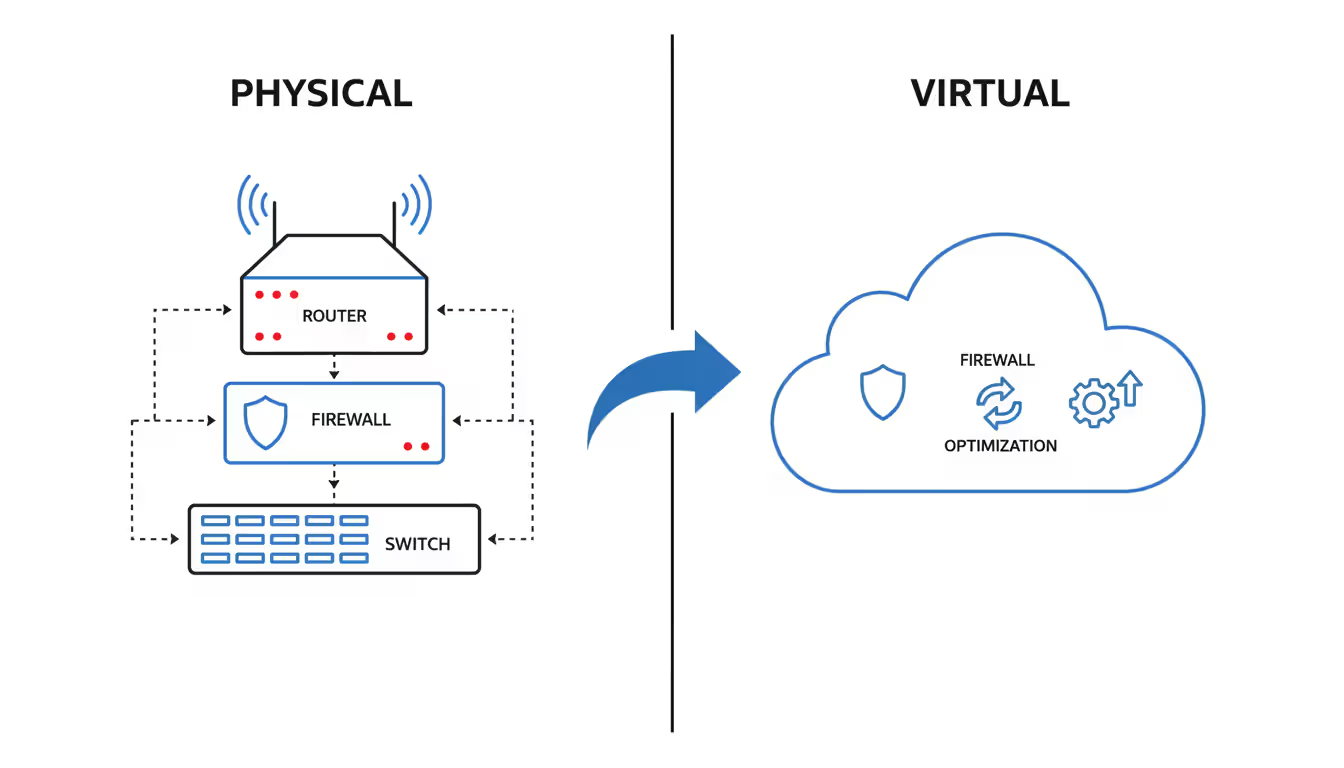
The old way meant buying physical gear—routers, switches, firewalls—and nursing them through their lifecycle until they hit end-of-support. Then you'd start over. The new approach? Somebody else owns all that hardware. They maintain it, update it, replace it when it fails. You just pay monthly and use it.
Think about how you consume electricity. You don't buy a generator, right? You pay the utility company each month based on usage. Network as a service applies that same logic to enterprise networking.
Instead of dropping $25,000 on a router that'll be outdated in four years, you subscribe to routing capability. The provider installs their equipment at your site, manages everything remotely, and charges you monthly. When that hardware eventually fails or needs upgrading, they handle replacement. Zero capital expense on your end.
The network as a service definition boils down to this: consuming network functions—routing, security, load balancing, WAN optimization—without purchasing the equipment that delivers them. You rent the capability, not the boxes.
What makes network as a service NaaS genuinely different from how networking has worked for thirty years? The payment model, obviously. But more fundamentally, the ownership and responsibility model shifts entirely. That router in your server closet? Not your problem to configure, patch, or replace anymore.
Let's break down what you're actually getting:
Author: Trevor Langford;
Source: milkandchocolate.net
Virtual network functions: Software-based versions of networking gear replacing physical appliances. A firewall used to mean a $30,000 Fortinet or Palo Alto box sitting in your rack. Now it's software running on commodity hardware in the provider's infrastructure or spinning up as a cloud instance. When threats evolve, the provider updates the software. When capacity needs increase, they allocate more compute resources. You never touch the underlying systems.
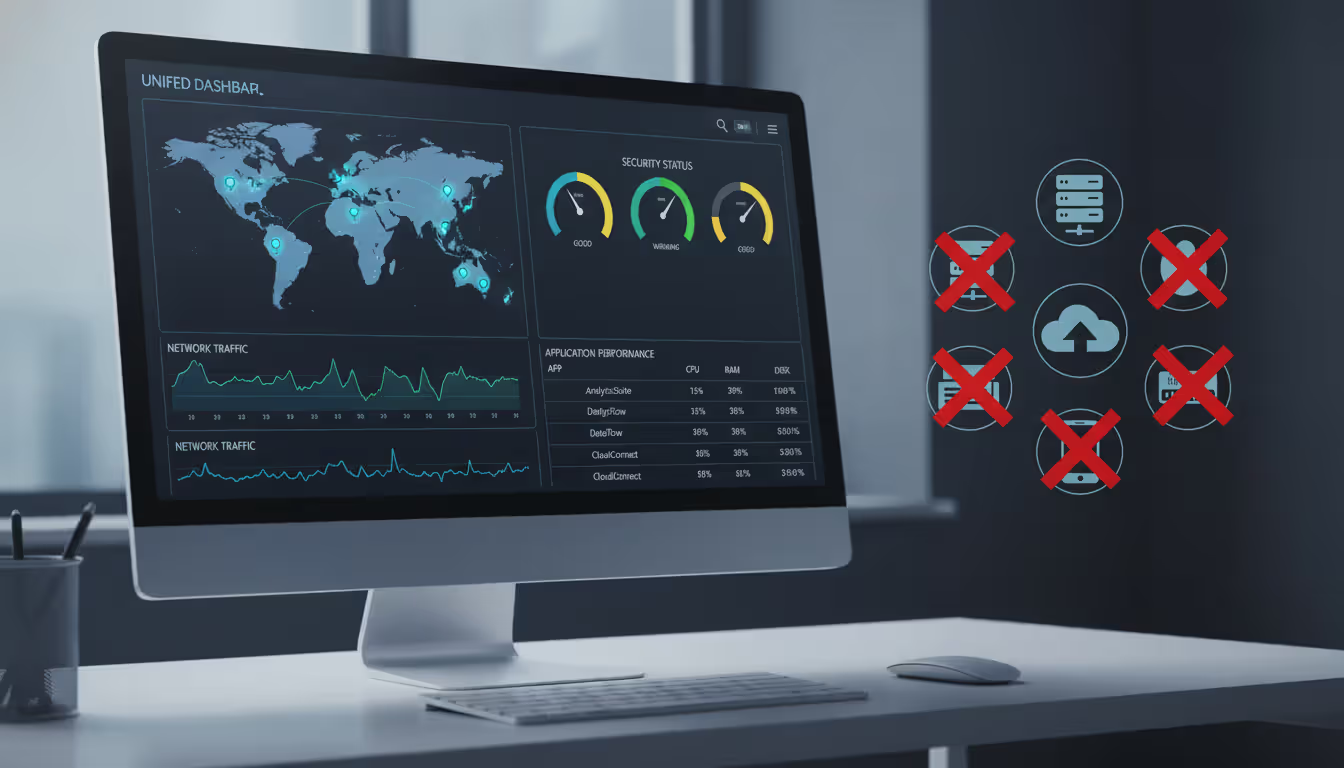
Management plane: One web dashboard controlling everything. Need to block TikTok at all forty office locations? That's a single policy change, not forty separate configuration sessions. Traffic analytics, security events, performance metrics—all visible in one interface. No more jumping between separate management consoles for your firewall vendor, router vendor, and WAN optimizer vendor.
Connectivity layer: The actual pipes carrying data. This part's flexible—fiber circuits if you've got them and want to keep them, regular business internet from Comcast or Spectrum, even cellular connections for backup. Most NaaS setups mix connection types based on what's available and affordable at each location. Your headquarters might run on dedicated fiber while smaller branches use cable internet with LTE backup for resilience.
Orchestration engine: Automation handling tasks that used to consume hours of admin time. Provisioning new sites, distributing security policies, rerouting traffic around failures—all happening automatically based on rules you set once. The system monitors everything constantly and reacts to problems faster than humans ever could.
Traditional networking meant configuring devices one at a time. You'd SSH into each router, manually enter commands, update routing tables, test connectivity. Repeat for every single device. With NaaS, you define desired outcomes in the management portal. The orchestration layer figures out how to make that happen across all your equipment automatically. Managing ten locations takes roughly the same effort as managing two hundred.
We're seeing organizations cut network operations costs by 40-60% in their first year on NaaS. The biggest savings come from eliminating hardware refresh cycles and reducing the staffing needed for routine maintenance tasks
— Sarah Chen
Your applications probably don't all run in one place anymore. Some stuff's in AWS. Other workloads run in Azure because the dev team preferred their tools. Maybe you've got Google Cloud handling your analytics. And you're still running some things on-premises because migration hasn't made sense yet.
Network as a service in cloud computing becomes the glue connecting these scattered environments. It creates secure, reliable paths between your cloud platforms and back to whatever you're still running locally.
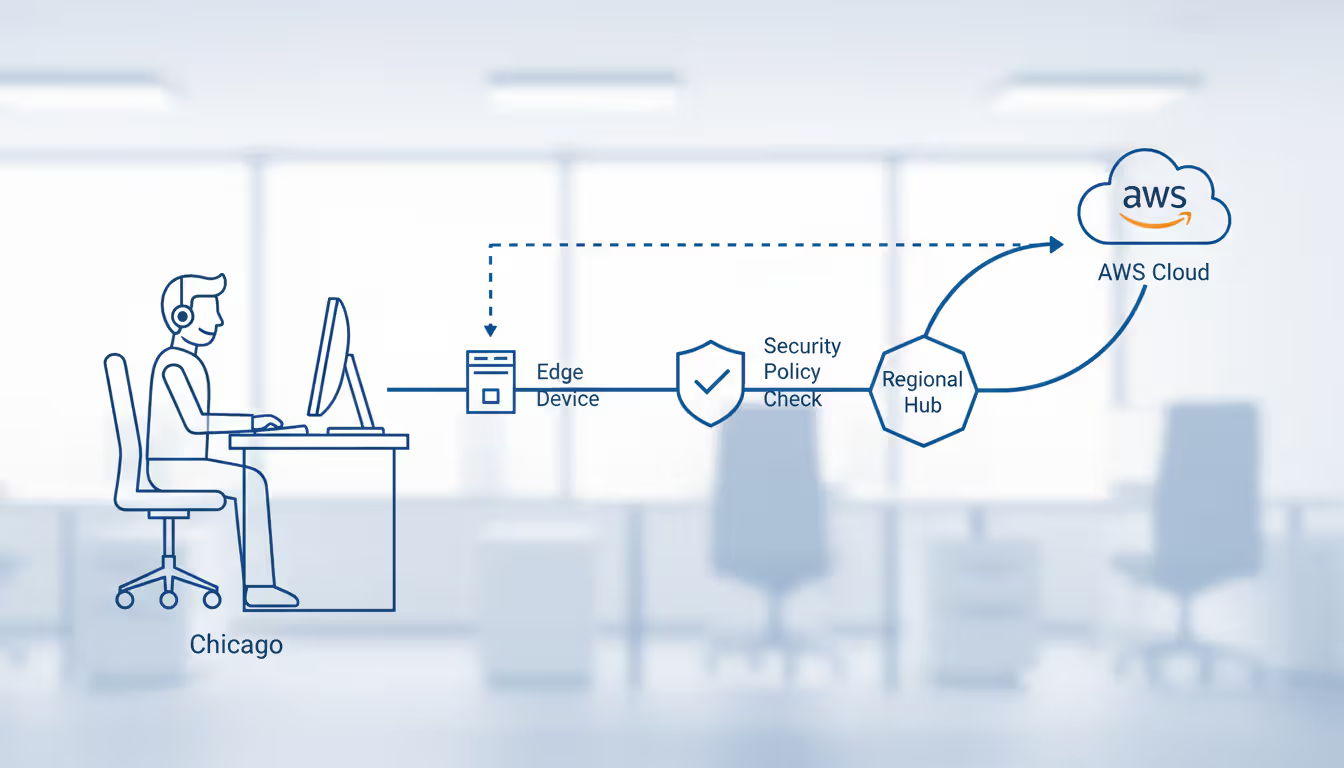
The technical implementation starts with edge devices at your locations. Some providers ship physical appliances (they arrive already configured with your settings). Others deploy virtual appliances running on your existing servers or in cloud regions. Either way, these edge devices establish encrypted tunnels back to the provider's core network, building an overlay that sits on top of whatever internet or MPLS connections you're using for transport.
Here's how traffic actually moves through the system. An employee at your Chicago office queries a database running in AWS's Virginia region. Their request hits the local edge device first. It checks security policies—is this user authorized? Is the destination allowed? Should we inspect the payload for threats? If everything passes, the device selects the optimal path. Maybe that means routing directly to AWS through local internet breakout. Maybe it means backhauling through a regional hub if your compliance rules require deeper inspection.
Author: Trevor Langford;
Source: milkandchocolate.net
Cloud platform integration happens through several mechanisms:
Direct cloud connectivity: Major NaaS providers maintain physical connections at AWS Direct Connect locations, Azure ExpressRoute facilities, and Google Cloud Interconnect points. Your subscription includes access to these private links without purchasing them separately. The provider already invested in that infrastructure and shares it across customers.
API-driven provisioning: Create a new VPC in AWS. The NaaS platform detects it through AWS APIs and automatically extends your security policies to that environment. No manual configuration required. Same thing works with Azure virtual networks and Google Cloud VPCs. The systems talk to each other, eliminating manual coordination work.
Unified policy management: Traditional approaches meant maintaining separate security rules in AWS security groups, Azure network security groups, and your WAN firewall. These inevitably drift out of sync because you're updating them separately. NaaS dashboards let you define policies once—"block file sharing services" or "require MFA for financial systems"—and push them everywhere automatically.
Delivery models vary based on provider and your needs. Some operate purely as software overlays, installing virtual appliances and calling it done. Others ship physical devices to locations pushing significant traffic or requiring hardware-accelerated encryption. Hybrid approaches combine both: physical gear at headquarters handling gigabits of throughput, virtual instances at smaller offices and in cloud regions.
The virtualization layer abstracts complexity away from you. Adding an office traditionally meant ordering circuits (30-90 day wait times), configuring routers (several hours), updating routing tables across your network (more hours), testing everything (even more hours). With NaaS, you enter location details in the portal, specify bandwidth requirements and security policies, then let the provider handle provisioning. Many complete deployment in under 24 hours.
Cost savings hit multiple budget categories. Capital expenditure drops to nearly nothing—you're done buying routers, done purchasing firewall appliances, done signing three-year maintenance contracts for individual devices. A company that previously spent $180,000 every three years refreshing network gear across twenty locations might instead pay $4,500 monthly for equivalent NaaS capacity. That's $162,000 over three years. Slightly cheaper, newer technology, included support.
Operational costs fall through automation. Adding VLANs used to mean logging into switches individually, entering configuration commands, testing connectivity. An hour per location. Updating firewall rules? Similar time investment. Troubleshooting routing problems? However long it takes to find the issue across your distributed infrastructure. NaaS condenses these tasks to minutes in a centralized interface. Organizations commonly reduce network administration needs by 30-50%, freeing those people for strategic projects instead of keeping lights on.
Scalability happens at software speed, not procurement speed. Opening a new retail location doesn't mean a three-month circuit installation wait. Ship a pre-configured appliance, plug it into whatever internet service you ordered, watch it activate automatically. Need more bandwidth? Change a setting in the portal. No contract renegotiations. No provider provisioning delays.
Management simplicity consolidates tools that used to be separate products. WAN optimization had its own management console. Firewalls had another platform. Routers needed their own configuration interface. You'd switch between six different admin portals throughout the day. NaaS provides unified dashboards showing traffic patterns, security events, application performance, and capacity utilization across all locations simultaneously.
Author: Trevor Langford;
Source: milkandchocolate.net
Now for the parts that don't work so well, because nothing's perfect.
Vendor lock-in sneaks up gradually. Migrating between NaaS providers involves substantially more complexity than switching SaaS applications. Your network policies, configurations, and potentially your entire WAN architecture become deeply entangled with the provider's platform. Switching means retraining staff on completely different tools, reconfiguring policies from scratch, possibly replacing edge devices. I've watched migrations consume 6-12 months and burn through massive professional services budgets. Plan your provider selection carefully, because changing later hurts.
Security considerations shift rather than disappear. Providers handle device hardening and patch management, which eliminates work for your team. But you're also trusting a third party with visibility into your traffic flows. Data traversing the NaaS fabric passes through provider infrastructure. Most implement strong separation and encryption, but this fundamentally differs from networks sitting in your own racks where you control everything. Some compliance frameworks struggle with this reality, particularly in finance and government sectors.
Internet dependency affects most implementations. Traditional MPLS networks came with guaranteed SLAs—99.9% uptime, 50ms latency, delivered consistently. Many NaaS solutions use internet transport with SD-WAN intelligence managing quality as best it can. Applications sensitive to latency or jitter might experience degraded performance when internet gets congested, even with quality-of-service policies applied. That choppy voice call quality during peak hours? Sometimes internet's just being internet, and there's only so much the NaaS platform can do.
Limited customization frustrates organizations with unique requirements. NaaS platforms offer broad functionality within defined parameters. Need specialized routing protocols? Custom packet inspection for proprietary applications? Unusual network topologies? The provider's platform might not support these needs, leaving you stuck or requiring expensive custom development work that negates the cost advantages.
Here's how major providers stack up when you compare their offerings:
| Provider | Core Capabilities | Monthly Cost Range | Ideal Customer Profile | Cloud Platform Support |
| Cisco+ NaaS | Full Catalyst switching portfolio, Meraki wireless infrastructure, Cisco security suite, ThousandEyes visibility | From $500/location | Large enterprises standardized on Cisco gear transitioning to opex model | Works with AWS, Azure, Google Cloud, Oracle Cloud |
| Aruba ESP | AI operations engine, campus and branch infrastructure, Zero Trust architecture, automated troubleshooting | From $400/location | Mid-sized organizations (50-500 sites) in retail, hospitality, medical sectors | Integrates with AWS, Azure, Google Cloud |
| Juniper NaaS | Mist AI platform, wired and wireless infrastructure, SD-WAN technology, cloud-native design | From $450/location | Businesses with extensive wireless needs requiring AI-driven management | Connects to AWS, Azure, Google Cloud, IBM Cloud |
| Cato Networks | SASE platform combining networking and security, global backbone spanning 80+ PoPs, clientless remote access | From $35/user | Distributed teams, cloud-native companies, fast deployment scenarios | Native integration with major cloud providers |
| VMware SASE | SD-WAN with security service edge, application acceleration, Cloud Console management | From $40/user | VMware-heavy environments, hybrid cloud architectures | Deep VMware Cloud ties plus AWS, Azure, Google support |
| Palo Alto Prisma SASE | Security-centric architecture, digital experience monitoring, unified threat prevention | From $50/user | Security-focused organizations, regulated industries like banking and healthcare | AWS, Azure, Google Cloud, Alibaba Cloud connectivity |
Cisco+ extends the company's hardware dominance into subscription territory. If your organization already standardized on Cisco equipment years ago, this transition feels natural—familiar interfaces, existing vendor relationship, just different payment structure. The platform excels for enterprises needing comprehensive campus networking beyond just WAN connectivity. We're talking switching, wireless, and security bundled into integrated subscriptions.
Aruba ESP (Edge Services Platform) targets mid-market companies with particular strength in retail chains, hotel groups, and healthcare systems. The AI-powered operations detect anomalies automatically, predict failures before they happen, and fix common issues without administrator intervention. Pricing scales reasonably for organizations running 50-500 locations—not prohibitively expensive for mid-market budgets while remaining comprehensive enough for genuine enterprise needs.
Juniper's Mist AI engine stands out through machine learning that optimizes wireless performance and predicts user experience issues before they tank productivity. Companies with large wireless deployments—warehouses, manufacturing floors, university campuses—see real benefits from Mist's radio resource management and client steering capabilities. The wireless experience genuinely improves for end users, not just for network administrators.
Cato Networks pioneered the SASE (Secure Access Service Edge) category by converging networking and security into unified cloud service. Rather than per-site pricing, Cato charges per user, which works out economically for organizations with many small offices or remote workers. Got 500 employees scattered across 30 small branch offices? Per-user pricing costs less than paying $400-500 per location. The global private backbone spanning 80+ points of presence worldwide provides consistent performance regardless of where users connect.
VMware SASE appeals to organizations already invested heavily in VMware infrastructure. Integration with VMware Cloud on AWS, Azure VMware Solution, and Google Cloud VMware Engine creates seamless hybrid cloud networking with unified policy management across environments. If your virtualization strategy already centers on VMware, this becomes the obvious networking choice rather than introducing another vendor into the mix.
Palo Alto Prisma SASE leads in security-first implementations. Organizations in financial services, healthcare, and government that prioritize threat prevention often accept higher per-user costs ($50 versus $35-40 elsewhere) for Palo Alto's advanced security capabilities. We're talking inline ML-powered threat detection, comprehensive data loss prevention, advanced malware analysis—security features that genuinely justify premium pricing for risk-conscious organizations.
Let's break down actual differences beyond marketing claims:
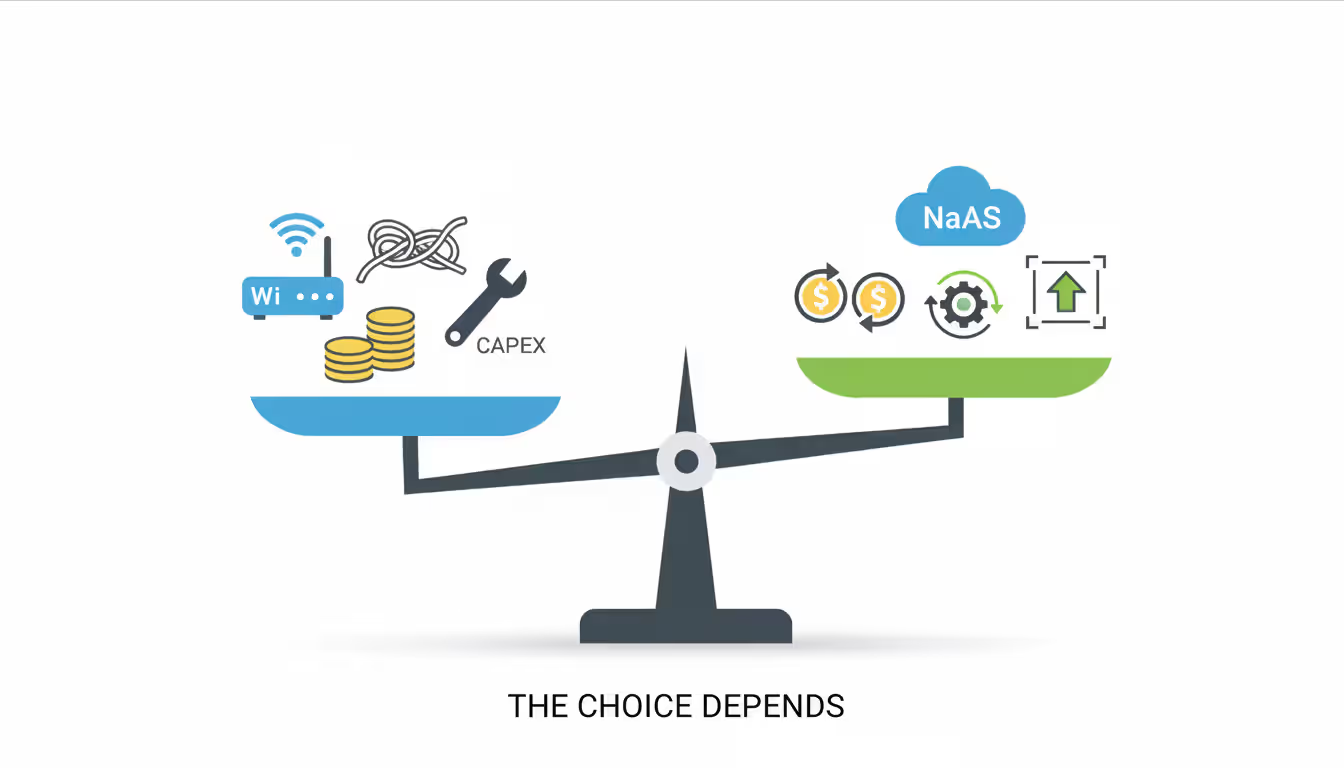
Initial cost: Traditional networking hits hard with upfront capital—$15,000-50,000 per site covering routers, firewalls, switches, installation labor, the works. NaaS requires minimal capital, typically just installation fees for provider-managed equipment. Costs flow through monthly subscriptions instead of capital requisitions requiring board approval.
Deployment time: Provisioning traditional infrastructure spans 8-16 weeks from equipment order to full operation. Circuit procurement alone eats 30-90 days, assuming no underground utility conflicts or permitting delays. NaaS deployments complete in 2-7 days for locations with existing internet—the provider ships pre-configured equipment that activates upon connection. You're literally plugging in an appliance and watching it come online.
Scalability: Want to expand traditional networks? Get ready to repeat the entire procurement dance. Equipment quotes, vendor negotiations, installation scheduling, configuration sessions, testing phases. Bandwidth increase? That means renegotiating circuit contracts and waiting for provider provisioning. NaaS handles expansion through portal adjustments. New locations come online in days. Bandwidth changes activate within hours through subscription modifications.
Maintenance burden: Traditional infrastructure dumps firmware updates, security patches, hardware failures, and configuration changes on internal IT teams. A 50-location network might consume 1.5-2 full-time employees just for routine maintenance—not projects, just keeping things running. NaaS providers handle all maintenance, pushing updates during scheduled windows and replacing failed hardware without customer involvement. Your hardware dies at 2 AM? Not your problem anymore.
Required IT expertise: You need serious networking chops to run traditional infrastructure well. BGP configurations, OSPF area design, firewall policy optimization, circuit troubleshooting—these aren't skills you pick up watching YouTube videos. Finding and retaining people with these skills? Good luck. They're expensive and getting harder to hire. NaaS abstracts complexity away. Your team needs to understand business requirements and policies rather than memorizing routing protocol syntax.
Security control: With traditional infrastructure sitting in your closets and racks, you control everything. Every security decision, every data flow inspection point, every encryption key. You manage your own device hardening and decide exactly where traffic gets examined. NaaS changes this equation—you're delegating some control to providers who manage the underlying infrastructure and operate the network fabric your traffic runs through. Most providers do excellent separation and encryption work, but you're fundamentally trusting their security practices and multi-tenant isolation.
Use cases: Traditional networking still makes sense for organizations with stable, predictable requirements, existing paid-off infrastructure performing adequately, specialized networking needs that NaaS platforms don't support, or regulatory requirements explicitly prohibiting certain data from traversing third-party networks. NaaS suits growing companies, distributed organizations, businesses undergoing digital transformation, and those lacking deep networking expertise internally.
Author: Trevor Langford;
Source: milkandchocolate.net
Company size influences NaaS suitability in ways that might surprise you. Very small businesses—under 25 employees, single location—typically lack complexity making NaaS valuable. Basic business internet and cloud-managed WiFi suffice. You're not managing multiple locations or complex security policies yet.
The inflection point hits around 50 employees or three locations. At this scale, network management starts consuming significant IT resources without yet justifying dedicated network engineers. You've reached the pain threshold where networking demands real attention but hiring specialists doesn't make financial sense.
Mid-market companies (200-2,000 employees, 5-50 locations) represent NaaS's core target. They face enterprise networking challenges without enterprise IT budgets. A regional healthcare provider running twelve clinics needs consistent security policies, reliable connectivity, and HIPAA compliance but can't afford dedicated network staff at each location. NaaS delivers enterprise capabilities at mid-market price points.
Large enterprises (2,000+ employees, 50+ locations) adopt NaaS more selectively. Branch offices might run on NaaS while headquarters and data centers keep traditional infrastructure. Or they'll deploy NaaS in regions where their IT presence runs thin. Complete NaaS adoption at enterprise scale? Less common, though it's growing as providers prove they can handle the load.
Growth stage matters tremendously. Stable companies with established infrastructure and no expansion plans gain less from NaaS. Their networks work fine, capital costs are already sunk, and disruption carries risk. Why introduce change when everything's working? Rapidly growing organizations opening multiple locations annually find NaaS invaluable, avoiding both capital and time costs of traditional networking at each new site.
Available IT resources guide decisions practically. Organizations with experienced network engineers might prefer traditional infrastructure's control and customization options. Companies where the entire "IT department" consists of one person juggling servers, desktops, networks, cloud services, and help desk tickets? They benefit enormously from NaaS's managed complexity and provider-handled maintenance.
Budget constraints cut both ways. You can start with NaaS without asking the board to approve a $500,000 upfront infrastructure purchase. Monthly subscriptions spread costs and eliminate capital barriers. But here's something important—if you calculate total cost over 5-7 years for a stable environment, traditional infrastructure might actually cost less. The subscription fees accumulate. Do the math based on your actual situation, not generic assumptions.
Scenarios where NaaS makes clear sense:
Retail expansion: You're opening 15 new stores this year. Each location needs network connectivity, but you don't want infrastructure deployment becoming the critical path for store openings. With NaaS, each site requires just internet service and a shipped appliance rather than custom network design, equipment procurement, and specialized installation. Your rollout timeline compresses from months to weeks.
Merger integration: You just acquired a company using completely different network infrastructure. Traditionally this means months of integration work—harmonizing IP addressing, connecting networks, standardizing security policies. NaaS lets you extend your network policies to acquired locations quickly while deferring complex integration decisions until you've figured out the broader organizational strategy.
Cloud migration: You're moving applications from on-premises data centers to AWS and Azure. This transition demands network architecture changes. Traditional approaches mean designing new connectivity, purchasing equipment, configuring everything manually. NaaS providers offer pre-built cloud connectivity and unified management across hybrid environments, which accelerates migration timelines significantly.
Remote workforce growth: You've added 200 remote employees who need secure access to corporate resources. Traditional VPN concentrators require significant infrastructure investment—hardware purchases, licensing costs, ongoing maintenance. NaaS with integrated clientless access or lightweight agents scales more elegantly, charging per user rather than requiring hardware capacity planning and capital expenditure.
Compliance requirements: Your industry faces PCI-DSS, HIPAA, or SOC 2 requirements. NaaS providers maintain certifications and implement compliant architectures as standard offerings rather than expensive custom projects. They've already done the compliance work; you inherit the benefits through their platform rather than building it yourself.
Aging infrastructure: Your network was built 7-10 years ago and equipment's approaching end-of-support dates. This creates a decision point. Refresh with new capital purchases repeating the traditional model, or shift to NaaS subscriptions? If your current refresh cycle coincides with business changes—growth plans, cloud adoption initiatives, digital transformation projects—NaaS timing might align perfectly with broader strategic shifts.
Network as a Service transforms networking from a capital-intensive, expertise-demanding infrastructure challenge into a managed subscription service. You're getting enterprise-grade capabilities without corresponding capital investments or specialized staffing requirements. The model particularly suits growing companies, distributed workforces, and businesses undergoing cloud transformation where traditional networking becomes an obstacle rather than an enabler.
Successful adoption requires honest assessment of your specific situation—growth trajectory, existing infrastructure state, internal IT capabilities, and budget realities. The technology delivers genuine benefits, but it's not universally optimal for every scenario. Stable organizations with paid-off infrastructure performing adequately and deep networking expertise in-house may find traditional models more economical over 5-7 year horizons. Rapidly evolving businesses opening locations, migrating to cloud, or supporting distributed teams often discover NaaS eliminates major obstacles to network expansion.
Evaluate providers based on your specific requirements rather than general market leadership or analyst rankings. The "best" provider depends entirely on your use case—Cisco+ for Cisco-standardized environments, Cato for distributed workforces, Palo Alto for security-first implementations. Request proof-of-concept deployments at representative locations (busy headquarters, typical branch office, small remote site) before committing to multi-year contracts across your entire network. Those POCs reveal real-world performance and identify potential issues before they become expensive problems.
Understand SSL and TLS port numbers for secure communication. Covers port 443 for HTTPS, 465/587 for email, 993/995 for IMAP/POP3, plus configuration, troubleshooting, and hardening best practices for system administrators

Self hosted cloud storage puts you in complete control of your data. This guide explains what self hosting means, compares costs against commercial services, reviews popular platforms like Nextcloud and Syncthing, and walks through setup steps for building your own private cloud in 2026

Remote work demands more than enabling RDP. This comprehensive guide covers secure remote desktop implementation, from choosing the right platform to configuring multi-factor authentication, encryption, and monitoring. Learn the differences between remote desktop and VPN, avoid common security mistakes, and follow step-by-step setup procedures

Discover how to scan your network for connected devices and IP addresses. This comprehensive guide covers built-in tools, desktop software, mobile apps, and online scanners with step-by-step instructions for identifying every device on your home or office network
The content on this website is provided for general informational purposes only. It is intended to offer insights, commentary, and analysis on cloud computing, network infrastructure, cybersecurity, and IT solutions, and should not be considered professional, technical, or legal advice.
All information, articles, and materials presented on this website are for general informational purposes only. Technologies, standards, and best practices may vary depending on specific environments and may change over time. The application of any technical concepts depends on individual systems, configurations, and requirements.
This website is not responsible for any errors or omissions in the content, or for any actions taken based on the information provided. Users are encouraged to seek qualified professional advice tailored to their specific IT infrastructure, security, and business needs before making decisions.