

SSL TLS Port Guide
Understand SSL and TLS port numbers for secure communication. Covers port 443 for HTTPS, 465/587 for email, 993/995 for IMAP/POP3, plus configuration, troubleshooting, and hardening best practices for system administrators

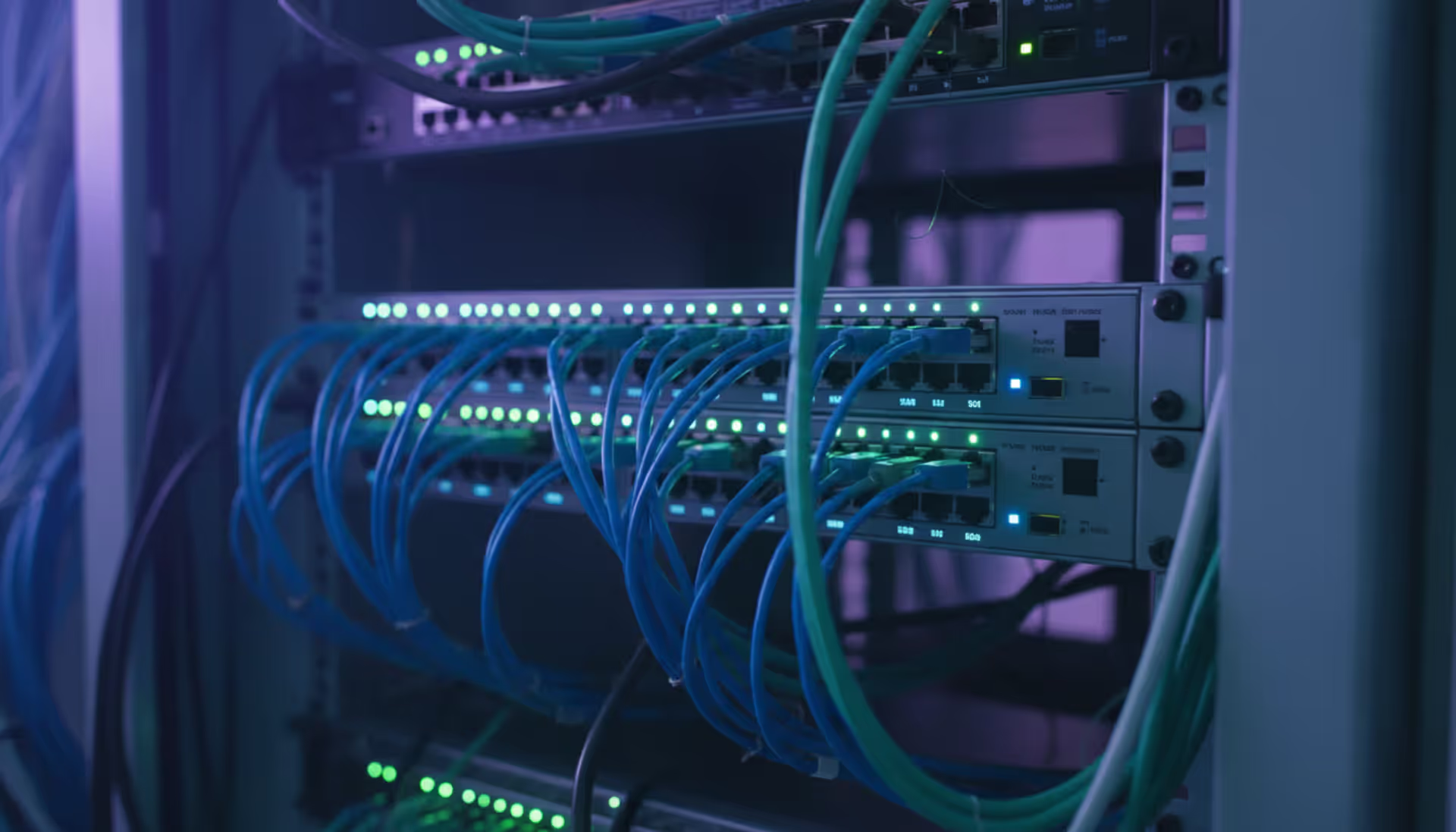
Modern server room with organized network racks, blue LED lighting, colorful ethernet cables, and a network switch with green port indicator lights
When you're planning how computers, phones, printers, and servers will talk to each other in your office, you're doing network design. It's about mapping out the pathways that data travels—deciding which equipment you'll need, how everything connects, and making sure you've got enough bandwidth to handle what your team does today and what they'll need next year.
Here's why this matters more than most people think: Your network is what keeps your business running. Email stops working? That's the network. Can't access your cloud accounting software? Network again. Video calls freezing during client presentations? You guessed it. When things go wrong, you're not just annoyed—you're losing money. Some companies lose $5,600 per minute during network outages, according to recent surveys.
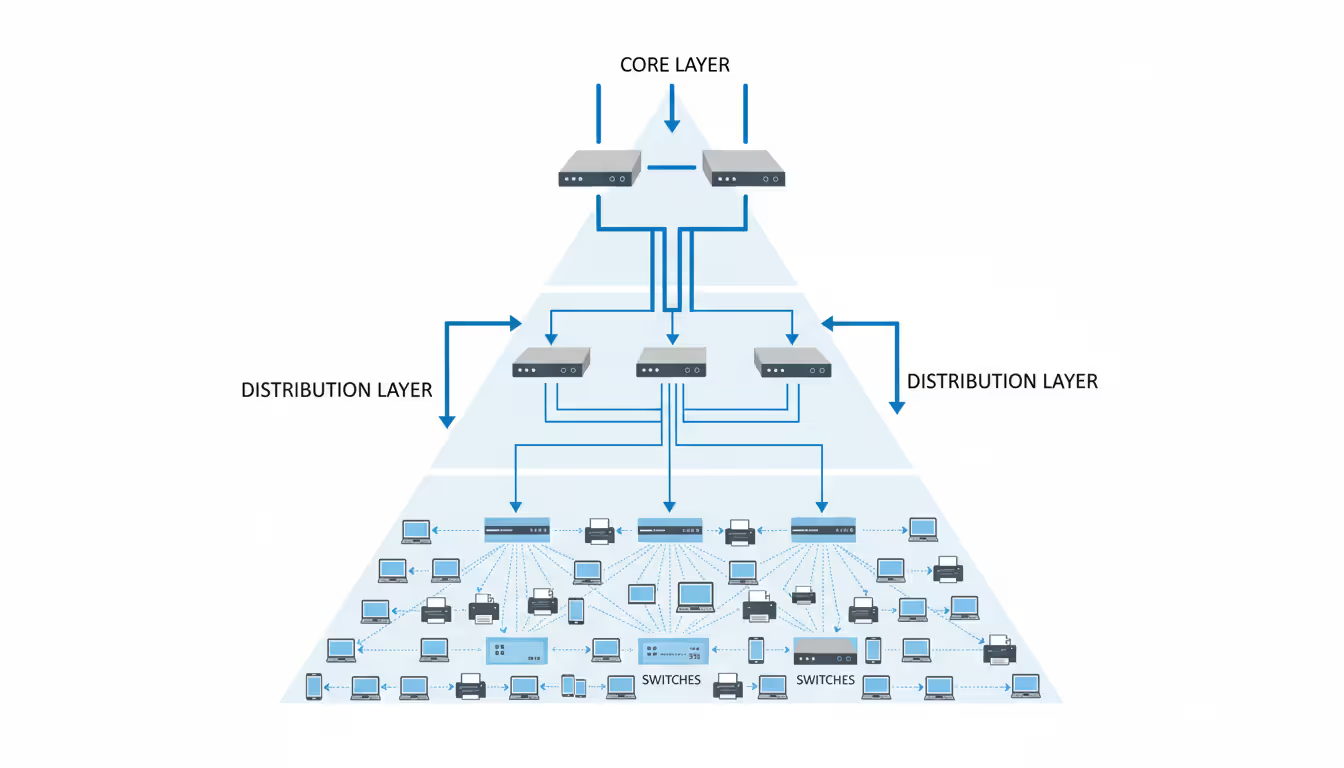
Most networks follow a three-tier structure, though smaller offices might skip the middle tier. Picture it like a highway system: The core layer is your interstate—big, fast connections moving massive amounts of data between major hubs. The distribution layer acts like state highways, gathering traffic from local roads and directing it efficiently. The access layer? That's your neighborhood street where individual devices actually plug in. You can upgrade one section without ripping out everything else, which saves headaches and budget down the road.
What actually makes up a network? You've got physical stuff you can touch—routers pushing traffic between different network segments, switches connecting devices within the same segment, firewalls blocking the bad guys, WiFi access points, miles of ethernet cable, and the servers hosting your applications. Then there's the invisible architecture: IP addresses telling packets where to go, VLANs segmenting traffic virtually, routing protocols making path decisions, QoS rules prioritizing your VoIP calls over someone's Spotify stream, and authentication systems checking who gets access to what. Get these two sides working together smoothly and you won't even notice your network exists. Mess it up and you'll hear about it constantly.
Small companies often start simple—everything plugged into one switch, maybe 15-20 people sharing files and a printer. Works fine until month 18 when you've hired another dozen people, added security cameras, deployed VoIP phones, and suddenly nobody can access the database during peak hours. That flat design hits a wall fast.
Author: Nicole Bramwell;
Source: milkandchocolate.net
Bigger organizations need separation from day one. A manufacturing plant we worked with kept having weird issues—their CNC machines would occasionally glitch when someone in accounting ran large reports. Turns out everything shared one network segment, and database queries were creating latency spikes that disrupted machine communications. They redesigned with separate VLANs: production equipment isolated on its own low-latency segment, office traffic on another, guest WiFi completely walled off. Problem solved, and they blocked potential security nightmares where a compromised guest device could've reached industrial controllers.
Don't paint yourself into a corner with IP addresses. Let's say you've got 60 employees and you choose a /26 subnet because "hey, that gives us 62 usable addresses, we're fine." Then you add IP phones (60 more addresses), security cameras (another 25), smart thermostats (8), and suddenly you're out of room. Renumbering a live network ranks somewhere between root canal and tax audit on the fun scale. Always plan 3-5 years out minimum. Better to have spare capacity than to explain to your boss why the network expansion project costs three times the original quote.
Turning your network plan into a visual map makes the difference between a smooth installation and a three-day troubleshooting marathon. You need to start by counting everything that'll touch your network—not just the obvious workstations, but printers, cameras, door controllers, building automation, even that "smart" coffee maker in the break room that corporate insists on connecting.
If you're redesigning an existing network, grab a notepad and walk the building. Write down make and model numbers of existing equipment, when it was installed, what's plugged into it, and whether users complain about it. That ancient 100Mbps switch in the warehouse? Yeah, that's probably why warehouse staff can't stream the training videos HR keeps assigning.
Next, figure out who needs to talk to whom. Accounting constantly accesses the finance server but rarely touches the CAD workstations that engineering uses. Engineers need fat pipes to the render farm. Customer service needs reliable access to the CRM. These usage patterns tell you how to group devices logically.
You'll create different diagram types for different audiences. Physical topology shows the actual building—this switch goes in the third-floor telecom closet, cable runs go through this conduit, patch panel port 24 connects to conference room B. Installation crews need this level of detail. Logical topology ignores physical locations and focuses on how traffic flows: VLAN 10 carries voice traffic and routes through the firewall to the SIP trunk provider, VLAN 20 handles data and splits between local file servers and cloud applications. Network engineers live in logical diagrams. Then there's the executive version—a simplified view showing branch offices connecting to headquarters and cloud services, perfect for board presentations where details about spanning tree protocol would cause eyes to glaze over.
Author: Nicole Bramwell;
Source: milkandchocolate.net
Symbols matter because confusion wastes time. Routers traditionally show up as cylinders with directional arrows, switches as boxes with multiple connection points shown, firewalls often depicted with a brick pattern, clouds representing internet or external networks you don't control. Cisco published a widely-used icon set that's become the de facto standard. Stick with one symbol library per diagram. Nothing's worse than documentation where routers look like three different things depending on which page you're reading.
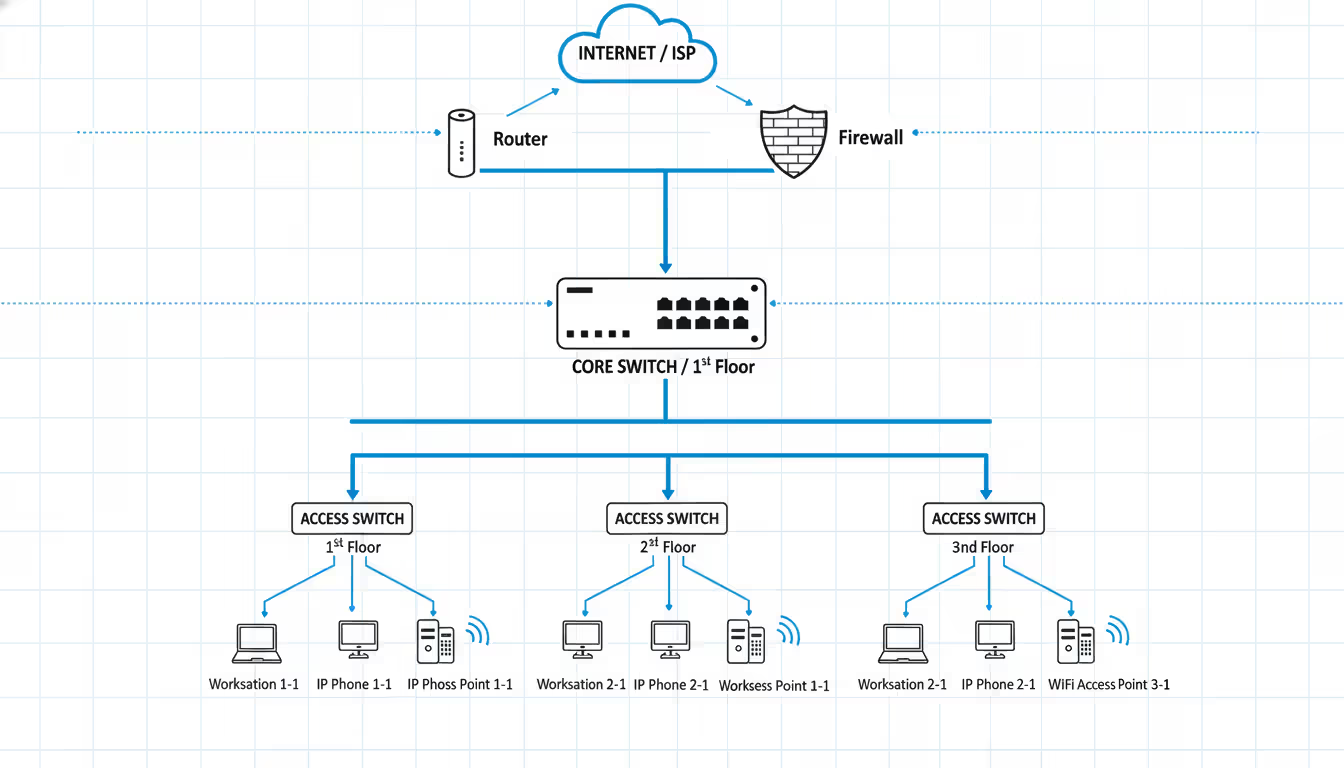
Here's a basic office layout: Internet connection comes in through your ISP's demarcation point, hits your firewall first (always first—don't let unfiltered internet traffic touch anything else), connects to your core switch, which links to access switches distributed around the building. Workstations, phones, and access points connect to those access switches. Label every connection. Not just "1GB" but "1000Base-T, VLAN 10 tagged, VLAN 20 untagged." Three months from now when you're troubleshooting, you'll thank yourself.
Multi-site WAN diagrams get complicated quickly. You're showing how your Chicago office connects to Dallas headquarters via an MPLS circuit from AT&T, how the Los Angeles warehouse uses a site-to-site VPN over commodity internet (cheaper but less reliable), and how remote workers hit your resources through a different VPN concentrator. Note bandwidth on each link—that 10Mbps MPLS circuit to your smallest branch office explains why they can't participate in all-hands video meetings without buffering.
Cloud-hybrid designs reflect modern reality. Maybe your email lives in Microsoft 365, your CRM runs in Salesforce, your custom inventory application sits in AWS, but your file servers and CAD software remain on-premises because the internet connection isn't reliable enough for multi-gigabyte design files. Show the ExpressRoute or Direct Connect between your datacenter and cloud providers, indicate which applications run where, mark bandwidth allocations. A retail client of ours runs point-of-sale locally (can't process transactions if internet dies) but pushes all analytics to Google Cloud for the heavy computational lifting.
Update these diagrams religiously. Treat them like living documents. Every time you add a switch, change a VLAN, or decommission old equipment, update the diagram immediately—not "when I get around to it." Outdated documentation is arguably worse than no documentation because it leads people down wrong paths confidently.
Picking design software depends on what you're trying to accomplish, how much you want to spend, and whether you're working solo or with a team spread across multiple locations.
Here's how the major players stack up:
| Software | Works Best For | What It Costs | Standout Features | Where It Runs |
| Microsoft Visio | Large companies with Office 365 | $280 annually or $580 once | Massive shape libraries, hooks into Active Directory, team collaboration | Windows desktop, web browser |
| Lucidchart | Remote teams needing real-time edits | $7.95-$9 monthly per person | Multiple people editing simultaneously, imports existing AWS/Azure setups, tracks version changes | Web browser, mobile apps |
| Cisco Packet Tracer | Students and testing scenarios | Nothing—it's free | Simulates actual network behavior, test configurations, CCNA exam prep | Windows, macOS, Linux |
| SolarWinds Network Topology Mapper | Documenting what's already there | $1,495 one-time purchase | Crawls your network automatically, compliance checking, creates multi-layer maps | Windows only |
| draw.io (now diagrams.net) | Tight budgets and privacy concerns | Completely free | No account needed, files stay local, tons of community plugins | Web browser, desktop app |
Visio dominates corporate environments because it plays nicely with other Microsoft products most companies already use. The interface feels familiar if you've spent time in PowerPoint. Need equipment shapes? They've got thousands—generic networking icons plus vendor-specific equipment from Cisco, Juniper, HP, you name it. The Professional edition adds database linking, so when you update your equipment inventory spreadsheet, the diagram can auto-update. Downsides? It's Windows-centric, and the one-time purchase price makes accountants wince.
Lucidchart wins when your team doesn't sit in the same building. You can have one engineer working on the datacenter section, another mapping the branch offices, a third adding security annotations—all at the same time, watching each other's changes appear live. The AWS and Azure import feature is genuinely useful: point it at your cloud account, authenticate, and it generates diagrams of your VPCs, subnets, security groups, and resources in minutes instead of hours. The catch? Subscription costs multiply across users. Ten network engineers paying $9/month hits $1,080 annually.
Packet Tracer serves a different purpose entirely—validation before you touch real equipment. Build your network virtually, configure routers and switches using actual Cisco IOS commands, generate traffic between hosts, and watch what happens. Thinking about implementing OSPF instead of static routes? Test it in Packet Tracer first. Wondering if that firewall rule will break database connectivity? Verify it safely. CCNA students rely on it heavily, but experienced engineers use it for prototyping complex scenarios. It's not pretty, and the simulation doesn't cover every edge case, but it's free and surprisingly capable.
SolarWinds Network Topology Mapper attacks the "we have no documentation" problem through automated discovery. Install it, give it SNMP credentials and IP ranges to scan, and it builds diagrams by crawling your network and interrogating devices about their neighbors. This works brilliantly for documenting inherited networks where the previous admin left no notes. The compliance reporting feature checks whether your segmentation meets PCI-DSS requirements or HIPAA standards. Limitations? The auto-generated layouts often look messy and need manual cleanup, and it's expensive for smaller organizations.
Draw.io (rebranded as diagrams.net recently) costs zero dollars and doesn't phone home with your data. Files save locally or to whatever cloud storage you choose—Google Drive, OneDrive, Dropbox, your call. The interface feels a bit rougher than commercial tools, lacking some polish, but it covers 90% of what most people need. Open-source advocates and startups love it for avoiding vendor lock-in. No licensing headaches, no subscription price increases, no sunsetting features you depend on.
Author: Nicole Bramwell;
Source: milkandchocolate.net
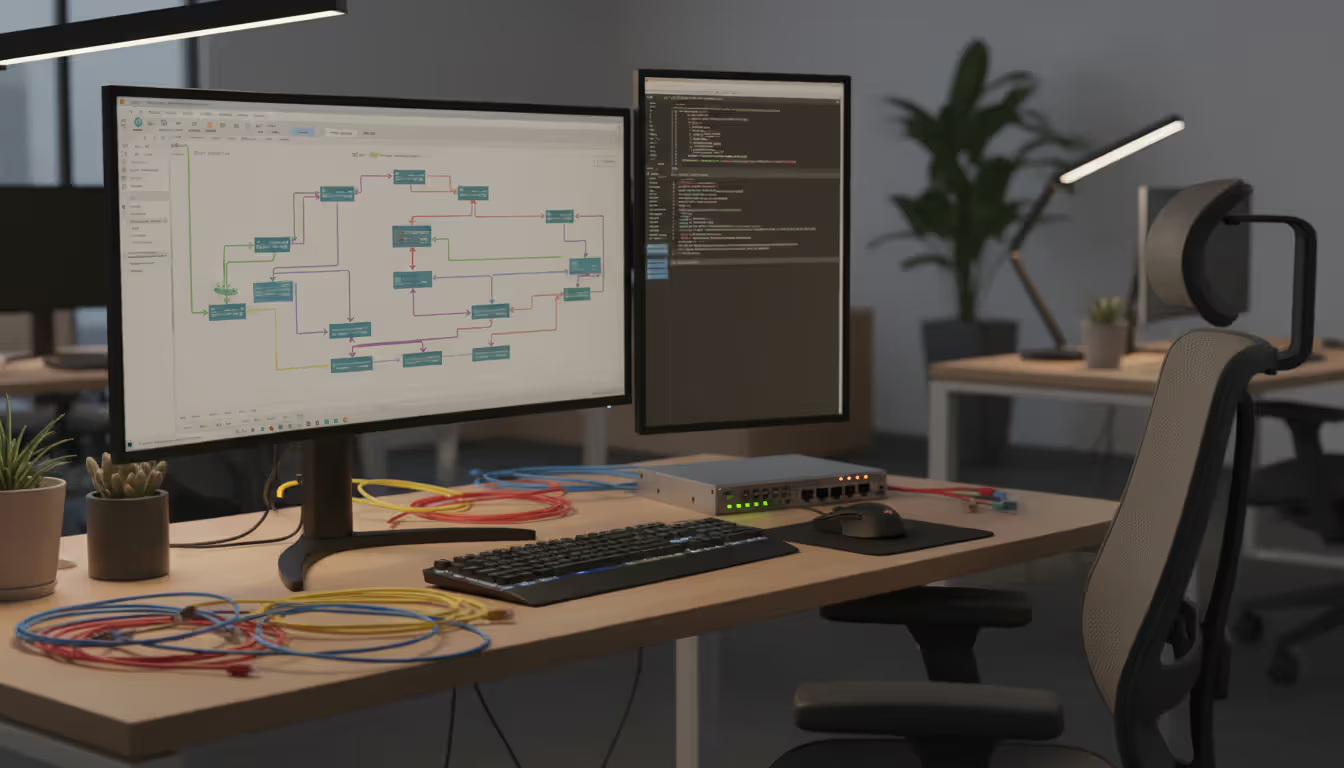
Most organizations end up using multiple tools—maybe draw.io for quick sketches during meetings, Visio for formal documentation that goes into change requests, and Packet Tracer for testing major changes. Pick the right tool for each job instead of forcing one tool to do everything.
Security can't be an afterthought you bolt on once the network's running. Trying to retrofit security into a poorly designed network costs more money and leaves gaps attackers exploit.
Network segmentation creates security zones based on what you trust and what functions things perform. Web servers facing the internet live in a DMZ with tight firewall rules—allow ports 80 and 443 inbound from anywhere, permit only database connections outbound to an application tier that sits behind another firewall, block everything else. Your internal file servers shouldn't share VLAN space with guest WiFi where visitors connect devices you don't control. A hospital we consulted for created four separate segments: medical devices like infusion pumps and monitors on an isolated clinical network, office computers running email and scheduling on a corporate network, patient and visitor WiFi completely walled off, and research lab equipment on its own segment because those researchers constantly need to disable security features for their work. When ransomware hit through a phishing email, it couldn't jump from the infected office computer to life-critical medical equipment.
Firewall placement needs more thought than just sticking one at the internet edge. Yes, you need that perimeter firewall inspecting incoming threats, but what happens after an attacker gets inside through a phishing email or compromised laptop? Internal firewalls between VLANs enforce zero-trust principles—nothing gets to talk to anything else just because it's "inside" your network. Each connection request gets verified independently. Attackers call this "lateral movement" when they hop from one compromised system to others, and internal firewalls make it much harder.
Zero-trust architecture assumes every device might be compromised, every user might be malicious, every request might be an attack. Sounds paranoid? That's the point. Instead of trusting everything inside your network perimeter, you continuously verify identity and check device security posture before granting access. This means implementing network access control systems that check whether connecting devices have current antivirus definitions, the latest OS patches, and compliant configurations before allowing them onto sensitive VLANs. Microsoft's conditional access and Google's BeyondCorp model work this way—even employees on the corporate network don't get automatic access to resources.
Encryption keeps data private as it crosses networks you don't control. Site-to-site VPNs protect traffic between branch offices traveling over the internet. TLS certificates encrypt web sessions. WPA3 with 192-bit encryption secures wireless instead of outdated WPA2 that's vulnerable to dictionary attacks. Common mistake: companies encrypt external traffic religiously but leave internal communications as plaintext. Insider threats and compromised internal devices can sniff unencrypted data just as easily as external attackers.

Author: Nicole Bramwell;
Source: milkandchocolate.net
Access controls determine who can log into network equipment and make changes. Every piece of gear ships with default passwords—admin/admin, root/password, or just "password." Attackers have automated scanners looking for devices still using defaults. Change them immediately. Implement role-based access where junior techs can view configurations and monitor status but can't modify routing protocols or firewall rules. Senior engineers get broader permissions. Use TACACS+ or RADIUS servers for centralized authentication instead of maintaining separate local accounts on every switch and router. When that engineer leaves the company, you disable one account instead of hunting through 50 devices.
Monitoring and logging feed your security operations center—or should, if you have one. Configure switches and routers to send syslog messages to a SIEM platform that correlates events and spots patterns humans miss. Enable NetFlow or sFlow export to track who's sending traffic where and how much bandwidth they're consuming. A sudden spike in outbound traffic at 3 AM might indicate someone exfiltrating your customer database. Deploy intrusion detection sensors at strategic chokepoints to catch exploit attempts and command-and-control traffic.
Vulnerability scanning finds weaknesses before attackers do. Tools like Nessus, Qualys, or OpenVAS probe your network looking for unpatched devices, weak cipher configurations, and security misconfigurations. Schedule scans monthly minimum, and always after significant changes. Finding out your new firewall has a critical vulnerability during a scan beats discovering it when you're breached.
Security controls scale with risk and budget. A financial services firm handling millions in daily transactions might deploy firewalls between every single tier (web, application, database), encrypt everything at rest and in motion, require hardware tokens for administrative access, and maintain air-gapped backups in a separate facility. A small retail shop might focus on separating payment terminals from office systems, using strong WiFi passwords with WPA3, and keeping firmware updated quarterly. Neither approach is wrong—they match different threat levels and available resources.
The goal is to turn data into information, and information into insight
— Carly Fiorina
Turning diagrams into working infrastructure requires careful planning and methodical execution. Companies that rush implementation to save time usually end up spending more fixing problems than they would've spent doing it right initially.
Planning and requirements gathering starts with talking to actual users, not just making assumptions. Schedule interviews with department heads about network pain points they're experiencing now and upcoming projects that'll need connectivity. Finance might tell you they absolutely cannot tolerate network outages during the last week of each quarter when they're closing the books. Marketing might explain their new video content strategy requires uploading 50GB files regularly. Manufacturing might mention they're deploying IoT sensors that need sub-10ms latency for real-time production monitoring. These conversations reveal requirements you'd never guess from your desk.
Write down technical specs: total bandwidth needed today and in two years, how many VLANs you'll need for proper segmentation, redundancy expectations (some companies can tolerate an hour of downtime, others can't survive five minutes), compliance requirements like PCI-DSS or HIPAA, and realistic growth projections. Build a complete bill of materials listing every cable, optic transceiver, rack unit, and software license. Get quotes from multiple vendors and add 15-20% contingency because something always gets forgotten or breaks during installation.
Create a realistic timeline with clear milestones. Consider phasing the rollout instead of big-bang cutover—maybe pilot the new design in one department, work out the kinks, then expand company-wide. Schedule disruptive work during maintenance windows when fewer people are affected, typically late nights or weekends. Communicate plans to everyone impacted weeks in advance, send reminders a week out, and message again the day before. People hate surprises when their network stops working.
Testing and validation happens in a lab before you touch production. Build a scaled-down version of your design using spare equipment or virtualization, configure all the features you're planning, and verify everything works. Test failover scenarios by unplugging cables and rebooting devices to make sure redundancy actually works. Measure throughput under load using iPerf or similar tools to verify you'll hit performance targets. Better to discover configuration errors in the lab at 2 PM on Tuesday than in production at 2 AM on Sunday.
Write detailed runbooks documenting every configuration command, IP assignment, and cable connection. Include rollback steps in case things go sideways—which cable to pull, which configuration to restore, who to call if you need vendor support. A proper runbook means someone unfamiliar with the project could execute the implementation by following your step-by-step instructions. You might get hit by a bus (knock on wood), and the project needs to proceed without you.
Deployment phases begin with physical installation. Rack the equipment, run cables, and label absolutely everything. Use a clear labeling system that makes sense six months later—maybe "SW1-P24-VLAN10-Accounting" indicating switch 1, port 24, carrying VLAN 10 to the accounting department. Bad labeling leads to troubleshooting nightmares where nobody knows which cable goes where.
Configure devices following your runbook exactly, checking off each step as you complete it. Turn on monitoring and logging before any traffic flows through the new equipment so you catch problems immediately. Run smoke tests: ping the default gateway, resolve a DNS name, load a webpage, access an internal application. Everything working? Great. Something broken? Fix it now, not during user cutover.
Execute the cutover during your scheduled maintenance window with the full team present—either on-site or on a video call where everyone can communicate instantly. Watch monitoring dashboards closely for the first hour after going live. Look for error messages, weird traffic patterns, latency spikes, or help desk tickets flooding in. Keep the old equipment powered and cabled for at least 24 hours so you can quickly revert if something major breaks.
Documentation and handoff ensures operations teams can maintain what you built. Provide updated network diagrams, configuration backups, IP address spreadsheets, and administrative credentials stored securely in a password vault. Run training sessions so the ops team understands the new architecture and knows how to handle common issues. Don't just toss documentation over the wall and disappear.
Schedule a post-implementation review meeting two weeks after go-live. Gather feedback about performance problems or unexpected issues. Compare actual throughput, latency, and availability against your original requirements. Update documentation to reflect any changes you made during deployment. This closes the loop and captures lessons learned for next time.
A manufacturing plant upgrading from a flat network to proper segmentation might implement floor by floor over six consecutive weekends, validating each section works before moving to the next. A startup building its first office network might knock everything out in one weekend, but they should still follow the same planning and testing principles—just at smaller scale.
Even veteran engineers fall into these traps that create years of problems.
Ignoring future growth creates expensive replacement cycles. Buying 1GbE switches to save $3,000 looks smart in a 20-person office until you hit 40 people 18 months later and everyone's adopting video collaboration. Now those switches are choking under the load and you're buying new equipment way earlier than expected. Spending slightly more upfront on 10GbE uplinks and modular chassis that accept additional line cards extends useful life dramatically. Design for triple your current requirements as a baseline.
Skipping redundancy guarantees eventual outages. Single internet connection? That gets cut during construction eventually. One core switch? It'll fail during your biggest sales day. Lone firewall? Hope you have a spare when it dies. Redundant connections to different ISPs, stacked switches with separate power supplies, and active-passive firewall pairs cost more initially but save your bacon when Murphy's Law strikes. The CFO complaining about redundancy costs hasn't experienced the revenue loss from multi-hour outages yet.
Messy IP addressing schemes create permanent headaches. Using random subnets without logic makes troubleshooting painful. Adopt a structured approach: maybe 10.10.x.0/24 for office VLANs where x matches floor number, 10.20.x.0/24 for datacenter equipment, 10.30.x.0/24 for WiFi networks. Document the scheme and enforce it strictly. Never let different sites use overlapping IP ranges if there's any chance you'll connect them later—renumbering a live network is nobody's idea of fun.
Documentation neglect turns every issue into an investigation. Six months after implementation, nobody remembers why that particular static route exists or which VLAN the warehouse uses. Keep a network wiki or documentation system with current diagrams, configuration snippets, change history, and vendor contact information. Make documentation updates mandatory as part of change management—if it's not documented, it didn't happen.
Treating security as optional invites disaster. Delaying firewall rule definition until after deployment means systems run wide open initially. Forgetting to disable unused switch ports allows anyone to plug in a rogue device. Skipping firmware updates leaves known vulnerabilities exploitable. Integrate security checkpoints into every implementation phase instead of "we'll secure it later."
Over-engineering wastes money on complexity you don't need. A 15-person office doesn't need three-tier architecture with redundant core routers and HSRP. Match the design to actual requirements, not what the CCNP textbook recommends. Complexity increases failure points and makes troubleshooting harder. Keep it as simple as possible while meeting requirements.
Under-engineering causes the opposite problem—hitting walls quickly and needing expensive upgrades. You'll regret that /24 subnet when you run out of addresses, cheap out on that core switch when it becomes a bottleneck, or skip monitoring systems when you can't figure out why the network's slow. Balance matters. A rapidly growing SaaS company should absolutely deploy enterprise-grade infrastructure anticipating scale. A stable nonprofit might choose simpler, budget-friendly solutions. Neither is wrong—they match different situations.
Forgetting about wireless results in dead zones, interference, and angry users. Don't just guess at access point placement. Perform a proper site survey with a WiFi analyzer to identify optimal locations, channel assignments, and power levels. Consider building materials—concrete and metal attenuate signals far more than drywall. Design for seamless roaming so users walking between APs don't drop Zoom calls mid-sentence.

Author: Nicole Bramwell;
Source: milkandchocolate.net
Your network design determines whether technology enables your business or holds it back. Thoughtful planning during the design phase prevents years of accumulated technical debt, security incidents, and user frustration. Whether building from scratch or refreshing aging infrastructure, core principles remain constant: understand requirements deeply, document thoroughly, bake security in from the start, test before going live, and always plan for growth.
Technologies keep evolving—software-defined networking, deeper cloud integration, zero-trust architectures represent current trends—but fundamental design principles don't change. Proper segmentation, built-in redundancy, logical addressing schemes, and clear documentation never go out of style.
Start simple if you're new to this: map what you currently have, identify what you actually need, choose tools appropriate for your scale and budget, and implement incrementally with thorough testing at each phase. Experienced teams should periodically revisit existing designs, challenging assumptions and incorporating new capabilities that align with evolving business objectives.
A well-designed network becomes invisible to users—they simply expect connectivity to work every time. That invisibility represents success: infrastructure supporting business goals without becoming an obstacle or constant frustration. Invest the time and resources upfront in proper design, and your network will serve reliably for years while adapting gracefully to changing needs.
Understand SSL and TLS port numbers for secure communication. Covers port 443 for HTTPS, 465/587 for email, 993/995 for IMAP/POP3, plus configuration, troubleshooting, and hardening best practices for system administrators

Self hosted cloud storage puts you in complete control of your data. This guide explains what self hosting means, compares costs against commercial services, reviews popular platforms like Nextcloud and Syncthing, and walks through setup steps for building your own private cloud in 2026

Remote work demands more than enabling RDP. This comprehensive guide covers secure remote desktop implementation, from choosing the right platform to configuring multi-factor authentication, encryption, and monitoring. Learn the differences between remote desktop and VPN, avoid common security mistakes, and follow step-by-step setup procedures

Discover how to scan your network for connected devices and IP addresses. This comprehensive guide covers built-in tools, desktop software, mobile apps, and online scanners with step-by-step instructions for identifying every device on your home or office network
The content on this website is provided for general informational purposes only. It is intended to offer insights, commentary, and analysis on cloud computing, network infrastructure, cybersecurity, and IT solutions, and should not be considered professional, technical, or legal advice.
All information, articles, and materials presented on this website are for general informational purposes only. Technologies, standards, and best practices may vary depending on specific environments and may change over time. The application of any technical concepts depends on individual systems, configurations, and requirements.
This website is not responsible for any errors or omissions in the content, or for any actions taken based on the information provided. Users are encouraged to seek qualified professional advice tailored to their specific IT infrastructure, security, and business needs before making decisions.