


SSL TLS Port Guide
Understand SSL and TLS port numbers for secure communication. Covers port 443 for HTTPS, 465/587 for email, 993/995 for IMAP/POP3, plus configuration, troubleshooting, and hardening best practices for system administrators

Server room with network racks and a large clock symbolizing NTP time synchronization across connected devices
Content
Network Time Protocol (NTP) servers keep computers, routers, and other devices synchronized to a common time source. Without them, clocks drift apart—sometimes by minutes per day—creating problems for logging, authentication, database transactions, and distributed applications. Understanding how to find, configure, and troubleshoot these servers helps maintain reliable infrastructure.
An NTP server is a specialized system that distributes accurate time information to client devices across a network. The protocol itself, defined in RFC 5905, uses algorithms to account for network latency and adjust client clocks incrementally rather than jumping forward or backward.
Accurate time matters more than most people realize. Certificate validation depends on synchronized clocks—if a client's time is off by more than five minutes, SSL/TLS connections fail. Log correlation becomes impossible when each server stamps events with a different time. Financial transactions require precise timestamps for regulatory compliance. Distributed databases use time to resolve conflicts and maintain consistency.
NTP operates over UDP port 123 and can achieve accuracy within milliseconds on local networks, tens of milliseconds across the internet. The protocol compensates for variable network delays by measuring round-trip time and estimating one-way latency. It gradually adjusts clock speed rather than making abrupt changes, preventing disruption to running processes.
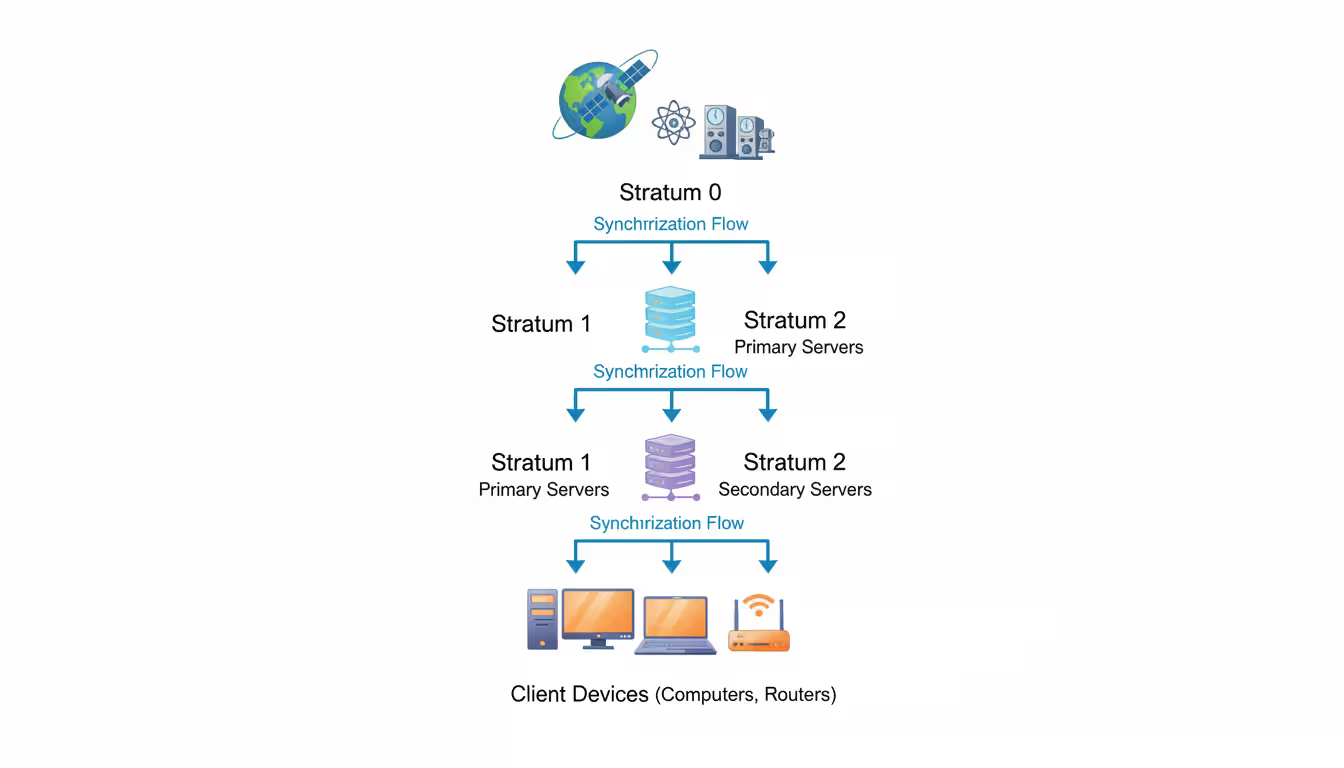
NTP uses a hierarchical system of stratum levels to organize time sources. Stratum 0 devices are atomic clocks, GPS receivers, or radio time signals—the authoritative sources. Stratum 1 servers connect directly to stratum 0 devices and serve as primary time sources. Stratum 2 servers synchronize with stratum 1, and so on, up to stratum 15. Stratum 16 indicates an unsynchronized device.
When a client queries an NTP server, it sends a packet containing a timestamp. The server records when it received the request, when it sent the reply, and includes both timestamps in the response. The client notes when the reply arrived. With these four timestamps, NTP calculates both the offset (how far off the client clock is) and the delay (network round-trip time).
The protocol doesn't simply set your clock to match the server. Instead, it calculates how fast or slow your clock runs and adjusts its rate. If your clock is two seconds behind, NTP might speed it up slightly so it catches up over several minutes. This approach, called "slewing," prevents time from moving backward, which would confuse applications expecting monotonically increasing timestamps.
NTP clients typically poll multiple servers and use statistical algorithms to identify outliers. If one server gives a wildly different time, the client discards it. This redundancy protects against misconfigured servers, network issues, or even malicious time sources.
Author: Trevor Langford;
Source: milkandchocolate.net
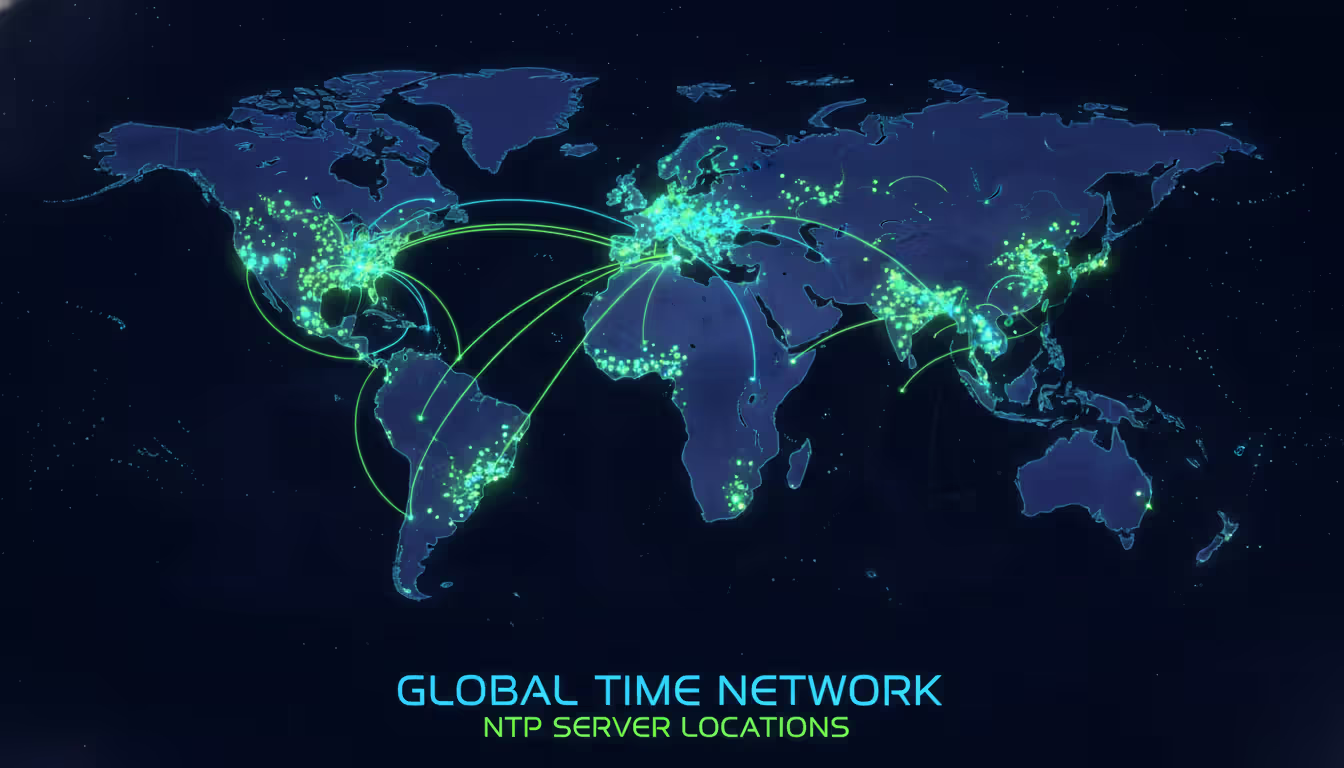
Public NTP servers are available worldwide, accessible via either domain names or IP addresses. Domain names offer flexibility—they can point to multiple servers for load balancing and automatically route you to geographically nearby systems. IP addresses provide direct access but lack these benefits.
The NTP Pool Project (pool.ntp.org) is the largest public time service, comprising thousands of volunteer servers. Using a pool address like 0.us.pool.ntp.org connects you to a random server from the pool, distributing load across many systems. The number prefix (0, 1, 2, 3) allows you to configure multiple pool entries that resolve to different servers.
Major tech companies operate public NTP services. Google's time.google.com uses anycast routing to direct you to the nearest data center. Cloudflare offers time.cloudflare.com with similar global distribution. Microsoft maintains time.windows.com primarily for Windows systems. Government agencies like NIST provide servers including time.nist.gov, though these often have usage restrictions.
| Provider/Pool Name | Server Address Example | Stratum Level | Geographic Coverage | Notes/Features |
| NTP Pool Project | 0.pool.ntp.org | 2-3 | Global, regional zones | Volunteer network, geographically distributed |
| Google Public NTP | time.google.com | 1 | Global (anycast) | Smeared leap seconds, high capacity |
| Cloudflare NTP | time.cloudflare.com | 3 | Global (anycast) | Privacy-focused, no logging |
| NIST | time.nist.gov | 1 | United States | Government-operated, usage limits apply |
| pool.ntp.org (US) | us.pool.ntp.org | 2-3 | United States | Regional pool for North America |
Before configuring a server, verify it responds correctly. On Linux or macOS, use ntpdate -q time.google.com to query without changing your clock. Windows users can run w32tm /stripchart /computer:time.windows.com /samples:5 to measure offset and round-trip time.
Look for consistent offsets across multiple samples and reasonable delay times. A server 50 milliseconds away with stable 2-millisecond offsets is better than one showing 200-millisecond jitter. High jitter indicates network congestion or an overloaded server.
The ntpq -p command on Unix systems displays all configured servers, their stratum, delay, offset, and jitter. The asterisk (*) marks the currently selected server. A plus (+) indicates acceptable alternatives. Servers marked with an "x" are discarded as outliers.
Time is the one thing you cannot store, and in distributed systems, disagreement about time is a fundamental source of bugs. NTP remains essential because it provides not just accuracy but also stability—small, continuous corrections rather than jarring jumps that break applications
— Dr. David Mills
Geographic proximity affects latency. A server 5,000 miles away might have 100-millisecond round-trip time, while one 50 miles away achieves 5 milliseconds. For most applications, anything under 50 milliseconds works fine, but high-frequency trading or scientific instrumentation demands local servers.
Stratum level matters less than you might think. A reliable stratum 3 server often outperforms an overloaded stratum 1. The pool project's stratum 2 servers handle billions of requests daily with excellent accuracy. Only specialized applications requiring sub-millisecond precision need dedicated stratum 1 access.
Pool servers versus individual addresses represents a trade-off. Pools provide automatic failover and load distribution. If one server goes offline, your client automatically uses others. Individual addresses give you control over exactly which servers you use, helpful when troubleshooting or meeting specific compliance requirements.
Private NTP servers make sense for large organizations. Running your own stratum 2 server synchronized to public stratum 1 sources gives you control, reduces external dependencies, and improves performance for internal clients. A single well-configured server easily handles thousands of clients on a local network.
Consider reliability metrics when available. The NTP Pool Project monitors member servers and removes those with poor performance. Checking a server's monitoring page shows uptime history and accuracy. Commercial services often publish SLAs guaranteeing availability and accuracy.
Author: Trevor Langford;
Source: milkandchocolate.net
Windows systems use the Windows Time service. Open an elevated command prompt and run w32tm /config /manualpeerlist:"time.google.com,0x8 time.cloudflare.com,0x8" /syncfromflags:manual /reliable:yes /update. The 0x8 flag marks each server as a peer. Restart the service with net stop w32time && net start w32time, then force synchronization using w32tm /resync.
Linux distributions typically use either ntpd or chrony. For chrony, edit /etc/chrony/chrony.conf and add server lines:
server 0.pool.ntp.org iburst
server 1.pool.ntp.org iburst
server 2.pool.ntp.org iburst
server 3.pool.ntp.org iburst
The iburst option sends multiple requests at startup for faster initial synchronization. Restart with systemctl restart chronyd. Check status using chronyc tracking to see current offset and accuracy.
For traditional ntpd, edit /etc/ntp.conf with similar server entries. The configuration supports additional options like prefer to favor a particular server or minpoll and maxpoll to adjust query frequency. Default polling starts at 64 seconds and increases to 1024 seconds once synchronized.
macOS uses systemsetup -setnetworktimeserver time.apple.com from the command line or System Preferences > Date & Time for GUI configuration. The system uses timed in newer versions, which functions similarly to chrony.
Router and network equipment configuration varies by manufacturer. Most have web interfaces with NTP settings under system or time configuration. Enterprise routers often support multiple servers with priority settings. Consumer routers typically allow one or two server addresses.
Author: Trevor Langford;
Source: milkandchocolate.net
Connection failures usually stem from firewall rules blocking UDP port 123. Many corporate networks restrict outbound NTP to prevent DDoS amplification attacks. If queries timeout, verify firewall rules allow outbound UDP 123 and accept return traffic. Some networks require using internal NTP servers rather than public ones.
Time drift despite configuration suggests the NTP daemon isn't running or lacks permission to adjust the clock. On Linux, systemctl status chronyd or systemctl status ntp shows service status. Windows requires the Windows Time service to be running and set to automatic startup.
Large offsets prevent synchronization. If your clock is more than 1000 seconds off, ntpd refuses to adjust it automatically, fearing clock corruption. Use ntpdate or chronyd -q to set time initially, then start the daemon. Windows allows forcing synchronization regardless of offset with w32tm /resync /force.
Stratum 16 in status output means the client hasn't synchronized. Check that servers are reachable, firewalls permit traffic, and you've waited several minutes for initial sync. NTP takes time—expect 5-10 minutes for first synchronization, especially over congested networks.
Jitter and inconsistent offsets point to network problems or poor server selection. Try different servers, preferably from the pool project or major providers. If all servers show high jitter, investigate local network issues like congestion, failing hardware, or routing problems.
Virtual machines sometimes struggle with time synchronization. Hypervisors pause VM clocks during snapshots or migrations. Most virtualization platforms provide guest tools that handle time synchronization better than NTP. Disable NTP in VMs and let the hypervisor manage time, or use both with careful configuration to avoid conflicts.

Author: Trevor Langford;
Source: milkandchocolate.net
NTP servers provide the foundation for time synchronization across networks, enabling everything from secure communications to accurate logging. Choosing reliable servers from established pools or providers, configuring multiple sources for redundancy, and understanding basic troubleshooting keeps systems synchronized. Whether you're setting up a home network or managing enterprise infrastructure, proper NTP configuration prevents subtle timing issues that create hard-to-diagnose problems. Start with pool.ntp.org or a major provider's service, configure at least three servers, and verify synchronization using built-in tools. Time synchronization runs quietly in the background, but its importance becomes clear the moment it fails.
Understand SSL and TLS port numbers for secure communication. Covers port 443 for HTTPS, 465/587 for email, 993/995 for IMAP/POP3, plus configuration, troubleshooting, and hardening best practices for system administrators

Self hosted cloud storage puts you in complete control of your data. This guide explains what self hosting means, compares costs against commercial services, reviews popular platforms like Nextcloud and Syncthing, and walks through setup steps for building your own private cloud in 2026

Remote work demands more than enabling RDP. This comprehensive guide covers secure remote desktop implementation, from choosing the right platform to configuring multi-factor authentication, encryption, and monitoring. Learn the differences between remote desktop and VPN, avoid common security mistakes, and follow step-by-step setup procedures

Discover how to scan your network for connected devices and IP addresses. This comprehensive guide covers built-in tools, desktop software, mobile apps, and online scanners with step-by-step instructions for identifying every device on your home or office network
The content on this website is provided for general informational purposes only. It is intended to offer insights, commentary, and analysis on cloud computing, network infrastructure, cybersecurity, and IT solutions, and should not be considered professional, technical, or legal advice.
All information, articles, and materials presented on this website are for general informational purposes only. Technologies, standards, and best practices may vary depending on specific environments and may change over time. The application of any technical concepts depends on individual systems, configurations, and requirements.
This website is not responsible for any errors or omissions in the content, or for any actions taken based on the information provided. Users are encouraged to seek qualified professional advice tailored to their specific IT infrastructure, security, and business needs before making decisions.