I've been watching companies struggle with cloud infrastructure for years now. Some nail it immediately. Others burn through thousands of dollars before figuring out they've over-provisioned everything by 300%.
Here's what nobody tells you upfront: spinning up cloud resources takes maybe five minutes. Using them efficiently? That's where the real work begins.
Most businesses need cloud infrastructure now—not next quarter, not eventually. Your competitors already moved their operations online. Customers expect 24/7 availability. Remote teams need access from anywhere. The question isn't whether you'll create cloud infrastructure, but whether you'll do it right the first time or learn expensive lessons along the way.
This guide cuts through the marketing fluff. You'll see exactly how to set up accounts, launch servers, configure storage, and build complete services. More importantly, you'll learn what to avoid—because I've seen the same mistakes cost companies real money over and over.
What Does It Mean to Create Cloud Resources
Think of cloud resources as renting computer power instead of buying physical machines. You click a button, specify what you need, and infrastructure appears within minutes.
The resources themselves split into distinct types. Compute power—the stuff that actually runs your code—comes as virtual machines, containers, or serverless functions that execute without you managing any servers. Storage keeps your data safe, whether that's files sitting in object buckets, databases running on block storage, or archives holding years of records. Networking ties everything together through virtual networks, load balancers spreading traffic around, and CDNs delivering content globally.
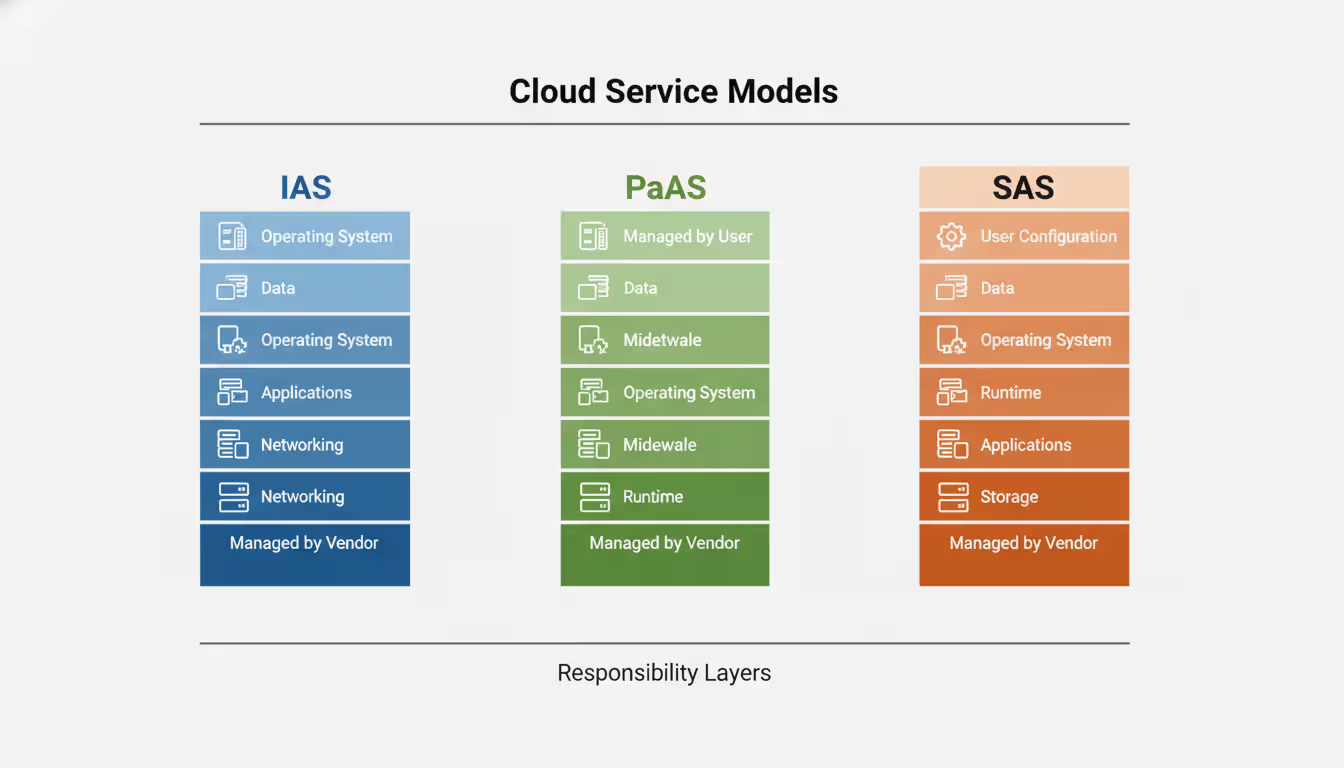
Three service models shape how much control you get. IaaS hands you virtual machines where you install everything yourself—the operating system, security patches, application stack, the whole nine yards. PaaS strips away infrastructure headaches so you just deploy code while someone else handles the servers underneath. SaaS delivers finished applications where you're basically just creating user accounts and tweaking settings.
What makes cloud resources different from the servers collecting dust in your office? Elasticity. Spin up twenty servers for Black Friday traffic, then shut down nineteen on Monday. Try doing that with physical hardware.
Most platforms use declarative provisioning. You describe the end result—"I want a server with four cores, sixteen gigs of RAM, running Ubuntu"—and the platform figures out how to make it happen. Advanced teams write infrastructure-as-code that defines entire environments in config files. Version control for your infrastructure. Pretty neat.
The billing model follows actual usage. That server running for three hours? You pay for three hours. Shut it down and charges stop (mostly—we'll get to the exceptions later).
Author: Rachel Denholm;
Source: milkandchocolate.net
How to Create a Cloud Account with Major Providers
Setting up cloud accounts looks similar everywhere, but each provider throws in unique quirks that'll trip you up if you're not ready.
AWS, Azure, and Google Cloud Account Setup
Amazon Web Services wants your email, a credit card, and your phone for verification. Type in your details, wait for a text code, punch that in. AWS places a one-dollar hold on your card to confirm it's real—don't panic when you see that charge. Finally, they ask about support plans. Pick the free basic tier unless you're launching something mission-critical tomorrow.
Microsoft Azure takes a different route. Got an Outlook or Office 365 account already? Just use that. The signup process feels familiar if you've used other Microsoft products. They verify your phone number and card the same way AWS does, but the interface pushes you harder toward enabling multi-factor authentication. Do it anyway—two-factor auth saves more headaches than it causes.
Google Cloud Platform leverages your Gmail account, making the initial signup almost too easy. Verification feels lighter than AWS or Azure, though you still need a payment method on file. Google won't charge your card for free tier usage, but they want it there just in case. The whole process takes maybe ten minutes if you're not stopping to read every disclaimer.
DigitalOcean streamlined everything for developers who just want to ship code. They accept PayPal alongside credit cards—handy if you're working with international clients or don't want to expose card details. Account approval happens fast, usually under five minutes. The interface assumes you know what you're doing, skipping the lengthy tutorials that AWS or Azure walk you through.
Author: Rachel Denholm;
Source: milkandchocolate.net
Free Tier Options and Trial Periods
Every major provider offers ways to experiment without spending money upfront, though the details vary enough to matter.
AWS gives you twelve months of free access after signup. That includes 750 hours monthly of specific small instances—enough to run one server continuously. You also get five gigs of S3 storage, some database hours, and a bunch of other services with caps. It's generous if you stay within the limits.
Azure hands you $200 in credits good for thirty days, plus twelve months of select services. The credits let you test expensive stuff during month one without worrying about costs. After they expire, certain services stay free within usage limits. Different approach than AWS, more frontloaded.
Google Cloud drops $300 in credits into your account, valid for ninety days. They also maintain an always-free tier with monthly usage allowances that never expire. The micro instance, 30GB storage, and basic networking stick around permanently—perfect for tiny projects or learning.
These free tiers come with fine print. Can't spin up the massive instances. Some advanced features stay behind paywalls. Exceed the limits and billing kicks in automatically. I've watched people rack up three-figure bills because they forgot to shut down test servers.
Read. The. Limits. Seriously.
How to Create a Cloud Server Step by Step
Launching your first cloud server feels intimidating until you've done it once. After that? It's almost boring how straightforward it becomes.
Log into your provider console and find the compute section. AWS calls it EC2. Azure says Virtual Machines. Google goes with Compute Engine. DigitalOcean uses Droplets because apparently standard terminology is overrated.
Instance selection comes first. Providers group machines by purpose—general balanced workloads, CPU-heavy processing, memory-hungry databases, storage-intensive data work. A t3.medium on AWS gives you two virtual CPUs and four gigs of RAM. That handles small web apps fine. Could it run your production e-commerce platform serving ten thousand daily users? Maybe. Probably not. Start small anyway—you can always scale up.
Operating system selection matters more than people think. Ubuntu Server works for most purposes. Amazon Linux is optimized for AWS but locks you into their ecosystem. Windows Server costs extra because licensing, but you'll need it for .NET applications or Active Directory integration. The choice affects both cost and which software you can install later.
Region selection determines where your server physically runs. US-East-1 in Northern Virginia hosts about half the internet (or feels like it). US-West-2 in Oregon serves West Coast users better. Pick something close to your customers—latency differences between coasts add up. Also check regional pricing because some locations cost more for the same resources.
Storage configuration controls your disk space. The root volume usually starts at 8-10GB, but size it for actual needs. Running a small blog? 20GB is plenty. Hosting a video platform? You'll need way more. Many setups benefit from separating the OS drive from data drives—makes backups cleaner and upgrades easier.
Security group setup functions as your virtual firewall. For a web server, allow ports 80 (HTTP) and 443 (HTTPS) from anywhere—that's how people visit your site. Restrict port 22 (SSH) to specific IP addresses. Leaving SSH open to the entire internet invites automated bot attacks within literal minutes. I've watched it happen. It's not pretty.
Key pair generation creates your SSH credentials. Download that private key file and guard it like your bank password. You cannot retrieve it later. Windows users need PuTTY to connect. Mac and Linux folks use the built-in ssh command. Lose the key, lose server access (unless you've set up backup authentication).
Hit launch and review the estimated monthly cost. Remember that estimate assumes 24/7 operation—stopping the instance when you don't need it cuts costs proportionally.
Most servers become accessible within sixty to ninety seconds. Windows boxes take longer, sometimes five to ten minutes for initial configuration. Grab the public IP address once it appears. Connect with SSH: ssh -i yourkey.pem ubuntu@YOUR-IP-ADDRESS. Windows requires retrieving the admin password using your key, then Remote Desktop in.
How to Create a Cloud Storage Solution
Cloud storage serves different purposes than whatever disk lives inside your server. While server storage holds operating systems and applications temporarily, cloud storage provides scalable repositories designed for durability and access.
Object storage dominates cloud storage discussions. S3 from AWS, Blob Storage from Azure, Cloud Storage from Google—they organize data as objects inside buckets. Each object contains your actual file, metadata describing it, and a unique identifier. The architecture scales ridiculously well. Billions of objects? Petabytes of data? No problem.
Creating object storage starts with naming a bucket. In AWS, bucket names must be globally unique across every AWS customer on the planet. Not just unique to your account—unique period. "data" is taken. "backup" is taken. "my-company-files" is probably taken. Get creative or prepare for error messages.
Region selection matters here too. Choose where you'll access files most often to minimize latency and data transfer costs.
Versioning preservation keeps multiple copies as protection against accidental deletion or bad overwrites. Critical data should absolutely have versioning enabled. Just know it increases costs since you're storing multiple copies. Everything's a tradeoff.
Access permissions trip up more people than anything else. Buckets default to private—good. You can grant public read access for static website hosting or file sharing. Public write access? Almost never appropriate. That's how companies end up in the news for data breaches. Use bucket policies or access control lists for granular permissions. Give applications IAM roles instead of hardcoding credentials in source code.
Lifecycle policies automate cost savings by transitioning objects between storage tiers. Keep new files in standard storage for thirty days, move to infrequent access tier for sixty days, then archive to glacier for long-term retention. The transitions happen automatically based on rules you define once.
Block storage works differently—it attaches to servers like traditional hard drives. EBS from AWS, Managed Disks from Azure, Persistent Disks from Google. You need block storage for databases or when applications expect traditional file systems. These volumes exist independently, so you can detach from one server and attach to another without losing data.
Backup strategies require both snapshots and replication. Providers offer snapshot features capturing point-in-time copies. Critical data deserves cross-region replication protecting against whole data center failures. Test restores regularly—backups only matter if you can actually recover when disaster strikes.
How to Create a Cloud Service from Scratch
Building a complete service combines multiple resource types into something users can actually interact with. It's where cloud infrastructure gets interesting.
Start with requirements. A typical web application needs servers for handling requests, a database for storing information, storage for user uploads, and networking tying it together. Data processing pipelines look different—batch compute resources, message queues, a data warehouse for analytics.
Network architecture provides the foundation. Create a VPC (Virtual Private Cloud) isolating your resources from everyone else's. Split it into subnets—public ones for internet-facing resources like load balancers, private ones for databases and application servers that shouldn't face the internet directly. This segmentation limits what attackers can reach if they breach one component.
Web applications typically start with a load balancer in public subnets. AWS Application Load Balancer, Azure's Load Balancer, Google Cloud Load Balancing—they distribute incoming traffic across multiple server instances. Configure health checks so bad instances get skipped automatically.
Deploy application servers into private subnets spanning multiple availability zones. High availability demands running in at least two zones so a data center problem doesn't kill your whole service. Auto-scaling groups automatically launch or terminate instances based on CPU usage, memory, request counts—whatever metrics matter to you. Traffic spike at 2 AM? New instances spin up automatically. Load drops? Excess capacity shuts down, saving money.
Database selection depends on your data model and consistency requirements. Managed services like RDS from AWS, SQL Database from Azure, or Cloud SQL from Google handle backups, patches, and replication for you—tons of operational burden lifted. For document stores, look at managed NoSQL like DynamoDB or Cosmos DB. Always deploy databases in private subnets with encryption at rest enabled.
Managed services accelerate development by handling undifferentiated heavy lifting. Building a message queue from scratch takes weeks. Using SQS or Service Bus takes minutes. Need caching? Managed Redis or Memcached. File processing? Serverless functions triggered by storage events. Let providers handle the boring infrastructure so you can focus on what makes your service unique.
Monitoring and logging belong in your initial setup, not bolted on later. Turn on CloudWatch, Azure Monitor, or Cloud Operations Suite from day one. Collect metrics and logs. Set alerts for critical conditions—high error rates, resource exhaustion, unusual traffic patterns. Flying blind when problems occur turns five-minute fixes into two-hour outages.
Security requires defense in depth. Encrypt data moving between components using TLS certificates from Certificate Manager, Key Vault, or Google-managed certs. Encrypt data sitting in databases and storage using provider-managed keys or your own keys for sensitive information. Implement least-privilege access via IAM roles—never use root credentials or wildcard permissions in production.
Infrastructure as code via Terraform, CloudFormation, or Azure Resource Manager templates documents your architecture in version-controlled files. Define your entire service as code, store it in Git, use CI/CD pipelines for deployments. Configuration drift disappears. Disaster recovery becomes redeploy from code.
Common Mistakes When Creating Cloud Infrastructure
Author: Rachel Denholm;
Source: milkandchocolate.net
Over-provisioning wastes staggering amounts of money. Teams launch instances sized for peak load and run them continuously at 5% CPU utilization. Auto-scaling exists for exactly this reason—match capacity to actual demand. That eight-core monster might seem necessary during planning, but if metrics show you're using ten percent of available resources, you're burning cash for nothing.
Security misconfigurations expose everything. SSH ports open to the internet attract brute-force attacks immediately. Default credentials remain unchanged. IAM permissions grant wildcard access because properly scoping permissions takes effort. S3 buckets get configured for public access accidentally and dump sensitive data to anyone with the URL. Use security scanning tools. Follow least privilege religiously. Assume attackers are already probing your infrastructure because they probably are.
Ignoring cost management creates nasty billing surprises. Cloud charges accrue continuously in the background. Test resources left running over weekends. Snapshots accumulating indefinitely. Large data transfers between regions. The individual charges seem small—a few dollars here, a few there—until monthly totals hit four figures and you're scrambling to explain to finance what happened. Set billing alerts at meaningful thresholds: $50, $100, whatever matters to your budget. Get notified before costs spiral.
Lack of monitoring means finding out about problems from angry users instead of proactive alerts. Create dashboards tracking CPU, memory, disk I/O, network traffic, request latency, error rates—metrics that actually matter. Configure alerts for anomalies. Reactive troubleshooting at 3 AM costs more than proactive monitoring during business hours.
Single points of failure undermine everything. Deploying all instances in one availability zone means a data center issue takes down your entire service. Skipping database replication risks data loss when hardware fails (and it will). Design for failure by distributing resources across zones and implementing redundancy everywhere that matters.
Neglecting backup and disaster recovery plans creates existential risk. Assume you'll eventually need those backups—accidental deletion, data corruption, ransomware, disgruntled employees. Test restore procedures quarterly to verify they actually work. Document recovery time objectives and recovery point objectives, then architect backups meeting those requirements.
Vendor lock-in happens gradually through heavy use of proprietary services. Managed services accelerate development but tie you to specific providers. Balance convenience against portability. Use open standards where practical. For critical workloads, consider multi-cloud strategies despite added complexity.
Cloud Creation Costs and Pricing Factors
Companies keep treating cloud like old-school data centers, just in someone else's building. That's the biggest mistake I see. They provision virtual machines the same way they'd order physical servers—sized for maximum theoretical load, running 24/7 regardless of actual demand. You're missing the entire point. Cloud power comes from elasticity, automation, and managed services. Start small, measure everything obsessively, and let real usage data drive infrastructure decisions instead of guessing what you might need someday
— Marcus Chen
Cloud pricing seems simple until you dig into the details. Pay-as-you-go models charge for actual consumption, but "actual consumption" encompasses more than you'd expect.
Compute pricing varies by instance type, operating system, and region. A Linux t3.medium in US-East-1 runs about four cents hourly—roughly thirty bucks monthly if you never shut it down. Windows licensing bumps that to six cents hourly for identical hardware. Larger instances scale costs proportionally: t3.xlarge with four cores and sixteen gigs runs about seventeen cents hourly.
Reserved instances and savings plans slash compute costs if you commit to usage patterns. One-year reservations might save 30-40%. Three-year commitments can hit 60% discounts. The catch? You pay regardless of actual usage. Only reserve capacity for steady-state workloads you're confident will continue.
Spot instances offer the deepest discounts—sometimes 90% off on-demand pricing—for workloads tolerating interruption. Providers reclaim spot capacity when needed, giving brief warnings. Batch processing, data analysis, and dev environments work great on spot. Production web servers facing customers? Probably not ideal.
Storage pricing depends on type and access patterns. S3 standard runs about two cents per gigabyte monthly. Infrequent access storage drops to roughly one cent per gig but charges retrieval fees. Glacier archival costs less than half a cent per gig with slower retrieval taking hours and higher access fees. Match storage tiers to actual access frequency or pay for performance you're not using.
Data transfer costs surprise everyone eventually. Inbound transfer to cloud providers? Usually free. Outbound to the internet? About nine cents per gigabyte for the first 10TB monthly, with volume discounts beyond that. Inter-region transfers within the same provider also cost money. Design architectures minimizing cross-region traffic and cache content at edges via CDNs.
Hidden costs accumulate from overlooked resources. Elastic IP addresses cost money when not attached to running instances. Load balancers charge hourly fees plus data processing fees. NAT gateways providing internet access for private subnets run about five cents hourly plus data processing. Review bills monthly and terminate unused resources.
Cost optimization requires ongoing attention. Provider cost management tools identify the biggest expenses. Rightsize instances by analyzing actual utilization—10% average CPU screams over-provisioning. Delete old snapshots and unused volumes. Enable auto-scaling to shut down instances during off-peak hours. Small optimizations compound significantly.
Budget for cloud infrastructure with buffers for growth and experimentation. A small app might start at $100 monthly but grow to $500 as traffic increases. Set billing alerts at multiple thresholds. Review spending weekly during initial deployment, monthly during steady-state operation.
Comparison of Major Cloud Providers
Provider
Account Setup Process
Free Tier Details
Basic Server Monthly
Storage Types
Ideal Customer
AWS
Moderate complexity (needs phone verification and card)
12-month access to select services, 750 hrs/month micro instances
Enterprises and startups needing extensive service catalog
Azure
Straightforward (Microsoft account works)
$200 credits first 30 days, select services free 12 months
Around $15 (B1S Linux)
Blob Storage, Managed Disks, Azure Files
Organizations already using Microsoft ecosystem
Google Cloud
Simple (Gmail account sufficient)
$300 credits for 90 days, always-free tier with monthly limits
Around $7 (e2-micro)
Cloud Storage buckets, Persistent Disks
Data analytics teams and ML projects
DigitalOcean
Very simple (accepts PayPal too)
$200 credits for 60 days (promotional)
$6 (basic droplet)
Spaces object storage, Block Storage volumes
Developers and small businesses wanting simplicity
Frequently Asked Questions
What is the easiest cloud platform for beginners to create resources?
DigitalOcean wins for pure beginner-friendliness. The interface skips complex enterprise features and focuses on getting basic resources running quickly. Google Cloud also ranks high if you already have a Gmail account—the signup barely takes five minutes. AWS and Azure offer more comprehensive services but present steeper learning curves. Their consoles assume familiarity with enterprise IT concepts that beginners might not have yet.
How long does it take to create a cloud server?
The server itself appears within one to three minutes after clicking launch. Linux instances boot faster than Windows—sometimes ready in under sixty seconds. Windows servers might take five to ten minutes for initial configuration. The account setup before your first server takes longer, maybe fifteen to twenty minutes including verification steps and payment configuration.
Do I need technical skills to create a cloud account?
Creating the account needs minimal skills—basic computer literacy plus a credit card. Actually using cloud resources effectively? That demands technical knowledge. You should understand networking fundamentals, feel comfortable with command-line interfaces, and grasp security principles. Providers offer tutorials and documentation helping beginners, but expect a real learning curve beyond initial signup.
What's the difference between creating cloud storage and cloud servers?
Servers provide compute capacity—virtual machines running operating systems and executing your applications. Storage provides data persistence—repositories for files, databases, and backups existing independently. Servers can be created and destroyed rapidly; they're ephemeral. Storage persists regardless of whether servers are running. Most applications use both: servers for processing logic and storage for data. You can create storage without servers for archival purposes, but servers typically need storage to do anything useful.
How much does it cost to create and maintain a cloud server?
Small cloud servers run $6-15 monthly for basic configurations handling development work or small websites. Production servers with more resources cost $30-200 monthly depending on CPU, memory, and storage requirements. Additional costs include data transfer, extra storage volumes, backups, and load balancers. Actual costs vary dramatically based on usage patterns—a server running 24/7 costs more than one running only business hours. Spot instances can reduce costs by 70-90% if your workload tolerates interruption.
Can I create cloud resources for free?
Yes, major providers maintain free tiers letting you create and use limited resources without charges. AWS provides twelve months of free access to certain services. Google Cloud offers $300 in credits for ninety days plus always-free products with monthly usage limits. Azure grants $200 in credits for thirty days. These free tiers work well for learning and small projects but have strict usage limits. Exceeding those limits automatically triggers billing, so monitor usage carefully to avoid surprise charges.
Cloud infrastructure represents a fundamental operational shift from how IT worked for decades. The ability to provision servers in minutes, scale storage to petabytes, and deploy globally from a browser democratizes capabilities once limited to Fortune 500 companies.
Success requires balancing multiple competing concerns simultaneously: cost efficiency, security, reliability, and performance. Start with clear requirements rather than provisioning speculatively. Use free tiers and small instances for learning before committing real budgets.
Security deserves attention from the first resource you create—not as an afterthought weeks later. Enable encryption everywhere. Implement least-privilege access from day one. Monitor for anomalies continuously. Cloud convenience shouldn't compromise protecting data and systems.
Cost management separates successful cloud adoption from budget disasters. Set billing alerts immediately. Review spending regularly—weekly during initial deployment, monthly during steady-state operation. Rightsize resources based on actual metrics instead of guesses.
Infrastructure as code, comprehensive monitoring, and aggressive automation transform cloud resources from manually managed servers into programmable infrastructure. Invest time learning these practices early—they pay dividends as infrastructure grows.
Cloud providers evolve their platforms constantly, introducing new services quarterly. Stay current with changes affecting your infrastructure, but resist adopting every shiny new feature. Focus on services solving real problems for your specific use case.
Whether you're creating your first cloud account today or architecting complex multi-region deployments, the core principles remain consistent: start small, measure everything, automate relentlessly, and optimize continuously. Cloud infrastructure creation isn't a one-time project—it's an ongoing practice of building, monitoring, and improving the systems powering your business.
Zero trust VPN fundamentally changes remote access security by continuously verifying identity and device posture before granting application-level access. Unlike traditional VPNs that trust authenticated users across entire networks, zero trust solutions enforce micro-segmentation and never assume trust
WiFi 6E adds 59 channels in the 6 GHz band, providing clean spectrum for high-speed connections. Learn how channel allocation works, real-world speed differences versus WiFi 6, tri-band operation, and whether the technology justifies the cost premium for your specific environment
Organizations with distributed locations depend on reliable WAN connectivity. This guide covers monitoring methods, performance metrics, common issues, tool selection, and implementation best practices to maintain network health across geographic distances
Web based and cloud based systems differ fundamentally in infrastructure, scalability, and costs. Web based systems run on fixed servers with predictable expenses, while cloud platforms offer elastic scaling with usage-based pricing. Learn which architecture fits your monitoring, remote access, or enterprise needs
The content on this website is provided for general informational purposes only. It is intended to offer insights, commentary, and analysis on cloud computing, network infrastructure, cybersecurity, and IT solutions, and should not be considered professional, technical, or legal advice.
All information, articles, and materials presented on this website are for general informational purposes only. Technologies, standards, and best practices may vary depending on specific environments and may change over time. The application of any technical concepts depends on individual systems, configurations, and requirements.
This website is not responsible for any errors or omissions in the content, or for any actions taken based on the information provided. Users are encouraged to seek qualified professional advice tailored to their specific IT infrastructure, security, and business needs before making decisions.