Single server rack in a small room on the left versus a large cloud data center with rows of servers on the right, separated by a dividing line, blue lighting
You've probably seen "web based" and "cloud based" used like they mean the same thing. They don't. I've watched this confusion trip up procurement teams who thought they were buying cloud infrastructure but actually got traditional hosting with a browser interface.
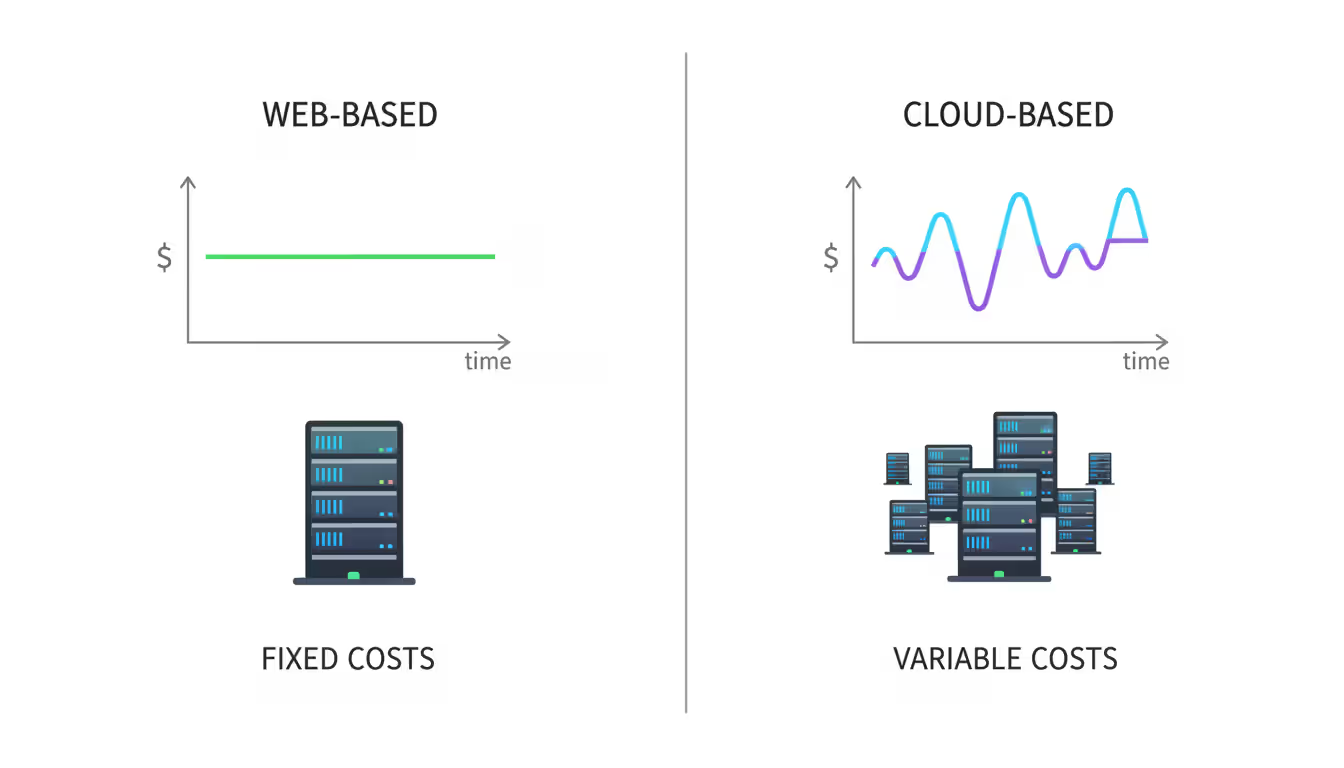
Both architectures let you access software through browsers without desktop installations. That's where the similarities end. One runs on fixed servers you control (or rent). The other taps into elastic infrastructure that grows and shrinks automatically. Your choice determines whether you'll pay $500 monthly regardless of usage or $200 one month and $3,000 the next.
When you're evaluating a web based temperature monitoring system for your warehouse or considering network management tools, these architectural differences affect everything from your monthly bill to what happens when traffic suddenly triples.
Let's break down what these terms actually mean and when each approach makes sense for your situation.
What Does Web Based Mean in Software Architecture
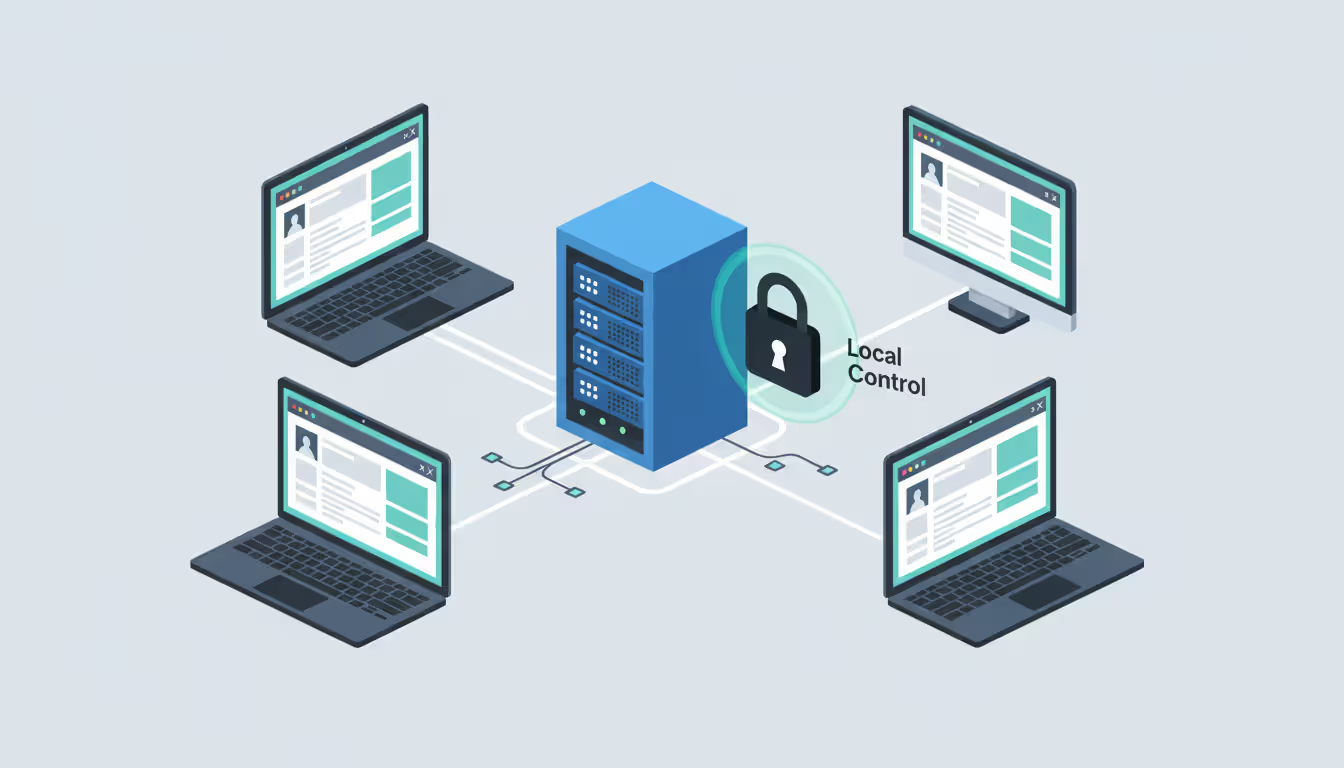
Think of web based systems as traditional server setups accessible through your browser. The software lives on specific servers—either in your building, your data center, or rented from a hosting company. You navigate to a URL, log in, and the server does all the heavy lifting while your browser displays the results.
Here's how it works: Your company sets up servers (physical boxes or virtual machines from a traditional hosting provider). All the application code, databases, and processing happen on those specific machines. When Sarah from accounting opens the expense reporting tool, her browser sends requests to your server. The server processes her expense submission and sends back the formatted page to display.
Web based remote access tools follow this exact pattern. Your IT department configures a server running remote desktop software. Employees visit a specific web address, authenticate, and access their office computers from home. That access server sits in your infrastructure with fixed specifications—8 CPU cores, 32GB RAM, whatever you provisioned.
What makes something web based:
Fixed capacity that doesn't auto-scale: You decide upfront how powerful your servers need to be. Got 100 users today and expect 500 next year? You'll manually upgrade those servers or add new ones. There's no automatic "sensing load and adding resources" happening.
Browser access instead of installed programs: Your users need Chrome, Firefox, Safari—whatever browser works. No downloading 200MB installers or worrying about Mac versus Windows compatibility.
You (or your hosting provider) control the metal: Even if you're renting a dedicated server from a hosting company, you know exactly which physical machine runs your application. You can usually SSH into it, install whatever software you want, and configure it however you need.
Predictable monthly bills: That $400/month dedicated server costs $400 whether you process 10 transactions daily or 10,000. Your accounting team loves this predictability even if you're sometimes paying for unused capacity.
A medical practice I consulted for runs their patient portal on two dedicated servers in a local data center. Patients schedule appointments and view lab results. The practice knows exactly where that data lives (important for HIPAA compliance). When patient volume grew 40% over three years, their IT contractor added a third server. Manual scaling, but perfectly adequate for their steady growth pattern.
Web based architecture shines when you can forecast your needs, prefer hands-on control, or need to guarantee data stays in specific locations. It stumbles when you face unpredictable traffic spikes or rapid growth.
Author: Rachel Denholm;
Source: milkandchocolate.net
What Does Cloud Based Mean in Software Architecture
Cloud based systems run on someone else's massive infrastructure—AWS owns warehouses full of servers in Virginia, Oregon, Ireland, Singapore. You rent slices of that capacity, and the platform automatically adjusts how much you're using based on real-time demand.
Rather than "your application runs on Server #47," it's more like "your application runs somewhere in AWS's US-East region across however many virtual machines are currently needed." That abstraction is the whole point.
Cloud providers organize services into three layers:
Infrastructure as a Service (IaaS): You rent virtual machines but manage everything running on them. It's like leasing a car—you control what happens inside, but you don't own the vehicle. Your team still handles operating system updates, security patches, and application configuration.
Platform as a Service (PaaS): The provider manages servers and runtime environments. You just deploy your code. Heroku, Google App Engine, Azure App Service—these platforms handle scaling and infrastructure while you focus on application features.
Software as a Service (SaaS): Ready-to-use applications like Gmail or Salesforce. You subscribe and start using them. The vendor handles literally everything technical.
Web based cloud applications combine browser access with elastic infrastructure underneath. A project management tool might normally run on 5 virtual servers. During a product launch when 30 teams collaborate intensively, the platform automatically spins up 15 more servers. After launch, it scales back down to 5. You pay for those extra servers only while they existed.
Cloud computing fundamentally shifts IT from a capital expenditure model to an operational one, but more importantly, it introduces elasticity as a core architectural principle rather than an afterthought
— Lydia Leong
Cloud systems share these traits:
Automatic resource adjustment: Traffic doubles unexpectedly? The platform provisions more capacity within minutes without human intervention. Load drops? Resources disappear and so do the associated costs.
Geographic distribution baked in: Your application can simultaneously run in data centers across Virginia, Frankfurt, Tokyo, and Sydney. Users connect to whichever location is closest for better performance.
Pay-for-consumption pricing: A development project might cost $150 in January during planning, $4,200 in March during heavy testing, then $600 during April's maintenance phase. Costs fluctuate with actual usage.
Managed infrastructure: Hardware failures, security patches, data center cooling—AWS handles that. Your team focuses on application logic instead of replacing failed hard drives.
I worked with a logistics company that moved their shipment tracking to AWS. During November and December, the system automatically scaled up to handle 10x normal package queries. January arrives, traffic drops, and monthly AWS bills decreased by 65% without anyone touching the configuration. The platform just released unused resources.
Cloud architecture excels for unpredictable workloads, global users, or teams wanting minimal infrastructure management. You trade direct control and cost predictability for flexibility and automatic scaling.
Author: Rachel Denholm;
Source: milkandchocolate.net
Key Differences Between Web Based and Cloud Based Systems
Both let you use software through browsers, but that's where similarities end:
Feature
Web Based
Cloud Based
Where It Runs
Specific servers you control or rent from traditional hosting
Distributed across provider's global data centers
How It Scales
Manually upgrade servers or add new ones
Automatically adds/removes resources based on current demand
Internet Dependency
Needed for remote access; works on local networks without internet
Always requires internet; no local-only option
Data Location
Stored on specific servers in known locations
Distributed across multiple facilities; provider manages placement
Who Handles Maintenance
Your team manages updates, hardware issues, everything
Provider handles infrastructure; you manage application layer
Cost Structure
Fixed monthly fees regardless of usage levels
Variable charges based on actual resource consumption
Best Examples
Internal HR systems, web based network scanner, intranet portals
Global SaaS platforms, mobile app backends, big data processing
Who owns the infrastructure creates the fundamental split. With web based systems, you either own the physical servers or rent dedicated machines from a traditional host. You know Server ID #1847 runs your application. Cloud platforms abstract this completely—your app runs "somewhere" in their infrastructure, potentially moving between physical servers as the platform optimizes.
Scaling philosophy matters practically. Say you deploy a web based monitoring system handling 1,000 sensor readings daily. Business expands and you need to monitor 10,000 sensors. You'll provision bigger servers or add capacity before connecting those new sensors. Cloud alternatives automatically allocate resources as sensor count increases, then release them if you reduce monitoring scope later.
Cost patterns flip depending on usage. A dedicated server costs $500 monthly whether it handles 100 transactions or 100,000. Cloud bills reflect actual consumption—maybe $200 during slow months, $2,000 during busy periods. Startups love this flexibility. CFOs at stable enterprises sometimes prefer fixed costs for easier budgeting.
Disaster recovery complexity differs substantially. Web based systems need you to configure backup servers, data replication, and failover procedures. Cloud platforms typically include geographic redundancy automatically—your data replicates across multiple facilities, and applications fail over transparently if one data center has issues.
A manufacturing client runs their web based temperature monitoring system on local servers. Regulations prohibit storing production data outside specific countries. Fixed infrastructure ensures compliance, though they're responsible for backup systems and replacing failed hardware.
Meanwhile, a software startup chose cloud infrastructure for their collaboration platform. User count swung from 50 beta testers to 10,000 users within two months. Cloud scaling handled this growth without upfront infrastructure investment or frantic server ordering.
Author: Rachel Denholm;
Source: milkandchocolate.net
When to Choose Web Based Solutions
Web based architecture makes sense in specific situations where control, predictability, or regulations outweigh cloud benefits:
Internal business applications with stable usage: Your employee directory serves 200 office workers. Traffic doesn't fluctuate wildly. A web based system on company servers provides reliable access without ongoing cloud subscriptions. Peak usage happens weekdays 9-5, minimal traffic evenings and weekends—totally predictable.
Industrial monitoring systems: Manufacturing plants deploy sensor networks tracking equipment performance. A web based monitoring system on local servers processes data from assembly line sensors, quality cameras, and environmental monitors. Local hosting means monitoring continues if your internet connection drops—critical when production downtime costs $5,000 hourly.
Web based temperature monitoring systems in regulated environments: Pharmaceutical warehouses and food distributors need constant temperature tracking to prevent spoilage. Running a web based temperature monitoring system on local infrastructure offers concrete advantages: data stays on-site for regulatory audits, monitoring functions during internet outages, and fixed costs simplify budgeting for facilities with consistent monitoring requirements.
Web based network scanner tools for security: IT security teams use these to identify vulnerabilities across corporate networks. Hosting scanning tools internally prevents sending network topology details to external cloud providers. That's a legitimate security concern—you don't want infrastructure maps potentially exposed through a third party.
Modernizing legacy systems without full migration: A county government modernized their permit application process by adding a web based interface to existing databases. This improved citizen access without the cost and risk of migrating decades of data to cloud platforms.
Meeting specific regulatory requirements: Healthcare providers under HIPAA or financial institutions meeting SOC 2 compliance sometimes prefer direct infrastructure control. Cloud providers absolutely offer compliant solutions, but some organizations find demonstrating regulatory adherence simpler with servers they directly manage.
Budget-conscious operations with steady traffic: A local newspaper's subscriber portal serves a stable readership of 8,000 subscribers. Fixed hosting costs of $300 monthly beat cloud services that might charge $400-$600 monthly due to baseline resource requirements, data transfer fees, and storage costs.
Web based solutions work when you can accurately forecast needs, prefer infrastructure control, or operate where internet reliability matters. The approach struggles with rapid growth, geographic expansion, or highly variable demand.
When to Choose Cloud Based Solutions
Cloud based architecture delivers advantages in scenarios requiring flexibility, distribution, or minimal infrastructure management:
Rapid growth with unpredictable trajectories: A mobile app launches with 500 users but hits 50,000 within six months. Cloud infrastructure scales seamlessly with growth, avoiding the bottleneck of ordering and configuring servers before confirming your product actually works. Pay for current usage instead of gambling on capacity for projected growth.
Global users needing low latency: A video conferencing platform serves customers across North America, Europe, and Asia. Cloud providers operate data centers globally. Your Tokyo customer connects to Asian servers while your London user accesses European infrastructure. Both get optimal performance without you building worldwide server infrastructure.
Extreme variability in workload patterns: Tax preparation software experiences intense activity January through April, then minimal usage the rest of the year. Cloud infrastructure scales up during tax season to handle millions of returns, then scales dramatically down. Fixed web based infrastructure would sit mostly idle eight months annually—expensive waste.
Big data processing with intermittent needs: A retail chain analyzes point-of-sale data from 1,000 stores monthly to optimize inventory. Processing terabytes of transactions requires substantial computing power for a few hours, then minimal resources until next month's analysis. Cloud platforms provision powerful instances temporarily—complete analysis in two hours for $300 rather than maintaining expensive servers year-round.
Development and testing environments: Software teams need temporary environments for testing new features. Cloud platforms create isolated testing environments within minutes, run automated tests, then delete everything. This costs far less than maintaining dedicated testing servers that sit idle between testing cycles.
Disaster recovery without massive investment: Cloud platforms replicate data across geographically separated data centers automatically. Hurricane hits your primary region? Applications fail over to unaffected locations within minutes. Achieving similar redundancy with web based infrastructure requires substantial investment in multiple server locations—prohibitively expensive for smaller organizations.
Mobile application backends: Mobile apps need infrastructure handling push notifications, user authentication, and data synchronization. Cloud platforms offer managed services designed specifically for mobile workloads, including automatic scaling when your app suddenly goes viral and global content delivery networks for fast media loading.
Machine learning and AI processing: Training machine learning models requires intensive computing power for days or weeks, followed by minimal resources for actually running the trained model. Cloud platforms provide access to specialized hardware like GPUs and TPUs on-demand, making advanced AI accessible without purchasing $50,000 specialized servers.
Microservices architectures: Modern applications built as collections of independent services benefit from cloud platforms designed for container orchestration. Cloud infrastructure handles service discovery, load balancing, and automatic failover between microservices without manual configuration.
Cloud solutions excel when facing uncertainty—unpredictable growth, variable demand, or evolving requirements. The operational flexibility and reduced infrastructure burden justify less direct control and variable costs.
Author: Rachel Denholm;
Source: milkandchocolate.net
Common Misconceptions About Web and Cloud Systems
Several persistent myths muddy discussions about these architectures:
Myth: Cloud based and web based mean the same thing.
Not quite. All cloud applications deliver through browsers (making them web based), but plenty of web based applications run on traditional servers. Your company's HR portal accessible through browsers might run on servers in your basement—definitely web based, definitely not cloud based. The relationship only works one direction.
Myth: Cloud always costs more than traditional hosting.
Cost depends entirely on usage patterns. A web based network scanner serving 50 devices monthly costs less on a $100 dedicated server than cloud infrastructure with minimum charges. However, systems with variable demand—processing 100 requests one month and 10,000 the next—typically cost less on cloud platforms charging for actual usage instead of peak capacity.
Myth: Cloud based systems are inherently more secure.
Security comes from implementation, not architecture labels. A poorly configured cloud application with default passwords and unencrypted connections is less secure than a properly hardened web based system with strong access controls and regular security audits. Cloud providers offer advanced security tools, but you're still responsible for configuring them correctly.
Myth: You must pick exclusively web based or cloud based.
Hybrid architectures combine both approaches. A company might run a web based temperature monitoring system on local servers for real-time facility monitoring while replicating historical data to cloud storage for long-term analytics. Local systems ensure monitoring survives internet outages while cloud storage provides unlimited capacity for years of temperature records.
Myth: Cloud based systems always perform faster.
Performance depends on architecture design and user proximity to servers. A web based application on servers in your office building delivers faster response times than a cloud application hosted 2,000 miles away. Cloud platforms offer global distribution that can improve performance for geographically dispersed users, but only with proper configuration.
Myth: Moving to cloud eliminates IT maintenance.
Cloud providers manage infrastructure, but your team still maintains applications, databases, security configurations, and user management. Fully managed SaaS like Microsoft 365 requires minimal maintenance. Applications deployed on cloud IaaS still need patching, monitoring, and optimization—you've just eliminated hardware management.
Myth: Web based systems can't handle serious scale.
Web based architectures scaled major websites to millions of users before cloud platforms existed. The difference is scaling methodology—web based systems require manual capacity planning and hardware provisioning while cloud automates these processes. For predictable growth, manual scaling works fine and sometimes costs less.
Getting past these misconceptions helps you evaluate technologies based on actual capabilities rather than marketing buzzwords or incomplete information.
Frequently Asked Questions About Web Based and Cloud Based Systems
Is web based the same as cloud based?
No, they describe different aspects of software architecture. Web based refers to delivery method—accessing applications through browsers instead of installed desktop software. Cloud based describes infrastructure—applications running on distributed, elastic infrastructure managed by providers like AWS or Azure. A web based application might run on cloud infrastructure, but it could also run on traditional servers in your own data center. All cloud applications deliver through browsers (web based), but not all web based applications use cloud infrastructure.
Can a web based application run without the internet?
Web based applications need network connectivity but not necessarily internet connectivity. An application running on your company's internal network operates without internet access—employees connect via local network. Remote access requires internet connectivity. Some web based applications cache data locally in browsers, allowing limited offline functionality, but full features require server connection. You can't submit that expense report without reaching the server.
Are cloud based systems more secure than web based systems?
Security depends on configuration and management rather than architecture choice. Cloud providers invest heavily in security infrastructure with DDoS protection, automated threat detection, and compliance certifications. But companies must still properly configure these tools—defaults don't guarantee security. Web based systems on self-managed servers provide complete control over security measures but require in-house expertise to implement correctly. Both architectures achieve high security with proper implementation. Neither is inherently more secure.
What is a web based temperature monitoring system and is it cloud based?
A web based temperature monitoring system collects data from temperature sensors and displays readings through browser interfaces. Whether it uses cloud infrastructure depends on implementation. Some systems run on local servers within the monitored facility—web based but not cloud based. Others use cloud infrastructure for data storage and remote access. Local server implementations ensure monitoring continues during internet outages (critical for cold storage facilities). Cloud versions offer unlimited storage for historical data and access from multiple locations simultaneously.
Do web based network scanners require cloud infrastructure?
No. Web based network scanners typically run on local infrastructure for security reasons. These tools probe network devices to identify vulnerabilities, open ports, and security misconfigurations. Running them locally keeps sensitive network topology information within your organization instead of sending it to external cloud providers. The "web based" aspect means administrators access the scanner through browsers instead of installing desktop software. The scanning engine itself operates on your internal servers.
Which costs more to maintain: web based or cloud based systems?
Maintenance costs depend on usage patterns and scale. Web based systems on dedicated servers have predictable monthly costs but require your team to handle hardware failures, security patches, and capacity upgrades. Cloud based systems shift infrastructure maintenance to providers but introduce variable costs based on usage. For stable workloads with predictable traffic, web based hosting often costs less. For variable workloads or rapid growth, cloud based systems typically prove more economical by charging only for resources actually consumed rather than maintaining capacity for peak demand you might only hit occasionally.
The choice between web based and cloud based systems affects more than technical architecture—it determines cost structures, scaling approaches, and who's responsible when things break. Web based systems deliver applications through browsers while maintaining traditional server infrastructure with fixed capacity and predictable costs. Cloud based systems leverage distributed infrastructure that scales automatically, shifting from capital expenses to consumption-based pricing.
Neither approach wins universally. Web based solutions excel for predictable workloads, regulatory compliance requirements, and organizations preferring direct infrastructure control. Examples like web based temperature monitoring systems in manufacturing facilities or web based network scanners for security audits show where fixed infrastructure and local control provide practical advantages.
Cloud platforms shine with unpredictable growth, variable demand, or geographic distribution requirements. Automatic scaling, managed services, and pay-per-use models benefit startups, seasonal businesses, and applications with fluctuating resource needs.
Many organizations adopt hybrid approaches—running critical systems on local web based infrastructure while leveraging cloud platforms for specific workloads like data analytics or development environments. This pragmatic combination captures benefits from both while mitigating their limitations.
Choosing between web based and cloud based requires evaluating your specific situation: traffic predictability, budget preferences, regulatory constraints, available technical expertise, and growth projections. Understanding these architectural differences enables decisions aligned with operational needs rather than blindly following technology trends.
Zero trust VPN fundamentally changes remote access security by continuously verifying identity and device posture before granting application-level access. Unlike traditional VPNs that trust authenticated users across entire networks, zero trust solutions enforce micro-segmentation and never assume trust
WiFi 6E adds 59 channels in the 6 GHz band, providing clean spectrum for high-speed connections. Learn how channel allocation works, real-world speed differences versus WiFi 6, tri-band operation, and whether the technology justifies the cost premium for your specific environment
Organizations with distributed locations depend on reliable WAN connectivity. This guide covers monitoring methods, performance metrics, common issues, tool selection, and implementation best practices to maintain network health across geographic distances
Remote file transfers are essential for distributed work. This comprehensive guide covers practical methods from Windows RDP to network shares and SSH protocols, with step-by-step instructions, troubleshooting tips, and security practices that protect your data during transit
The content on this website is provided for general informational purposes only. It is intended to offer insights, commentary, and analysis on cloud computing, network infrastructure, cybersecurity, and IT solutions, and should not be considered professional, technical, or legal advice.
All information, articles, and materials presented on this website are for general informational purposes only. Technologies, standards, and best practices may vary depending on specific environments and may change over time. The application of any technical concepts depends on individual systems, configurations, and requirements.
This website is not responsible for any errors or omissions in the content, or for any actions taken based on the information provided. Users are encouraged to seek qualified professional advice tailored to their specific IT infrastructure, security, and business needs before making decisions.