Modern cloud data center with glowing data flow lines connecting server racks to cloud icons, dark blue background with neon accents, professional technology illustration
Cloud managed file transfer is a service model where file transfer infrastructure, orchestration, and security controls are hosted and maintained by a third-party provider in the cloud. Unlike traditional managed file transfer (MFT) systems that require on-premises servers, software licenses, and dedicated IT staff, cloud managed file transfer shifts the entire operational burden to the vendor while giving organizations secure, automated pathways for moving data between systems, partners, and applications.
Organizations use this approach to eliminate the complexity of maintaining file transfer infrastructure while gaining enterprise-grade security, compliance tracking, and workflow automation. The cloud provider handles software updates, server maintenance, capacity planning, and disaster recovery, allowing internal teams to focus on business logic rather than infrastructure management.
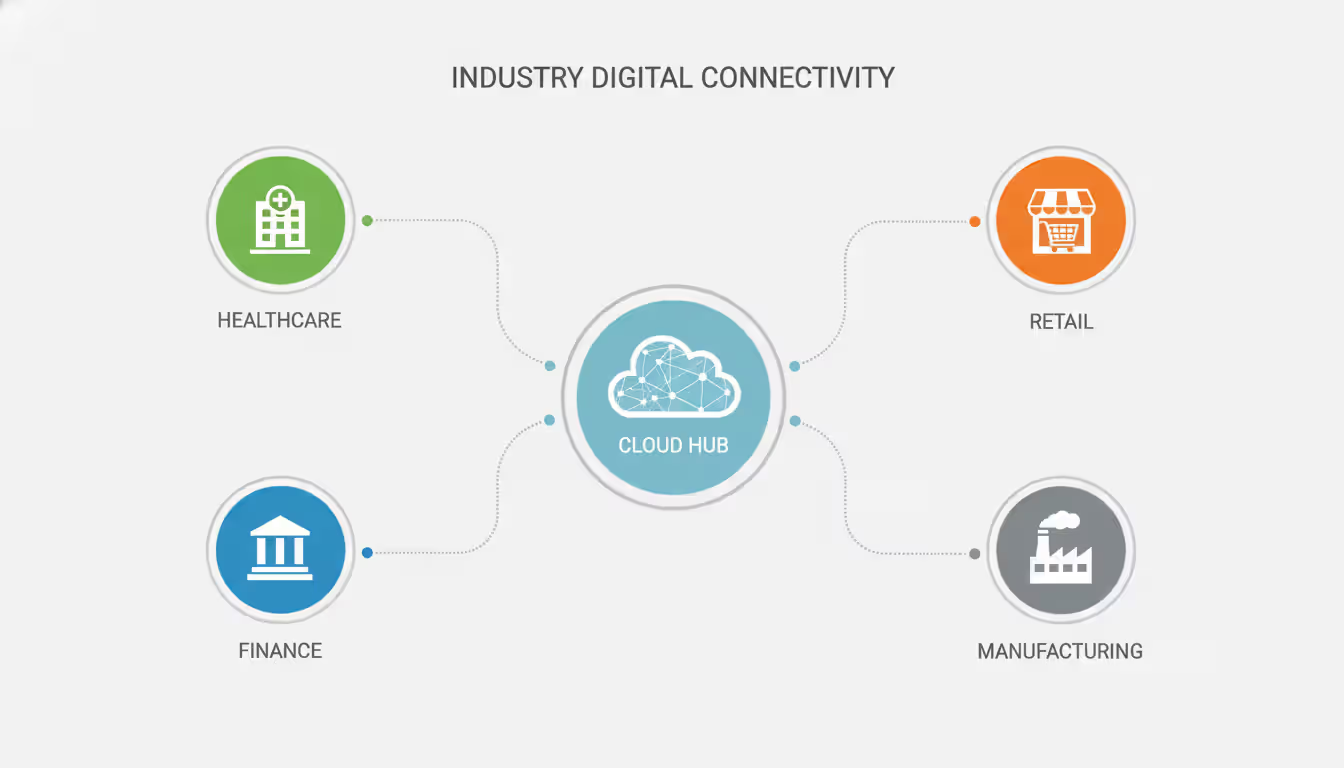
This model has gained significant traction across regulated industries where data movement must be both rapid and auditable. Financial institutions transfer transaction files between core banking systems and payment processors. Healthcare networks exchange patient records between hospitals, labs, and insurance clearinghouses. Retailers synchronize inventory data across distribution centers and point-of-sale systems. Manufacturing operations send production specifications to suppliers and receive quality control documentation in return.
How Cloud Managed File Transfer Works
Cloud managed file transfer operates through a multi-tenant architecture where the vendor provisions dedicated logical environments for each customer within shared physical infrastructure. The provider deploys transfer nodes across multiple availability zones, creating redundant pathways that maintain service continuity even when individual data centers experience outages.
Author: Evan Crossfield;
Source: milkandchocolate.net
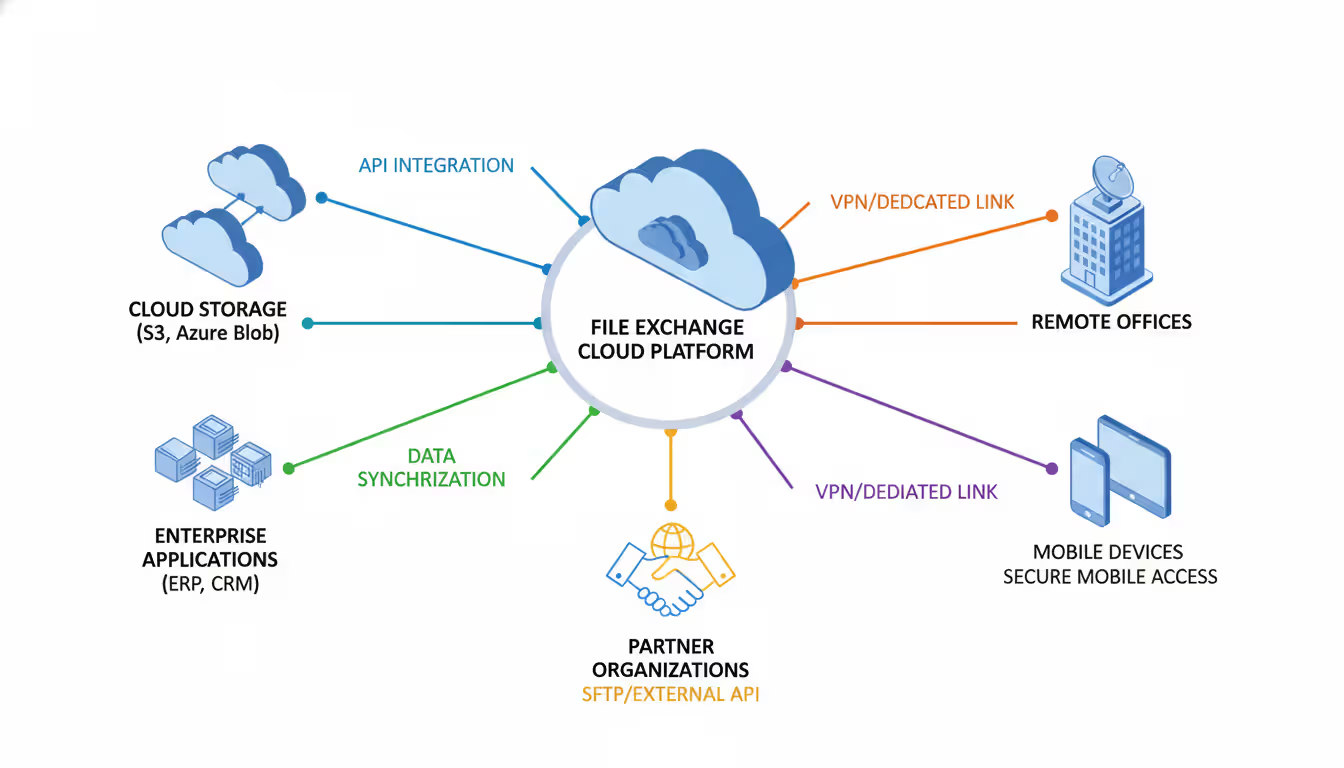
When organizations adopt this model, they typically connect through several methods. Browser-based interfaces allow business users to upload files manually when needed. API endpoints enable applications to trigger transfers programmatically. Agent software installed on-premises creates persistent connections that monitor specific folders, automatically pushing files to the cloud when they appear. SFTP, FTPS, and AS2 protocols provide compatibility with legacy systems and external trading partners who expect traditional transfer methods.
The operational flow follows a consistent pattern. Source systems deposit files into designated pickup locations—either cloud storage buckets or monitored on-premises folders. The transfer engine detects new files through event notifications or scheduled polling. Pre-transfer validation checks file integrity, naming conventions, and size thresholds. The system then encrypts data in transit, routes it through optimized network paths, and delivers it to target destinations. Post-transfer workflows trigger notifications, update tracking databases, and archive copies for compliance retention.
What is cloud managed services in this context? The "managed" component means the vendor assumes responsibility for maintaining uptime, applying security patches, scaling compute resources, and providing technical support. Organizations configure workflows and business rules through web consoles, but they never touch the underlying servers, load balancers, or database clusters. This separation of concerns allows smaller teams to operate sophisticated file transfer ecosystems that would traditionally require dedicated infrastructure engineers.
Deployment models vary based on regulatory requirements and existing infrastructure. Pure multi-tenant environments offer the lowest cost and fastest provisioning, with customers sharing compute resources while maintaining logical data separation. Dedicated tenant deployments allocate exclusive servers within the vendor's cloud, providing performance isolation for high-volume workloads. Hybrid configurations keep sensitive processing on-premises while using cloud infrastructure for external partner connections and long-term archival storage.
Key Benefits Over Traditional File Transfer Methods
Traditional file transfer approaches force organizations into a maintenance cycle that consumes resources without adding business value. On-premises MFT software requires operating system patching, database tuning, certificate renewals, and capacity planning. When transfer volumes spike during month-end close or seasonal peaks, IT teams scramble to provision additional servers. When vulnerabilities emerge, administrators must test patches against custom configurations before deploying fixes.
Cloud managed file transfer eliminates these operational burdens through vendor-managed infrastructure that scales automatically. Transfer capacity expands during peak periods without manual intervention. Security updates deploy across the entire platform simultaneously, closing vulnerabilities within hours rather than weeks. High availability configurations that would cost hundreds of thousands to build on-premises come standard in cloud deployments.
Automation capabilities exceed what most organizations can justify building internally. Visual workflow designers let business analysts create complex routing logic without writing code. If a file arrives from a specific partner, the system can decrypt it using their unique key, validate contents against expected schemas, split it into smaller batches, transform data formats, and route segments to different downstream applications—all without manual intervention. Failure handling becomes systematic rather than reactive. When transfers fail, the system retries with exponential backoff, escalates persistent failures to support teams, and maintains detailed logs for troubleshooting.
Cost structures shift from capital expenditure to operational expense. Organizations avoid upfront investments in servers, storage arrays, and software licenses. They pay based on actual usage—transfer volume, storage consumption, and active connections—which aligns expenses with business activity. A startup moving 100 GB monthly pays dramatically less than an enterprise transferring 50 TB daily. As businesses grow, costs scale proportionally rather than requiring periodic infrastructure refresh cycles.
Security postures improve through vendor specialization. Cloud MFT providers invest in security expertise that individual organizations cannot match. They employ dedicated security teams, undergo continuous compliance audits, and implement defense-in-depth architectures. Encryption key management, which often becomes an afterthought in on-premises deployments, follows rigorous rotation schedules and hardware security module protection in cloud environments.
Author: Evan Crossfield;
Source: milkandchocolate.net
Common Use Cases and Industries
Healthcare organizations face strict deadlines for claims submission and lab result delivery. A regional hospital network uses cloud managed file transfer to exchange HL7 messages with dozens of external labs, sending patient orders and receiving results within minutes. The system validates message structure before transmission, tracks delivery confirmations, and maintains seven-year audit trails for regulatory compliance. When a lab connection fails, automated alerts notify both technical teams and clinical staff who need the results.
Financial services firms move massive datasets between trading systems, risk engines, and regulatory reporting platforms. A mid-size investment manager transfers portfolio holdings files to custodian banks each evening, receives transaction confirmations overnight, and imports reconciliation reports before markets open. The cloud platform handles time-zone coordination, retry logic when bank systems undergo maintenance, and encryption standards required by SEC cybersecurity rules. During quarter-end reporting, transfer volumes triple without requiring infrastructure changes.
Retail chains synchronize inventory across distribution networks spanning multiple countries. A specialty retailer sends point-of-sale data from 800 stores to central merchandising systems every 15 minutes. Cloud managed file transfer aggregates these small files, compresses them for efficient transmission, and delivers consolidated datasets to inventory planning applications. The system also handles reverse flows—sending pricing updates and promotional calendars from headquarters to store systems. Built-in scheduling ensures updates deploy during overnight hours when customer traffic is minimal.
Manufacturing operations exchange engineering specifications with global suppliers. An automotive parts manufacturer transfers CAD files, material specifications, and quality standards to contract manufacturers in six countries. Files often exceed 2 GB, requiring resume capabilities when network interruptions occur. The cloud platform chunks large files into segments, transfers them in parallel, and reassembles them at destination. Digital signatures verify file authenticity, preventing counterfeit specifications from entering production workflows.
Government agencies share data between departments while maintaining strict access controls. A state revenue department exchanges taxpayer information with employment agencies for fraud detection. Cloud managed file transfer enforces role-based permissions, ensuring only authorized systems access sensitive datasets. Comprehensive logging captures every file access, modification, and deletion for audit purposes. When privacy regulations change, administrators update encryption policies centrally rather than modifying dozens of individual transfer scripts.
Cloud-managed file transfer isn’t just about moving data—it’s about removing infrastructure from the equation entirely. The real value comes when organizations stop thinking in terms of servers and start thinking in terms of workflows, security policies, and business outcomes.
— Michael Grant
Security Features in Cloud Managed File Transfer
Encryption protects data throughout its lifecycle. Files encrypt at rest using AES-256 algorithms with customer-managed or vendor-managed keys. During transmission, TLS 1.3 protocols create encrypted tunnels between endpoints. Some implementations add application-layer encryption, wrapping files in additional security layers before they enter transit encryption. This defense-in-depth approach ensures that even if attackers compromise network traffic, they cannot decrypt file contents.
Access controls operate on multiple dimensions. User authentication requires multi-factor verification before granting console access. Service accounts connecting applications use certificate-based authentication with short-lived tokens that expire after each session. IP allowlisting restricts connections to known network ranges, blocking unauthorized access attempts. Role-based permissions ensure that finance teams cannot access HR data feeds and marketing departments cannot modify supply chain transfers.
Compliance frameworks receive built-in support. Cloud managed file transfer platforms maintain certifications for HIPAA, SOC 2, PCI DSS, and GDPR requirements. Vendors undergo regular third-party audits, publishing attestation reports that customers can share with their own compliance teams. Data residency controls keep information within specific geographic regions, satisfying regulations that prohibit cross-border data movement. Automated retention policies delete files after required holding periods, reducing storage costs and compliance risk.
Audit trails capture granular activity records. Every file upload, download, modification, and deletion generates log entries with timestamps, user identities, and source IP addresses. Failed authentication attempts trigger security alerts. Unusual transfer patterns—such as downloading thousands of files within minutes—activate anomaly detection rules. These logs integrate with security information and event management (SIEM) platforms, allowing security operations centers to correlate file transfer activity with broader threat intelligence.
Cloud managed security appliances complement file transfer platforms by adding additional inspection layers. Before files reach their final destinations, they pass through malware scanning engines that detect viruses, ransomware, and other threats. Data loss prevention modules examine file contents for sensitive patterns—Social Security numbers, credit card data, proprietary formulas—and block transfers that violate corporate policies. These security appliances update threat signatures automatically, protecting against emerging attack vectors without requiring manual updates.
Author: Evan Crossfield;
Source: milkandchocolate.net
Integration with Other Cloud Managed Infrastructure
Modern enterprises rarely deploy isolated solutions. Cloud managed file transfer connects with broader infrastructure ecosystems to create cohesive operational environments. These integrations eliminate data silos and reduce the manual effort required to move information between systems.
Cloud managed network infrastructure provides the connectivity foundation. Software-defined WAN (SD-WAN) solutions optimize routing between branch offices, data centers, and cloud regions. When a retail store uploads sales data, the cloud managed network automatically selects the fastest path—sometimes using broadband internet, other times preferring MPLS circuits based on real-time congestion. Quality of service policies prioritize time-sensitive transfers over bulk archive uploads. Network administrators configure these policies centrally, applying them across thousands of endpoints without touching individual routers.
Cloud managed access points extend secure connectivity to remote users and mobile devices. Field sales representatives upload signed contracts from customer sites through encrypted connections that terminate at cloud transfer gateways. The access point infrastructure handles authentication, applies security policies, and routes traffic through appropriate network segments. When employees travel internationally, the system automatically connects them to regional transfer nodes, minimizing latency and avoiding expensive cross-border data charges.
Integration with identity providers streamlines user management. Organizations sync their Active Directory or Okta directories with cloud file transfer platforms, automatically provisioning accounts when employees join and revoking access when they depart. Single sign-on eliminates separate passwords for file transfer systems. When a finance analyst logs into the corporate network, they gain immediate access to budget file repositories without additional authentication prompts.
Cloud storage platforms serve as both sources and destinations. Amazon S3 buckets, Azure Blob Storage containers, and Google Cloud Storage repositories connect directly to transfer workflows. When marketing teams upload campaign assets to cloud storage, automated workflows detect new files and distribute them to content delivery networks, email platforms, and social media management tools. The reverse flow also works—collecting user-generated content from various platforms and consolidating it into central repositories for analysis.
API ecosystems enable custom integrations with business applications. Enterprise resource planning systems trigger file transfers when purchase orders reach approval thresholds. Customer relationship management platforms export lead data for analysis in data warehouses. Accounting systems exchange transaction files with banks for payment processing. These integrations use RESTful APIs with webhook callbacks, creating event-driven architectures that respond to business activities in real time.
Author: Evan Crossfield;
Source: milkandchocolate.net
Choosing a Cloud Managed File Transfer Solution
Vendor evaluation begins with understanding transfer volume and complexity requirements. Organizations moving hundreds of small files daily have different needs than those transferring terabytes of video content. Calculate monthly transfer volumes, peak throughput requirements, and file size distributions. A rule of thumb: if individual files regularly exceed 10 GB, prioritize vendors with optimized large-file handling and resume capabilities.
Protocol support determines compatibility with existing systems and trading partners. Legacy applications may require FTP or AS2 connectivity. Modern cloud-native applications prefer HTTPS APIs. External partners often dictate specific protocols based on their infrastructure. Evaluate whether vendors support the protocols your ecosystem requires, and confirm they can handle protocol translation when sources and destinations use different standards.
Compliance certifications matter in regulated industries. Healthcare organizations must verify HIPAA compliance with signed business associate agreements. Financial institutions need SOC 2 Type II attestations and PCI DSS validation. European operations require GDPR-compliant data processing agreements. Request certification documentation during vendor discussions rather than assuming compliance based on marketing claims.
Geographic coverage affects performance and regulatory compliance. Vendors with transfer nodes in multiple regions reduce latency for global operations. Data residency requirements may mandate that certain information never leaves specific countries. Confirm vendors maintain infrastructure in required geographies and can enforce regional data boundaries through configuration policies.
Pricing models vary significantly between vendors. Some charge based on data volume transferred, making them economical for low-volume scenarios but expensive as usage grows. Others price by active connections or monthly API calls. Hybrid models combine base platform fees with usage-based overages. Request detailed pricing scenarios that reflect your actual usage patterns, including peak periods and growth projections. Watch for hidden costs like egress fees when data leaves the vendor's cloud or premium charges for advanced features.
Support and service level agreements (SLAs) determine how quickly issues resolve. What response times does the vendor guarantee for critical outages? Do they provide 24/7 support or only business-hours coverage? Are technical account managers included or available as paid add-ons? For mission-critical transfers, negotiate SLAs that specify maximum downtime thresholds with financial penalties when vendors fail to meet commitments.
Migration complexity influences deployment timelines. Some vendors provide automated tools that import existing transfer workflows from on-premises MFT platforms. Others require manual reconfiguration of every file route and transformation rule. Budget adequate time for testing—typically 4-8 weeks for straightforward migrations, 3-6 months for complex environments with hundreds of trading partners and intricate workflow logic.
Organizations adopting cloud managed file transfer report 60-70% reductions in operational overhead while simultaneously improving security postures and compliance readiness. The market has matured beyond early-adopter phases—cloud MFT is now the default choice for new deployments, with on-premises solutions reserved for specific regulatory or legacy constraints
Frequently Asked Questions
What is the difference between cloud managed file transfer and FTP?
FTP is a basic protocol for moving files between computers, offering minimal security and no automation capabilities. Cloud managed file transfer is a comprehensive service that uses multiple protocols (including secure FTP variants) while adding encryption, workflow automation, audit logging, and managed infrastructure. FTP requires you to maintain servers and write custom scripts for automation. Cloud managed platforms provide visual workflow designers, automatic retry logic, and vendor-maintained infrastructure. Organizations still using plain FTP for sensitive data face significant security risks—credentials transmit in cleartext, making them vulnerable to interception.
How secure is cloud managed file transfer for sensitive data?
Cloud managed file transfer platforms implement multiple security layers specifically designed for sensitive data. Files encrypt at rest using AES-256 and in transit using TLS 1.3. Multi-factor authentication, certificate-based service accounts, and IP allowlisting prevent unauthorized access. Comprehensive audit logs track every file interaction for compliance verification. Major vendors maintain certifications for HIPAA, PCI DSS, and SOC 2, undergoing regular third-party audits. The security often exceeds what individual organizations can implement on-premises because vendors employ dedicated security teams and invest in specialized protection technologies. However, security ultimately depends on proper configuration—weak passwords, overly permissive access rules, and disabled encryption undermine even the best platforms.
Can cloud managed file transfer integrate with on-premises systems?
Yes, through multiple integration methods. Agent software installed on internal servers monitors local folders and automatically transfers files to cloud destinations. API endpoints allow on-premises applications to trigger transfers programmatically. VPN tunnels and private network connections (like AWS Direct Connect or Azure ExpressRoute) create secure pathways between corporate data centers and cloud transfer infrastructure. Hybrid deployment models keep sensitive processing on-premises while using cloud platforms for external partner connections. Many organizations start by moving external-facing transfers to the cloud while keeping internal file movement on-premises, gradually migrating additional workflows as they gain confidence in the platform.
What is the typical cost structure for cloud managed file transfer services?
Pricing models vary, but most vendors use consumption-based structures. Common billing metrics include data volume transferred (per GB), number of active connections or trading partners, API transaction counts, and storage consumption for archived files. Entry-level pricing often starts around $500-1,500 monthly for small businesses transferring under 500 GB with fewer than 10 trading partners. Mid-market deployments typically range from $3,000-10,000 monthly for multi-terabyte transfers with dozens of connections. Enterprise contracts with hundreds of partners and petabyte-scale transfers can exceed $50,000 monthly. Watch for additional costs like premium support, dedicated infrastructure, advanced security features, and data egress fees. Request detailed quotes based on your actual usage patterns rather than relying on published starting prices.
How does cloud managed file transfer compare to managed file transfer on-premises?
On-premises MFT requires capital investment in servers, software licenses, and storage infrastructure, plus ongoing costs for maintenance, upgrades, and dedicated IT staff. Cloud managed platforms convert these to operational expenses with predictable monthly billing. On-premises deployments offer maximum control over infrastructure and data residency but demand significant expertise to maintain security and availability. Cloud platforms sacrifice some control in exchange for vendor-managed updates, automatic scaling, and built-in high availability. On-premises solutions make sense when regulatory requirements prohibit cloud usage or when organizations have existing infrastructure investments to amortize. Cloud managed approaches work better for growing businesses, organizations with limited IT resources, and scenarios requiring rapid deployment or global reach.
Do I need IT expertise to manage cloud file transfer solutions?
Basic operations require minimal technical expertise. Business analysts can configure simple workflows using visual designers without writing code. Uploading files through web interfaces requires only browser familiarity. However, complex scenarios benefit from IT involvement. Integrating with enterprise applications often requires API knowledge. Troubleshooting connection issues with trading partners demands protocol understanding. Configuring encryption, access controls, and compliance policies requires security expertise. Most organizations adopt a hybrid approach—IT teams handle initial setup, security configuration, and complex integrations, while business users manage day-to-day operations like monitoring transfers and updating file routing rules. Vendors typically provide training programs, documentation, and support to help teams develop necessary skills.
Cloud managed file transfer represents a fundamental shift in how organizations approach data movement. By offloading infrastructure management to specialized vendors, companies redirect resources from maintenance activities to strategic initiatives that drive business value.
The technology continues evolving. Machine learning algorithms now predict transfer failures before they occur, automatically rerouting traffic through alternate pathways. Intelligent compression reduces bandwidth consumption by analyzing file types and applying optimal algorithms. Edge computing integrations process data closer to sources, minimizing latency for time-sensitive transfers.
Organizations evaluating cloud managed file transfer should start with specific use cases rather than attempting wholesale migration. Identify a single high-value workflow—perhaps partner data exchange or regulatory reporting—and prove the model works before expanding scope. This incremental approach reduces risk while building internal expertise and stakeholder confidence.
Success requires more than technology selection. Establish clear governance policies defining who can create transfers, what data classifications require encryption, and how long to retain audit logs. Train business users on workflow design principles so they can modify processes without constant IT involvement. Monitor usage patterns to optimize costs and identify opportunities for automation.
The question facing most organizations is no longer whether to adopt cloud managed file transfer, but how quickly they can transition existing workloads and what competitive advantages they can gain by accelerating that migration. Those who move decisively gain operational flexibility, security improvements, and cost efficiencies that compound over time.
Zero trust VPN fundamentally changes remote access security by continuously verifying identity and device posture before granting application-level access. Unlike traditional VPNs that trust authenticated users across entire networks, zero trust solutions enforce micro-segmentation and never assume trust
WiFi 6E adds 59 channels in the 6 GHz band, providing clean spectrum for high-speed connections. Learn how channel allocation works, real-world speed differences versus WiFi 6, tri-band operation, and whether the technology justifies the cost premium for your specific environment
Organizations with distributed locations depend on reliable WAN connectivity. This guide covers monitoring methods, performance metrics, common issues, tool selection, and implementation best practices to maintain network health across geographic distances
Web based and cloud based systems differ fundamentally in infrastructure, scalability, and costs. Web based systems run on fixed servers with predictable expenses, while cloud platforms offer elastic scaling with usage-based pricing. Learn which architecture fits your monitoring, remote access, or enterprise needs
The content on this website is provided for general informational purposes only. It is intended to offer insights, commentary, and analysis on cloud computing, network infrastructure, cybersecurity, and IT solutions, and should not be considered professional, technical, or legal advice.
All information, articles, and materials presented on this website are for general informational purposes only. Technologies, standards, and best practices may vary depending on specific environments and may change over time. The application of any technical concepts depends on individual systems, configurations, and requirements.
This website is not responsible for any errors or omissions in the content, or for any actions taken based on the information provided. Users are encouraged to seek qualified professional advice tailored to their specific IT infrastructure, security, and business needs before making decisions.