The cloud platform you pick for machine learning determines whether your models finish training during your lunch break or overnight—and whether your AWS bill makes you wince or shrug. I've seen teams waste three months migrating off a platform that seemed perfect during the trial period but couldn't scale past their pilot project.
By 2026, every major cloud provider claims they're the best machine learning cloud platform. They all show off AutoML features, GPU access, and one-click deployments. But scratch the surface and you'll find that AWS charges you for data transfer in ways you didn't anticipate, Google Cloud lacks data centers in your region, or Azure doesn't support the obscure ML framework your team insists on using.
This guide cuts through the marketing. You'll see which technical details actually matter, where platforms hide their real costs, and how to avoid decisions that lock you into expensive contracts for features you'll never use.
What Makes a Cloud Platform Suitable for Machine Learning
Machine learning in cloud computing needs infrastructure that excels at three jobs: wrangling massive datasets, training models on specialized hardware, and serving predictions fast. Each job pounds different parts of the system.
Data prep hammers your storage throughput—you're reading terabytes of logs or images, transforming them, and writing them back out. Training crushes your GPU allocation for hours or days. Inference needs endpoints that wake up in milliseconds when traffic arrives and disappear when it doesn't.
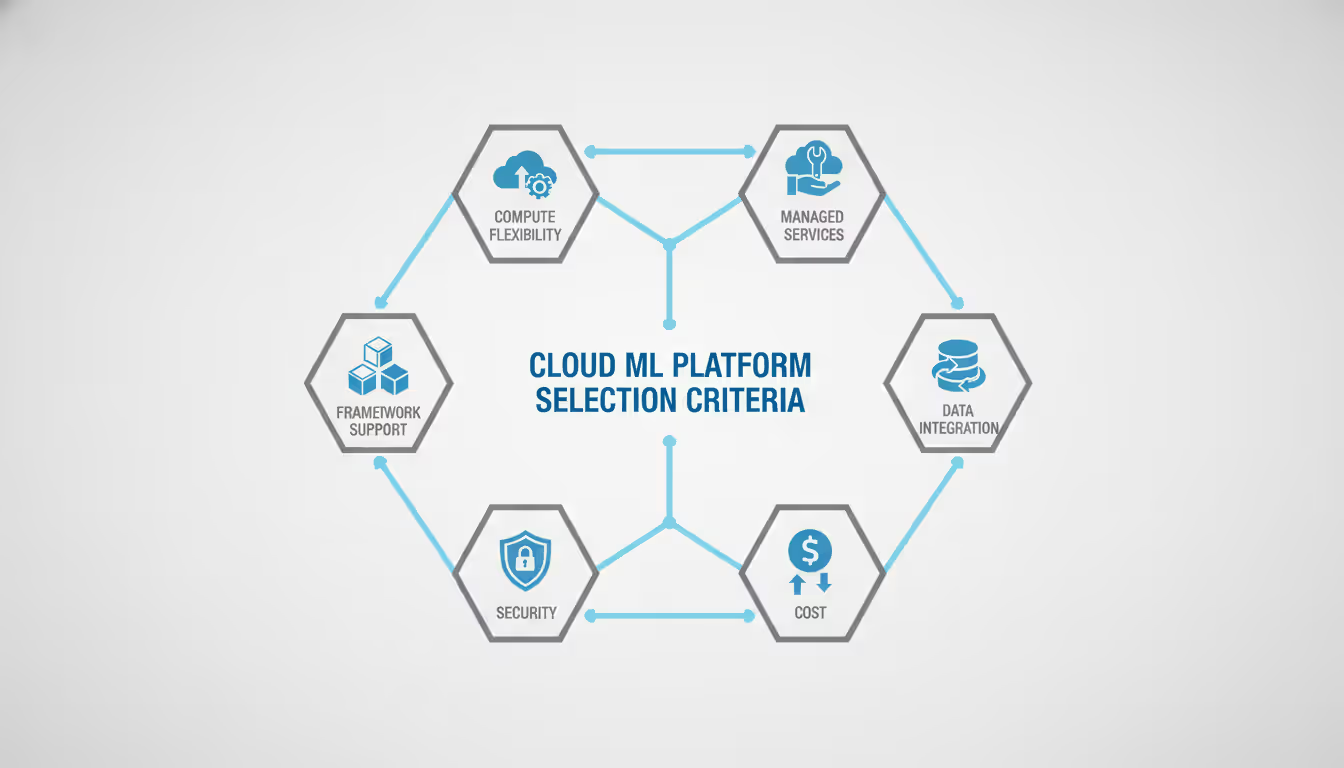
Compute flexibility beats raw power every time. A platform offering only fixed instance sizes backs you into a corner. Either you overpay for a 16-GPU box when you need 12, or you bottleneck your training because 8 GPUs isn't quite enough. The best platforms let you rent fractional GPUs, grab spot capacity when training jobs can tolerate interruptions, and deploy inference that scales down to zero servers at 3am.
Managed services sound great until they don't. Sure, AutoML trains a decent model without writing code. But the moment you need custom preprocessing or want to tweak the loss function? You're stuck. Before committing to managed services, verify you can drop into lower-level APIs when you inevitably hit their limits. Some platforms make this trivial. Others make it impossible.
Framework support goes deeper than logos on a features page. Which TensorFlow versions get the optimization love? Does distributed PyTorch training work out of the box, or will you spend two weeks debugging NCCL errors? Can you export models in standard formats, or does the platform push proprietary artifacts that only work on their infrastructure? I've watched teams discover—six months in—that their models won't export cleanly.
Data integration determines whether you're feeding your training pipeline efficiently or burning money on ETL jobs. Platforms that only talk to object storage force you to copy data out of PostgreSQL or Kafka first. That means extra storage costs, stale data, and complexity you don't need. Native database connectors and streaming integrations eliminate these headaches.
Security and compliance matter the moment you touch regulated data. Basic encryption is table stakes now. Dig into key management, network isolation, audit logs detailed enough to satisfy regulators, and which certifications exist in which regions. I know a healthcare startup that built their entire stack on a platform certified for HIPAA in Virginia but not Oregon—where their data center landed. They spent four months migrating.
Author: Trevor Langford;
Source: milkandchocolate.net
Top Machine Learning Cloud Platforms Compared
AWS, Google Cloud, Azure, IBM Watson, and Oracle Cloud have all built comprehensive ML platforms. They've converged on the basics while fighting over specialized features. Your choice depends less on "can they do ML?" and more on "do they fit how we already work?"
AWS Machine Learning Services
SageMaker dominates enterprise deployments because it's mature and plugs into everything else AWS offers. The platform covers your whole workflow: Data Wrangler for prep work, Training Jobs with hyperparameter tuning that actually works, and endpoints that can serve multiple models from one URL.
What works: rock-solid infrastructure, every instance type you could want (including their Trainium chips that undercut NVIDIA pricing), and deep integration with S3, Lambda, and Step Functions for orchestration. SageMaker Studio gives you a proper IDE instead of bouncing between browser tabs.
What doesn't: the service menu has gotten ridiculous. Figuring out which combination of features you need requires either expertise or expensive mistakes. Data transfer between services adds up—you'll move data from S3 to training to endpoints and pay for each hop. The pricing calculator gives you estimates that miss reality by 30% for your first few billing cycles until you learn its quirks.
Google Cloud AI and ML Tools
Google leverages the same infrastructure they use internally, which means Vertex AI reflects how Google thinks about ML. The standout feature? TPU access. Google's custom chips train certain architectures faster than GPUs and cost less doing it.
BigQuery ML deserves mention—you can train models directly on data warehouse tables using SQL. No data movement, no pipeline complexity, just CREATE MODEL statements. Analytics teams love this because they already know SQL. TensorFlow obviously gets first-class treatment, though PyTorch support has improved a lot since 2024.
This platform suits teams that value experimentation speed over enterprise polish. IAM is simpler than AWS. Networking is flatter so you don't get surprise data transfer charges. But regional availability trails AWS and Azure—you might not have a data center close to your users. Enterprise support often requires negotiation rather than just clicking "buy now."
Microsoft Azure ML Capabilities
Azure targets enterprises already running on Microsoft infrastructure. If you've standardized on Active Directory, Power BI, and Azure DevOps, the integration is seamless in ways that matter daily. Single sign-on just works. BI dashboards pull model metrics without glue code. CI/CD pipelines integrate naturally.
The designer interface offers visual pipeline building that citizen data scientists actually use, while the Python SDK gives experienced ML engineers full control. Azure pioneered responsible AI tooling—built-in fairness metrics and explainability that help you stay compliant without bolting on third-party tools later.
Cost management is more transparent than AWS. You get detailed breakdowns showing exactly which resources cost what, and reserved capacity planning doesn't require a PhD. The main limitation? Fewer instance types, especially for specialized configurations like high-memory GPUs. Sometimes you just can't get the exact hardware setup you need.
Machine Learning and Cloud Computing Integration
Machine learning and cloud computing solve each other's problems. ML needs massive compute that comes and goes. Cloud needs workloads that consume resources in bulk. This creates a feedback loop where machine learning cloud computing advances benefit both sides.
Storage systems like S3 eliminated the nightmare of capacity planning. Remember buying storage arrays and hoping you got the sizing right? Training datasets now scale transparently. When you need 50TB for a new dataset, you just upload it. Object versioning gives you dataset lineage tracking for free—no custom tooling to track which data version trained which model.
Elastic compute changed training economics completely. Your model takes two days on one GPU? Throw 16 GPUs at it and finish in three hours. Then those GPUs vanish from your bill. Spot instances drop training costs by 70-90% if your workload tolerates interruptions (and most training does). Kubernetes orchestration distributes work across whatever instance types are cheap right now.
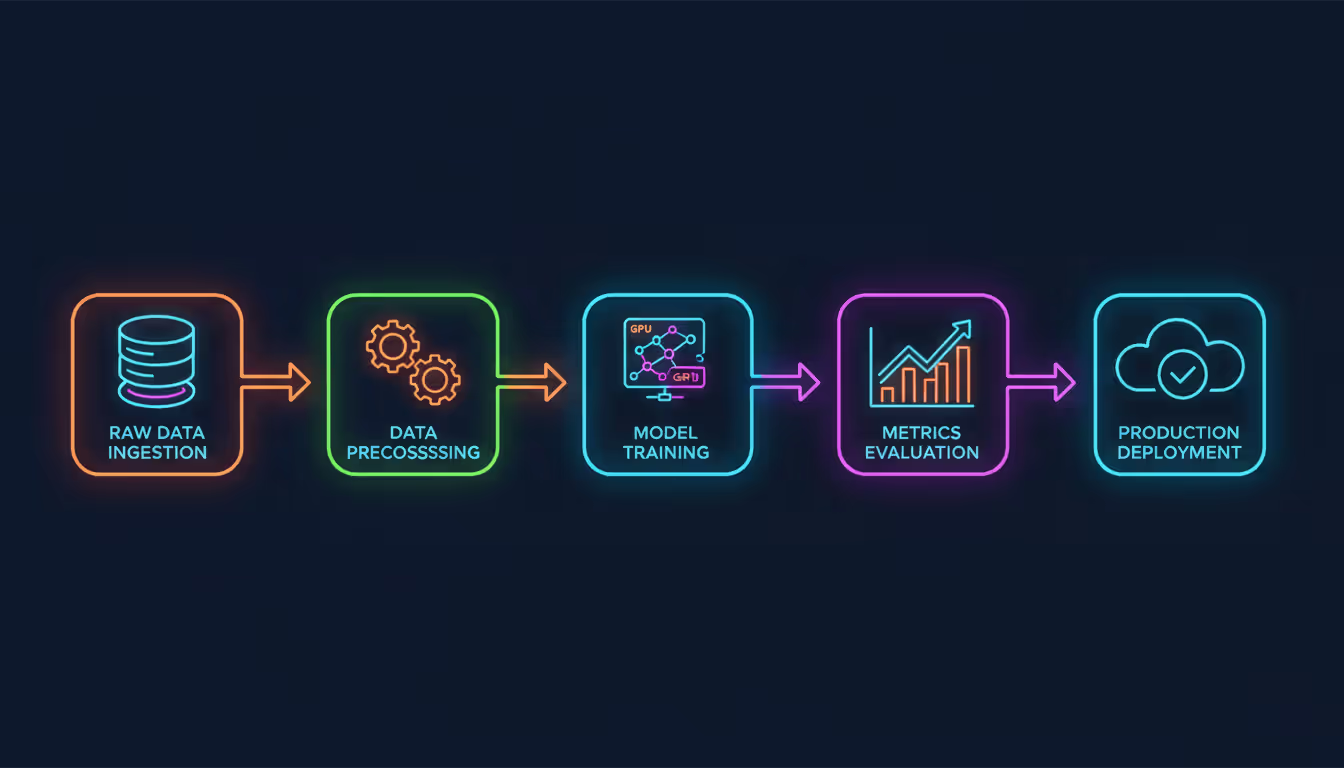
MLOps pipelines built on cloud services automate everything from raw data to production endpoints. New data arrives, triggers preprocessing across a hundred machines, launches parallel training of six model variants, evaluates metrics against your thresholds, and deploys the winner—all while you're asleep. No one clicks buttons or runs scripts manually.
Model registries track which model version serves production traffic, what data trained it, who approved the deployment, and when performance started degrading. This audit trail saves you when debugging prediction drift three months later or answering regulatory questions about model governance.
The integration depth varies wildly. AWS offers the most services but you're stitching them together yourself. Google Cloud integrates more tightly but gives you fewer choices. Azure splits the difference while keeping everything Microsoft-flavored.
Author: Trevor Langford;
Source: milkandchocolate.net
Edge Computing vs Cloud-Based Machine Learning
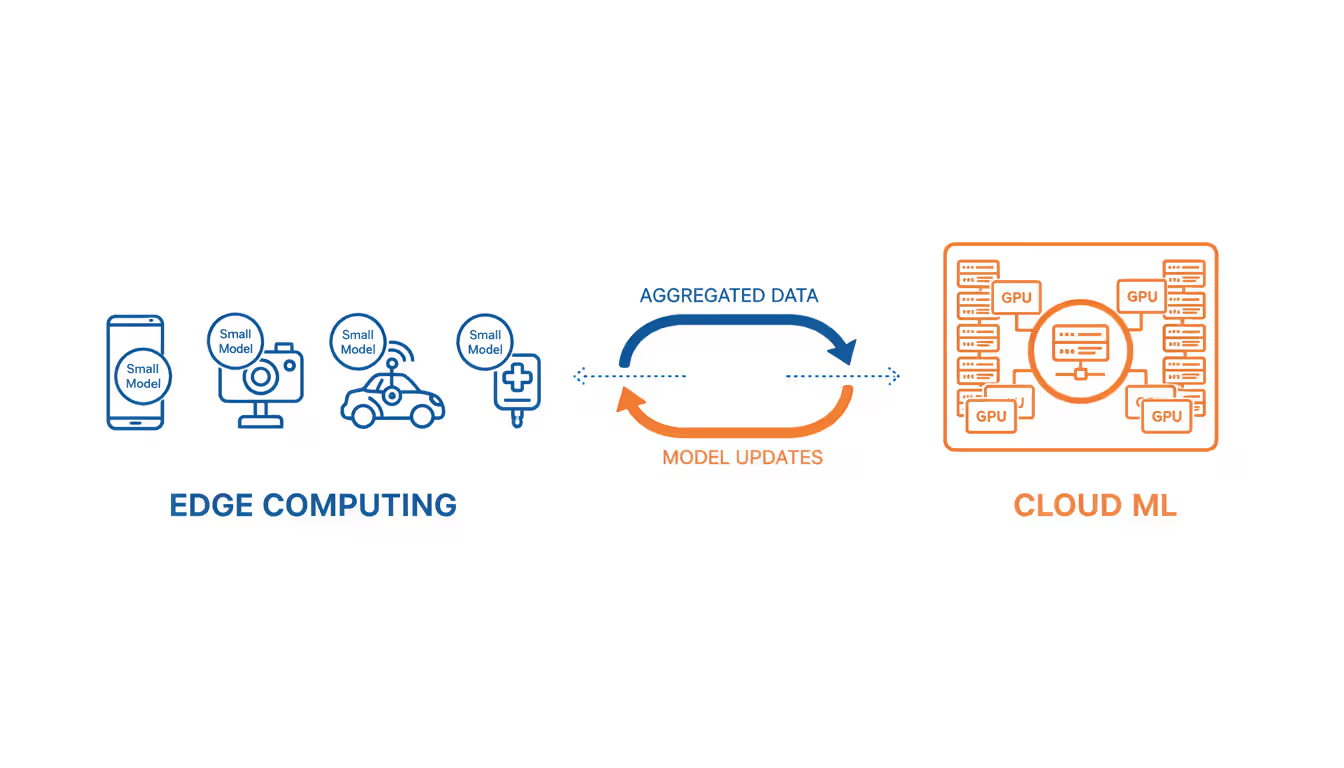
Machine learning on the edge runs inference on devices or local gateways instead of centralized servers. You're trading infrastructure simplicity for lower latency, better privacy, and reduced bandwidth costs. Whether that trade makes sense depends entirely on your constraints.
Latency requirements force edge deployment for real-time applications. Autonomous vehicles can't wait 100 milliseconds for a cloud roundtrip to detect that pedestrian. Too late. Manufacturing quality control systems need answers in under 10 milliseconds to flag defective parts before they're packaged. Voice assistants feel snappier when wake-word detection runs locally—users notice that 50ms difference.
Privacy constraints make edge inference mandatory for sensitive scenarios. Medical devices processing patient vitals, security cameras analyzing faces, smart home devices listening for commands—all raise privacy red flags when streaming data to cloud servers. On-device inference keeps everything local. The data never leaves the device.
Bandwidth economics favor edge when you're generating high-volume data but need small inference outputs. A single surveillance camera produces 5 megabits per second of video. That's terabytes monthly. But inference might generate only kilobytes of detection events. Sending all that video to the cloud costs more than running inference locally and uploading alerts.
Hybrid architectures combine both approaches strategically. Lightweight models run on edge devices for instant response. Cloud services handle periodic retraining, model updates, and complex analysis requiring context across devices. Smartphone apps use this pattern constantly—on-device models for speed, cloud models for accuracy when quality matters more than latency.
Trade-offs complicate every edge decision. Edge hardware limits model complexity dramatically. A server GPU handles models 100 times larger than a smartphone NPU. Model updates need over-the-air mechanisms that work reliably across flaky connections. Debugging production issues gets harder without centralized logging showing what went wrong.
Cloud platforms now offer edge ML services that simplify hybrid deployments. AWS IoT Greengrass, Azure IoT Edge, and Google Cloud IoT Core provide model deployment pipelines, local inference runtimes, and cloud sync. These reduce the operational nightmare of managing thousands of distributed edge devices.
Author: Trevor Langford;
Source: milkandchocolate.net
Cost Factors When Selecting an ML Cloud Platform
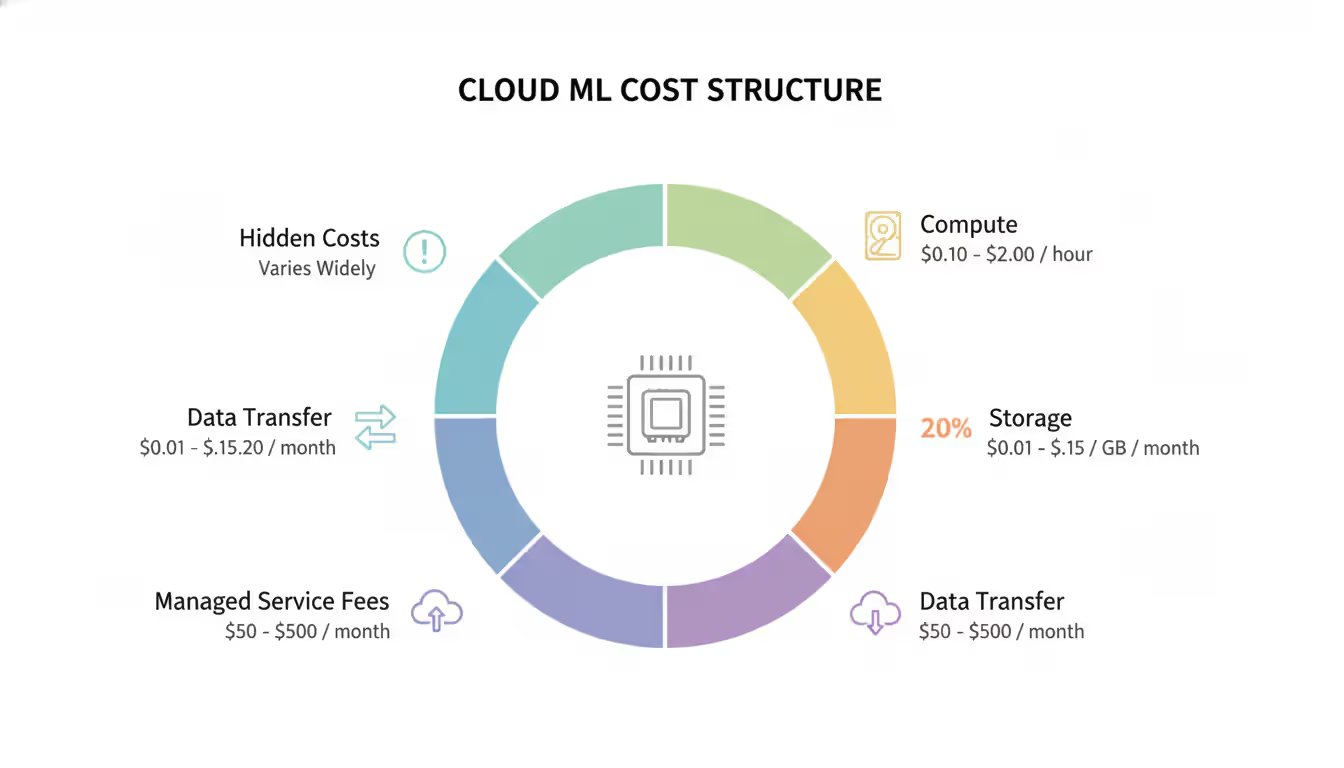
ML cloud costs split across compute, storage, networking, and service fees. Compute dominates for training-heavy workloads. Inference costs grow with user traffic. Underestimate any category and watch your budget explode.
Compute pricing varies by instance type, region, and commitment level. On-demand GPU instances run $3 to $15 hourly depending on memory and generation. Reserved instances drop costs 40-60% if you commit for a year. Spot instances offer 70-90% savings but might vanish with two minutes' warning—fine for training, terrible for serving.
Optimizing training costs means matching instance types to workload characteristics. Large language models demand high-memory GPUs like A100s. Computer vision models train fine on cheaper T4s. Sometimes distributed training across multiple small instances costs less than one large instance, especially when spot pricing enters the mix. Run the math for your specific workload.
Storage fees accumulate faster than anyone expects. Training datasets in object storage cost $0.02-0.03 per gigabyte monthly. Doesn't sound like much until you're storing 50TB of images and their transformed variants. Snapshots for reproducibility add up when each experiment stores 500GB of preprocessed data. Lifecycle policies that archive old datasets to cold storage cut costs but add retrieval delays.
Data transfer charges generate surprise bills that make engineers sad. Moving data between regions costs $0.02-0.12 per GB. Egress to the internet runs $0.08-0.15 per GB. A model serving 1TB of predictions monthly pays $80-150 just for bandwidth. Keep training data, compute, and inference endpoints in the same region to eliminate most transfer fees. Cross-region architectures bleed money.
Service fees for managed platforms add percentage margins on top of infrastructure. SageMaker charges 10-15% above raw EC2 pricing for managed training. Vertex AI adds similar margins. You're paying for operational simplicity. Whether that's worth it depends on whether your team can manage infrastructure directly. For small teams, the premium beats hiring a platform engineer.
Hidden costs include failed experiments (you paid for compute even though the model never converged), idle resources (someone forgot to stop their notebook), and overprovisioned inference endpoints (paying for capacity that sits unused overnight). Cost monitoring alerts catch these leaks. Automatic shutdown policies stop the bleeding.
Author: Trevor Langford;
Source: milkandchocolate.net
Machine Learning in Networking and Cloud Infrastructure
Machine learning in networking evolved from research projects to production systems that improve every cloud workload. Cloud providers apply ML to optimize their own infrastructure—better performance, lower costs, stronger security for everyone.
Traffic routing predictions let networks reroute packets before congestion happens. Google's B4 network has used reinforcement learning since 2024 to optimize wide-area traffic. Utilization improved 30% while latency spikes dropped. AWS Global Accelerator now does similar predictive routing based on real-time traffic patterns.
Anomaly detection spots security threats and performance degradation faster than rule-based systems ever could. ML models establish baseline traffic patterns, then flag deviations suggesting DDoS attacks, data exfiltration, or misconfigurations. Azure Network Watcher uses unsupervised learning to detect unusual flows without anyone writing rules manually.
Resource allocation applies forecasting to predict workload demands and provision capacity before you need it. Cloud platforms use time-series models to pre-warm instances ahead of traffic spikes. Cold start latency drops. This same tech powers autoscaling recommendations that balance cost against performance based on your actual usage patterns.
CDN optimization predicts which content will be popular and pre-positions it closer to users. Models analyze access patterns, geographic distribution, and temporal trends to minimize cache misses. CloudFront and Cloud CDN both use ML-driven cache eviction—deciding what to keep and what to drop based on predicted future requests.
Network security employs ML for intrusion detection, bot filtering, and fraud prevention in real-time. Models trained on attack patterns identify zero-day exploits faster than signature-based systems waiting for rule updates. Cloud WAF services now include ML-powered rate limiting that distinguishes legitimate traffic bursts from coordinated attacks.
These networking applications create a virtuous cycle. ML workloads push cloud infrastructure improvements. Those improvements make ML workloads faster and cheaper. The optimization compounds as platforms deploy increasingly sophisticated models.
The best machine learning cloud platform is the one that disappears—where infrastructure decisions become automatic, costs stay predictable, and your team focuses on models rather than servers. In 2026, all major platforms offer sufficient technical capabilities. The differentiator is how well they integrate with your existing systems and workflows
— Alex Carter
Common Mistakes When Choosing an ML Cloud Platform
Vendor lock-in creeps up slowly. You start with a managed service for convenience. Then you integrate proprietary features because they're right there. Six months later you discover that migrating would mean rewriting half your codebase. Avoid this by preferring open standards—containerized deployments, model formats like ONNX, and platform-agnostic orchestration tools like Kubeflow. Lock-in isn't inevitable if you plan for portability from day one.
Underestimating data transfer costs sinks budgets when training data lives in one region but GPU availability forces compute elsewhere. A single training run might shuffle 5TB at $0.05 per GB. That's $250 in charges you didn't budget for. Always colocate data and compute, even if it means replicating datasets across regions. The replication cost is less than paying transfer fees repeatedly.
Ignoring compliance requirements until production forces expensive delays and migrations. A healthcare company I know discovered their platform lacked HIPAA certification in their deployment region only after building everything. They spent six months migrating to a compliant region. Verify certifications for your industry and geography during evaluation, not after deployment.
Overlooking support quality seems minor until production models fail at 2am. Community forums can't diagnose why your training job hangs at 90% completion for three hours. Premium support resolves it in minutes because they've seen the issue before. For business-critical workloads, factor support contract costs into platform selection from the start.
Choosing based on free tier optimizes for the wrong phase of your project. Free tier covers experimentation beautifully. Production hits paid tiers immediately. A platform with generous free tier but expensive production pricing costs more over the 18-month lifecycle than one with limited free tier but better production economics. Optimize for production costs.
Neglecting team expertise forces expensive retraining. Your team knows Azure inside and out. You choose GCP for marginally better technical features. Now everyone's learning curve delays projects and increases errors. Platform familiarity often outweighs feature differences unless you have dedicated platform engineers. Pick what your team already knows.
Optimizing for current needs ignores where you'll be in 18 months. A platform perfect for training small models today might lack distributed training capabilities you'll need next year. Evaluate platforms against your roadmap, not just immediate requirements. Migration costs more than choosing the right platform initially.
Feature Comparison: Leading ML Cloud Platforms
Platform
GPU/TPU Options
AutoML Capabilities
Pricing Model
Pre-built Models
Supported Frameworks
Enterprise Support
AWS SageMaker
NVIDIA A100, H100, Trainium custom chips
SageMaker Autopilot for automated model building
Pay-as-you-go plus reserved capacity discounts
150+ available through Marketplace
TensorFlow, PyTorch, MXNet, scikit-learn
24/7 availability with premium service contracts
Google Cloud Vertex AI
NVIDIA A100, H100, TPU v5 pods
AutoML for Tables, Vision, Natural Language
Pay-per-use with committed use contracts
100+ through Model Garden catalog
TensorFlow, PyTorch, JAX
Business and Enterprise support tiers
Azure Machine Learning
NVIDIA A100, H100 configurations
Automated ML with visual interface
Pay-per-use with reserved instance options
50+ via Model Catalog integration
TensorFlow, PyTorch, ONNX, scikit-learn
Bundled with Azure support plans
IBM Watson Studio
NVIDIA V100, A100 options
AutoAI for automated pipelines
Pay-per-use plus subscription packages
30+ through Watson API services
TensorFlow, PyTorch, scikit-learn, SPSS
Included with Cloud Pak subscriptions
Oracle Cloud ML
NVIDIA A100 instances
OCI Data Science AutoML features
Pay-per-use with universal credits system
20+ via AI Services offerings
TensorFlow, PyTorch, XGBoost
Available through Premier support
Frequently Asked Questions
What is the cheapest cloud platform for machine learning?
There's no universal answer—costs depend entirely on your specific workload patterns. Google Cloud often delivers the lowest training expenses for TensorFlow models using TPUs. AWS typically provides the best spot instance availability, which matters if you're running cost-sensitive batch training jobs. Azure tends to offer superior reserved instance discounts when you've got predictable workloads. Calculate costs for your actual use case with each platform's pricing calculator, using realistic data volumes and compute requirements. The "cheapest" platform for someone else might be expensive for you.
Can I use multiple cloud platforms for machine learning?
Absolutely, and multi-cloud strategies work well for specific scenarios. You might train models on Google Cloud to access TPUs but deploy them on AWS for better global edge coverage. Or use Azure for compliance-sensitive workloads while running experiments on GCP's free tier. The complexity comes from managing separate credentials, synchronizing data across clouds, and dealing with different APIs for similar tasks. Container-based deployments with Kubernetes reduce platform-specific dependencies significantly and make multi-cloud operations more manageable.
Do I need coding skills to use cloud ML platforms?
Basic workflows run without code now through AutoML interfaces and visual pipeline builders. Azure ML Designer and AWS SageMaker Canvas let you construct models by dragging components around. But customization requires coding every time—adjusting preprocessing steps, implementing custom loss functions, or debugging why training suddenly started failing. Most successful teams have at least one person comfortable with Python and ML frameworks, even when relying heavily on low-code tools for routine work.
How does machine learning on the edge differ from cloud ML?
Edge ML executes inference on local devices instead of remote cloud servers, which cuts latency and keeps sensitive data private. However, edge devices have severely limited compute power compared to cloud infrastructure. A cloud server can run billion-parameter models smoothly while edge devices max out around million-parameter models. Edge deployment also complicates model updates—you need reliable over-the-air mechanisms—and makes monitoring harder without centralized logging. Most production systems blend both approaches: edge inference for instant response, cloud training and periodic model updates for accuracy.
Which cloud platform is best for deep learning projects?
Google Cloud and AWS lead for deep learning thanks to specialized hardware and framework optimization. Google Cloud offers TPUs optimized specifically for TensorFlow and JAX, delivering faster training for transformer architectures and large-scale computer vision. AWS provides the widest GPU instance selection and best spot availability for cost-effective training runs. Azure has improved substantially since 2024 but still offers fewer high-end GPU configurations. Choose based on your framework preference—TensorFlow users benefit from GCP's TPU acceleration, while PyTorch users find better optimization on AWS infrastructure.
What are the data privacy concerns with cloud-based machine learning?
Cloud ML raises three main privacy concerns: data exposure during network transfer, storage security on shared infrastructure, and model inversion attacks where adversaries extract training data from deployed models. Encryption in transit and at rest handles the first two concerns, but verify the platform manages encryption keys securely rather than just claiming "we encrypt everything." Model inversion requires additional defenses like differential privacy during training. For highly sensitive data, consider confidential computing instances that encrypt data even during active processing, or keep your most sensitive workloads on-premises while using cloud for less critical tasks.
Selecting the best machine learning cloud platform means balancing technical capabilities against cost structures and organizational fit. AWS offers the broadest service catalog and deepest enterprise features at the cost of significant complexity. Google Cloud provides superior performance for specific workloads through TPU access and BigQuery integration. Azure delivers the smoothest experience if you're already invested in Microsoft's ecosystem.
Evaluate platforms against where you'll be in 18 months, not where you are today. Start with proof-of-concept projects on your top two choices, running representative workloads to measure actual costs and surface integration friction early. Prioritize platforms supporting standard formats and containerized deployments to minimize lock-in risk down the road.
The cloud ML landscape keeps evolving—new hardware arrives, AutoML improves, cost optimization tools get smarter. Build flexibility into your architecture so you can adapt as platforms mature and your requirements shift. The right platform choice accelerates your ML initiatives. The wrong one becomes compounding technical debt with every model you deploy.
Ethernet remains the backbone of reliable network connectivity in homes, offices, and data centers. This guide explains how wired connections work, compares Ethernet vs WiFi performance, covers cable types and speeds, and provides practical troubleshooting advice for common connection problems
Out-of-band management provides independent administrative access to critical infrastructure when primary networks fail. This guide covers implementation strategies, technology options, security considerations, and best practices for deploying reliable out-of-band access across distributed IT environments
Network segmentation divides networks into isolated zones with controlled access, limiting lateral movement during breaches. This guide covers implementation strategies, tools comparison, design approaches, and common mistakes to help organizations improve security and performance through proper segmentation
Network discovery automates the process of identifying and cataloging devices connected to your infrastructure. This guide covers discovery methods, compares leading tools, and provides practical solutions to common challenges IT teams face when implementing network visibility
The content on this website is provided for general informational purposes only. It is intended to offer insights, commentary, and analysis on cloud computing, network infrastructure, cybersecurity, and IT solutions, and should not be considered professional, technical, or legal advice.
All information, articles, and materials presented on this website are for general informational purposes only. Technologies, standards, and best practices may vary depending on specific environments and may change over time. The application of any technical concepts depends on individual systems, configurations, and requirements.
This website is not responsible for any errors or omissions in the content, or for any actions taken based on the information provided. Users are encouraged to seek qualified professional advice tailored to their specific IT infrastructure, security, and business needs before making decisions.