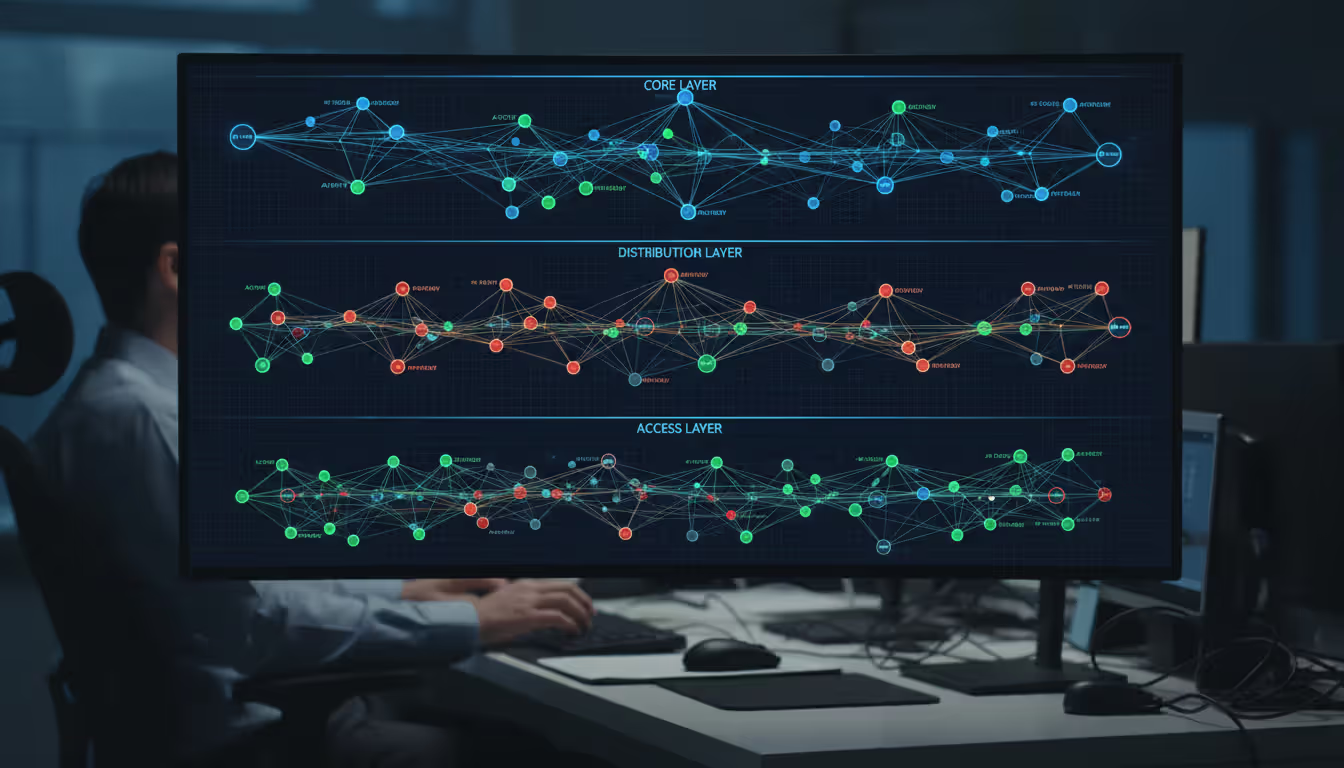
Network engineer standing in a modern server room looking at a large screen displaying network topology visualization with glowing blue connection lines
Network administrators face a persistent challenge: you can't protect, manage, or optimize what you can't see. Every device connecting to your infrastructure—from employee laptops to IoT sensors—represents both an asset and a potential vulnerability. Understanding which devices exist on your network, where they're located, and how they communicate forms the foundation of effective IT operations.
What Is Network Discovery and How Does It Work
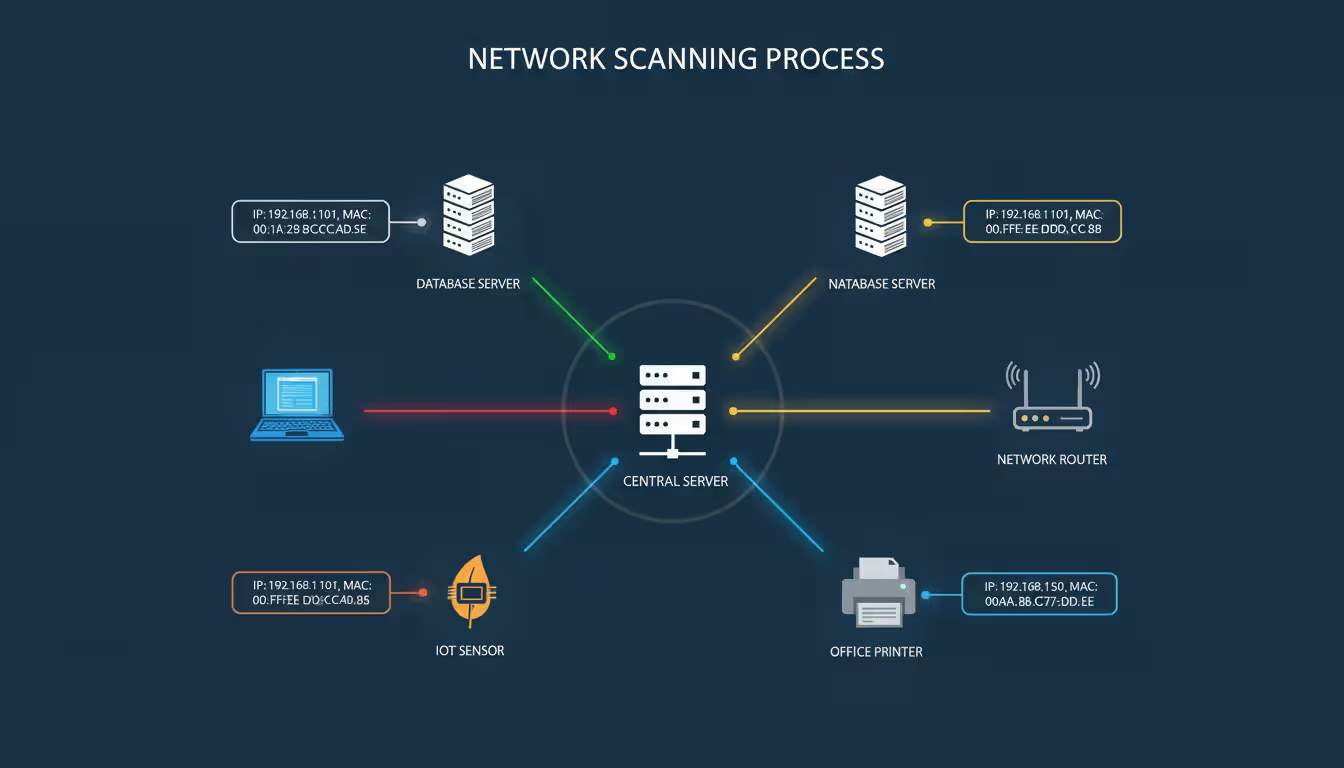
Network discovery is the automated process of identifying and cataloging all devices connected to a network infrastructure. This includes computers, servers, routers, switches, printers, mobile devices, and increasingly, IoT endpoints. The process reveals not just what's connected, but also gathers metadata such as IP addresses, MAC addresses, operating systems, open ports, and device relationships.
The technical process relies on several network protocols working in concert. Simple Network Management Protocol (SNMP) queries managed devices for detailed configuration data and performance metrics. Internet Control Message Protocol (ICMP), commonly known through the ping command, verifies device presence and responsiveness. Address Resolution Protocol (ARP) maps IP addresses to physical MAC addresses, revealing devices even when they don't respond to other queries. Many modern solutions also employ NetBIOS, WMI (Windows Management Instrumentation), SSH, and HTTPS to gather comprehensive device intelligence.
When a discovery scan runs, the tool typically sends packets across specified IP ranges. Responsive devices reply with varying amounts of information depending on their configuration and security posture. The discovery engine then correlates these responses, identifies device types through fingerprinting techniques, and populates an inventory database.
Organizations need network discovery for several critical reasons. Security teams use it to identify rogue devices and shadow IT before they become breach vectors. Asset management depends on accurate inventories for licensing compliance and hardware lifecycle planning. Network operations teams require current topology data to troubleshoot connectivity issues and plan capacity upgrades. During merger and acquisition activities, discovery tools reveal the actual state of inherited networks—which rarely matches documentation.
Network visibility isn't optional anymore.The average enterprise network changes 15-20% monthly through device additions, removals, and configuration shifts. Without automated discovery, your network map is obsolete before you finish drawing it
— Marcus Chen
Types of Network Discovery Methods
Choosing the right discovery approach depends on your network architecture, security requirements, and operational constraints. Each method offers distinct advantages and limitations.
Active vs. Passive Discovery
Active discovery sends probe packets directly to target devices, requesting responses. This approach provides comprehensive data quickly but generates network traffic and may trigger security alerts. A typical active scan might ping every IP in a subnet, then follow up with SNMP queries on responsive hosts. The method works well for scheduled inventory updates and initial network assessments.
Passive discovery monitors existing network traffic without injecting additional packets. By analyzing communications that devices naturally generate, passive tools build inventories over time without alerting security systems or impacting network performance. However, passive discovery only reveals devices that communicate during the observation period. A printer that hasn't been used in days won't appear until someone sends a print job.
Many organizations combine both methods. Passive monitoring runs continuously to catch devices as they communicate, while periodic active scans verify completeness and gather detailed configuration data. This hybrid approach balances thoroughness with operational sensitivity.
Author: Evan Crossfield;
Source: milkandchocolate.net
Agent-Based vs. Agentless Scanning
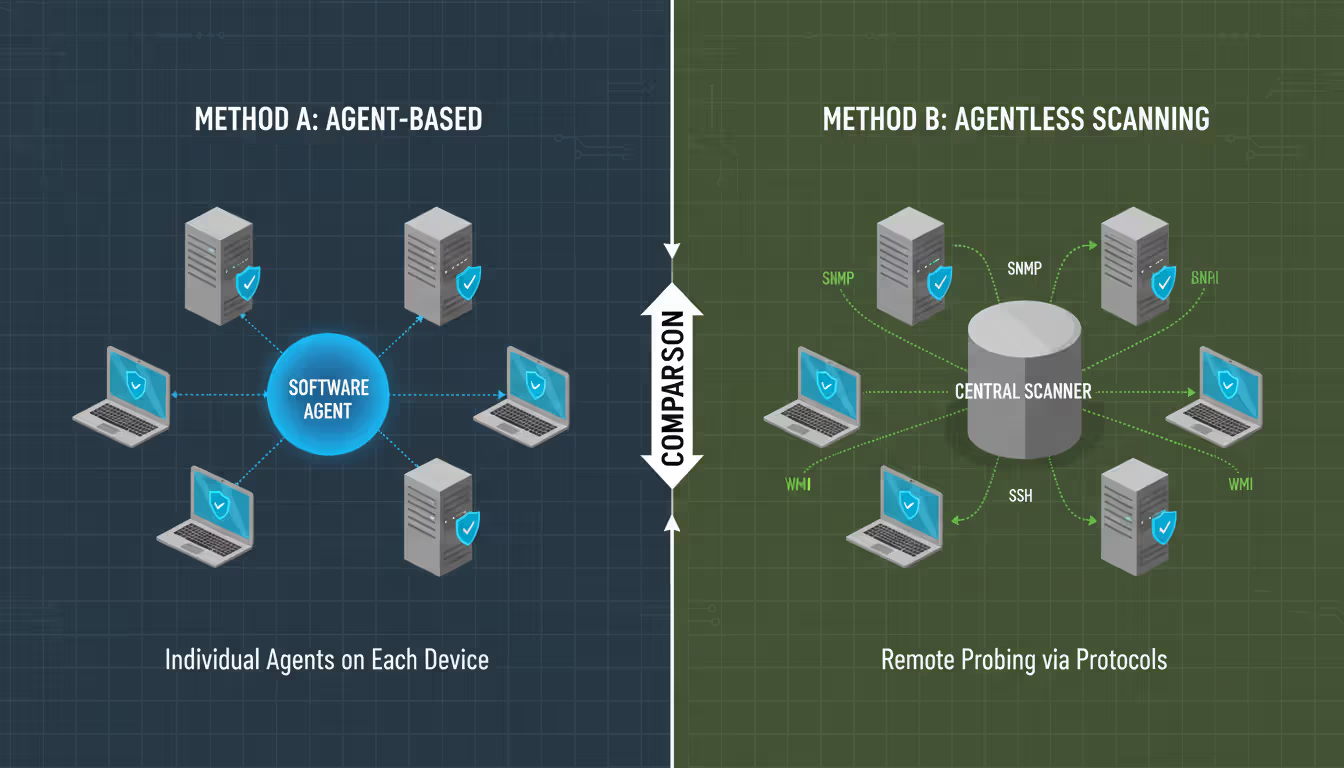
Agent-based discovery installs software on target devices to report inventory data and configuration details. Agents provide deep visibility into operating system versions, installed applications, patch levels, and running processes. They can monitor devices that roam between networks and report data even when disconnected from the corporate network.
The trade-off involves deployment complexity and management overhead. Installing agents on thousands of endpoints requires robust software distribution mechanisms. Each agent consumes device resources and requires updates. Unmanaged devices like network hardware, IoT sensors, and guest systems can't run agents.
Agentless scanning queries devices remotely using standard protocols without requiring installed software. This approach discovers any network-connected device regardless of type. Implementation is faster—no deployment project required. However, agentless methods provide less detailed information and depend on network connectivity and credential access.
Larger environments often use agents on managed endpoints (workstations, servers) while employing agentless scanning for infrastructure devices and unmanaged systems. This strategy maximizes visibility while minimizing deployment burden.
Key Features to Look for in Network Discovery Tools
Not all discovery tools offer equivalent capabilities. When evaluating options, prioritize features that align with your operational requirements and network complexity.
Auto-discovery capabilities determine how much manual configuration the tool requires. The best solutions automatically detect subnet ranges, identify device types without extensive fingerprint databases, and adjust scanning parameters based on network conditions. Look for tools that can discover devices across VLANs and routing boundaries without requiring agents in every network segment.
Author: Evan Crossfield;
Source: milkandchocolate.net
Real-time monitoring capabilities extend beyond periodic scans to detect network changes as they occur. When a new device connects or an existing device changes configuration, the system should update inventory records within minutes rather than waiting for the next scheduled scan. This immediacy matters for security response and troubleshooting.
Integration options multiply a discovery tool's value. API access lets you feed inventory data into CMDBs, security information and event management (SIEM) systems, and IT service management platforms. Pre-built connectors for popular platforms reduce integration effort. Some tools can trigger automated workflows when discovering specific device types or configurations.
Scalability becomes critical as networks grow. A tool that performs well scanning 500 devices may struggle with 50,000. Consider the vendor's largest customer deployments and whether the architecture supports distributed scanning across multiple sites. Cloud-based solutions often scale more gracefully than on-premises appliances.
Reporting capabilities transform raw inventory data into actionable intelligence. Standard reports should cover device counts by type, operating system distributions, unmanaged device alerts, and compliance status. Custom report builders let you answer specific questions without exporting to spreadsheets.
Security features within the tool itself matter as much as the security insights it provides. Credential storage must use encryption and follow least-privilege principles. The tool should support role-based access control so junior staff can view reports without accessing sensitive configuration data. Audit logging tracks who performed scans and accessed device information.
How Network Discovery and Mapping Tools Work Together
Discovery and mapping represent two sides of network visibility. Discovery answers "what exists," while mapping answers "how does it connect." Used together, they provide both inventory and context.
After discovery identifies devices, mapping tools trace connections between them. By analyzing routing tables, switch port data, and traffic flows, mapping software constructs topology diagrams showing physical and logical relationships. You can see which devices connect to which switch ports, how VLANs segment the network, and which paths traffic follows between locations.
Visualization transforms abstract network data into intuitive diagrams. Color-coding can highlight device types, health status, or security posture. Layered views let you zoom from high-level site interconnections down to individual switch port assignments. During outages, visual maps help identify affected segments and potential failure points faster than reading router configurations.
Author: Evan Crossfield;
Source: milkandchocolate.net
Topology mapping supports several management workflows. Capacity planning becomes easier when you can see link utilization across the entire network. Change management improves when you can visualize the downstream impact of modifying a core switch. Security investigations benefit from seeing all devices a compromised host communicated with.
The combination also reveals network sprawl and design inefficiencies. You might discover redundant paths that aren't configured for failover, or critical single points of failure that should have redundancy. Some organizations find entire network segments that were provisioned for temporary projects years ago but never decommissioned.
Modern tools increasingly merge discovery and mapping into unified platforms rather than separate products. This integration ensures maps automatically update as discovery finds new devices or detects configuration changes. The result is documentation that stays current without manual diagram updates.
Top Network Discovery Tools Compared
The network discovery market offers solutions ranging from open-source utilities to enterprise platforms. The right choice depends on network size, budget, and required feature depth.
Flow-based discovery, APM integration, cloud-native support
Usage-based, starts ~$15/host/month
Cloud-first organizations with hybrid infrastructure
SolarWinds dominates traditional enterprise environments with mature features and extensive protocol support. The learning curve is steeper than alternatives, but the depth rewards investment for complex networks.
PRTG appeals to organizations wanting comprehensive monitoring without enterprise pricing. The sensor-based licensing model makes costs predictable as networks grow.
Nmap remains the go-to for security-focused discovery and penetration testing. While it lacks the polish of commercial tools, its flexibility and scriptability are unmatched.
Auvik represents the modern cloud-native approach, particularly popular with managed service providers who need multi-tenant visibility. The automatic mapping and configuration backup features reduce manual documentation burden.
Lansweeper excels at detailed asset inventory beyond basic network discovery, tracking installed software and hardware specifications useful for license compliance and procurement planning.
Organizations with significant Cisco investments should evaluate DNA Center for its tight integration with Cisco's software-defined networking features, though it offers limited value for multi-vendor environments.
Common Network Discovery Challenges and Solutions
Even robust discovery tools encounter obstacles that require thoughtful configuration and operational practices.
Security concerns arise when scanning tools probe network devices. Security teams may view discovery traffic as reconnaissance activity, potentially blocking scans or generating false-positive alerts. Coordinate with security operations to whitelist discovery sources and establish scanning windows for sensitive segments. Document which protocols and ports the tool uses so firewall rules can permit necessary traffic while blocking actual threats.
Author: Evan Crossfield;
Source: milkandchocolate.net
False positives occur when discovery tools misidentify devices or report phantom hosts. Transient DHCP assignments sometimes create duplicate records for the same physical device. Network address translation can mask multiple devices behind single IP addresses. Combat this by correlating multiple identifiers—MAC addresses, hostnames, and SNMP system descriptions—rather than relying solely on IP addresses. Configure deduplication rules and schedule regular database cleanup.
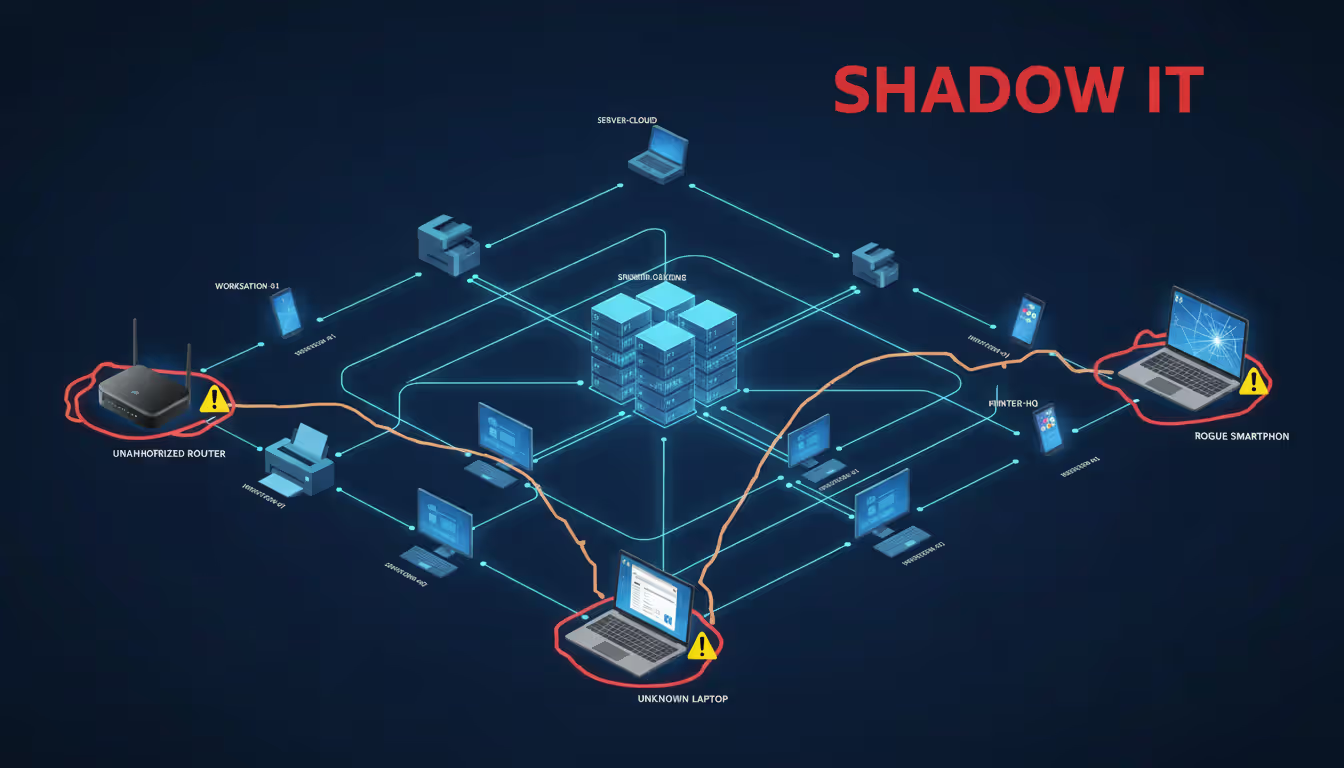
Shadow IT represents devices that users deploy without IT approval—personal routers, unauthorized cloud services, or departmental servers. Discovery tools excel at revealing these assets, but identification is only the first step. Establish clear policies about what constitutes shadow IT and create workflows for evaluating discovered devices. Some may provide legitimate business value and should be brought under management rather than simply removed.
Scalability issues emerge as networks exceed tool design limits. Scanning 100,000 devices across global locations requires distributed architecture and careful scheduling to avoid overwhelming network links or discovery servers. Implement regional scanning engines that report to central consoles. Stagger scan schedules so different network segments are inventoried at different times. Consider sampling approaches for extremely large environments where complete enumeration isn't necessary.
Credential management becomes complex when discovery tools need authentication to query devices. Storing thousands of credentials securely while ensuring discovery processes can access them requires privileged access management integration. Use service accounts with minimal necessary permissions rather than personal credentials. Rotate passwords regularly and monitor for failed authentication attempts that might indicate credential compromise. Some organizations implement certificate-based authentication where supported to eliminate password management entirely.
Environmental factors also impact discovery accuracy. Wireless devices that roam between access points may appear as multiple entities. Virtual machines that migrate between hosts can confuse inventory systems. Containers with ephemeral lifecycles challenge traditional asset tracking. Address these by focusing on stable identifiers and adjusting scan frequencies to match environment dynamics.
Frequently Asked Questions About Network Discovery
How often should network discovery scans run?
Scan frequency depends on network change rate and discovery method. Most organizations run comprehensive active scans weekly or monthly, with continuous passive monitoring filling gaps between active scans. High-security environments may scan daily or even hourly for critical segments. Balance thoroughness against network impact—excessive scanning consumes bandwidth and may affect device performance. Start with weekly scans and adjust based on how many changes you observe between runs.
Can network discovery tools detect unauthorized devices?
Yes, discovery tools excel at identifying unauthorized devices by comparing current inventory against approved asset lists. When a new MAC address or device type appears, the system can generate alerts for investigation. However, detection depends on the device being network-connected and responsive to discovery protocols. Sophisticated attackers may use techniques to avoid detection, so combine discovery with network access control and security monitoring for comprehensive protection.
What's the difference between network discovery and network monitoring?
Network discovery identifies what devices exist and catalogs their attributes—a point-in-time inventory. Network monitoring continuously tracks device performance, availability, and behavior over time. Discovery answers "what's on my network," while monitoring answers "how is my network performing." Most comprehensive network management platforms include both capabilities, using discovery to identify what should be monitored and monitoring to track ongoing health.
Do network discovery tools require agents on every device?
No, most modern tools offer agentless discovery that queries devices remotely using standard protocols. Agentless approaches work for any network-connected device including infrastructure equipment that can't run agents. However, agents provide deeper visibility into endpoint configuration and software inventory when that detail is needed. Many organizations use hybrid approaches—agentless for infrastructure and unmanaged devices, agents for managed endpoints.
How does network discovery impact network performance?
Active discovery generates traffic that consumes bandwidth and requires devices to process probe packets. The impact varies based on scan scope and aggressiveness. A typical subnet scan might generate a few megabits of traffic over several minutes—negligible on modern networks but potentially noticeable on bandwidth-constrained links. Passive discovery has minimal impact since it only observes existing traffic. Mitigate performance concerns by scheduling scans during maintenance windows and limiting concurrent scan threads.
What protocols do network discovery tools use?
Common protocols include ICMP (ping) for basic reachability, SNMP for detailed device information, ARP for MAC address mapping, and WMI or SSH for operating system details. Many tools also use NetBIOS, LLDP (Link Layer Discovery Protocol), CDP (Cisco Discovery Protocol), and various application-layer protocols. The specific protocols depend on target device types and available credentials. Most tools let you configure which protocols to use, allowing you to balance discovery depth against security policies.
Network discovery transforms abstract infrastructure into tangible inventory that you can secure, manage, and optimize. The practice has evolved from manual documentation and periodic audits to continuous automated visibility that keeps pace with dynamic environments. Whether you manage a small office network or global enterprise infrastructure, understanding what connects to your network forms the foundation for every other IT and security initiative.
The tools and methods discussed here provide multiple paths to achieving comprehensive network visibility. Start with clear objectives—are you primarily concerned with security, asset management, or operational efficiency? Your priorities will guide tool selection and implementation approach. Remember that discovery is not a one-time project but an ongoing operational practice that requires regular refinement as your network evolves.
Success comes from combining the right technology with sound processes. Even the most sophisticated discovery tool provides limited value if nobody acts on the insights it generates. Establish workflows for investigating newly discovered devices, remediating compliance gaps, and updating documentation. Integrate discovery data with your broader IT management ecosystem so inventory information flows where it's needed.
As networks continue expanding with cloud services, remote workers, and IoT proliferation, automated discovery becomes less optional and more essential. The networks you'll manage in coming years will be too large and too dynamic for manual tracking. Investing in robust discovery capabilities now positions your organization to maintain visibility and control as complexity increases.
Ethernet remains the backbone of reliable network connectivity in homes, offices, and data centers. This guide explains how wired connections work, compares Ethernet vs WiFi performance, covers cable types and speeds, and provides practical troubleshooting advice for common connection problems
Out-of-band management provides independent administrative access to critical infrastructure when primary networks fail. This guide covers implementation strategies, technology options, security considerations, and best practices for deploying reliable out-of-band access across distributed IT environments
Network segmentation divides networks into isolated zones with controlled access, limiting lateral movement during breaches. This guide covers implementation strategies, tools comparison, design approaches, and common mistakes to help organizations improve security and performance through proper segmentation
Master Kubernetes cluster monitoring with comprehensive guidance on tools, metrics, architecture, and implementation. Compare Prometheus, Grafana, Datadog, and other solutions while learning setup procedures, best practices, and disaster recovery strategies for production environments
The content on this website is provided for general informational purposes only. It is intended to offer insights, commentary, and analysis on cloud computing, network infrastructure, cybersecurity, and IT solutions, and should not be considered professional, technical, or legal advice.
All information, articles, and materials presented on this website are for general informational purposes only. Technologies, standards, and best practices may vary depending on specific environments and may change over time. The application of any technical concepts depends on individual systems, configurations, and requirements.
This website is not responsible for any errors or omissions in the content, or for any actions taken based on the information provided. Users are encouraged to seek qualified professional advice tailored to their specific IT infrastructure, security, and business needs before making decisions.