When your critical business application crashes at 2 AM, how long can you afford to wait for it to come back online? High availability systems answer this question by keeping services running even when individual components break down—using redundancy, fault tolerance, and automatic recovery processes to minimize unexpected outages.
Here's the thing about measuring reliability: most people express it as percentages. Someone tells you their system has 99% uptime and it sounds great, right? Except when you do the math, that "great" number translates to roughly 87 hours of your service being completely unavailable each year. That's more than three full business days when your customers can't reach you.
For serious business operations, those numbers don't cut it. Let's break down what different reliability levels actually mean in practice:
Three nines (99.9%): You're down for about 8.76 hours every year
Four nines (99.99%): Your annual downtime drops to 52.56 minutes
Five nines (99.999%): You get only 5.26 minutes of downtime yearly
Each additional nine gets dramatically harder (and more expensive) to achieve. Your online clothing store probably works fine at 99.9% availability. But if you're processing credit card transactions or running hospital equipment? You'd better be targeting 99.99% or higher.
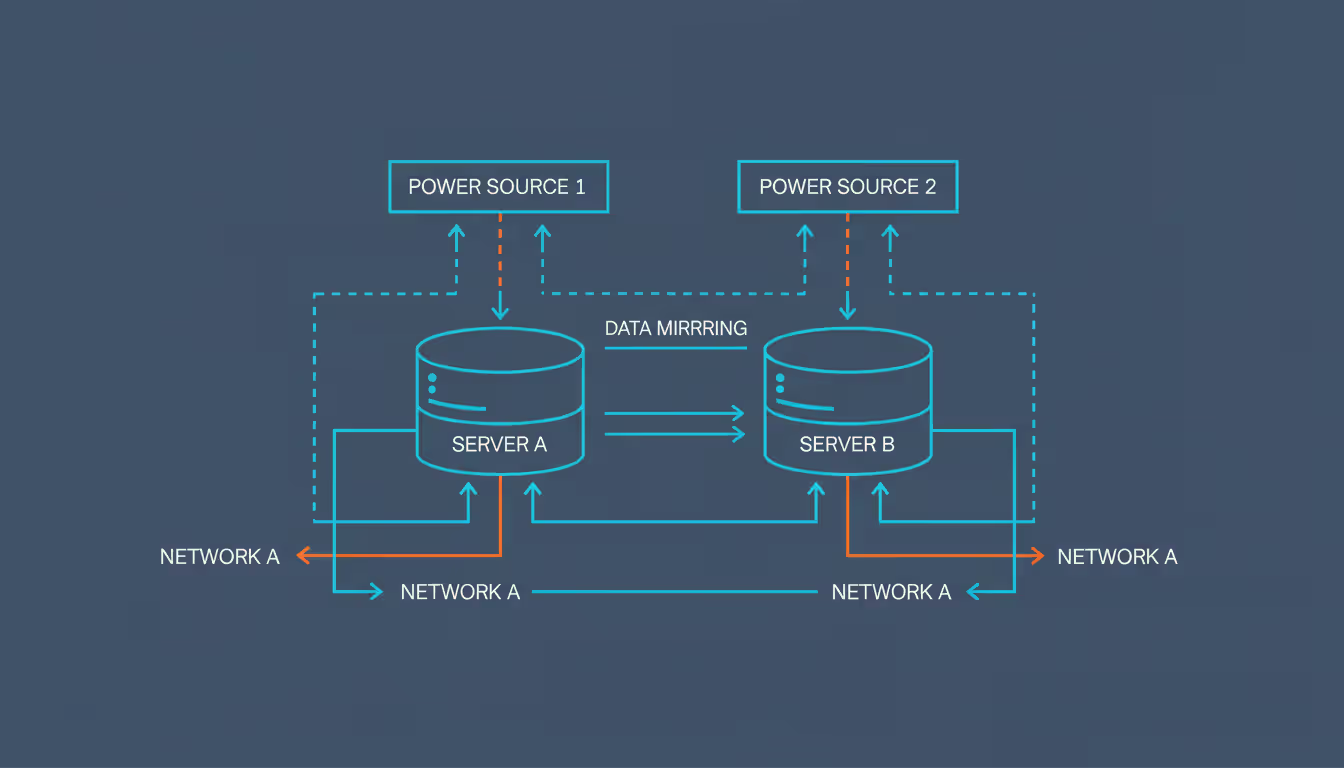
Fault tolerance describes a system's ability to keep functioning when parts of it fail. Instead of betting everything on one database server, you run synchronized copies across multiple machines. One server dies? Your traffic immediately flows to a working replica without your users ever noticing the hiccup.
Redundancy works by duplicating every critical piece of your infrastructure—servers, network links, storage arrays, sometimes entire data centers. The catch: your backup components need true independence. Running two servers that share a single power supply doesn't protect you when an electrical problem takes down that supply.
Author: Trevor Langford;
Source: milkandchocolate.net
Core Components of High Availability Solutions
Building systems that stay online requires understanding the fundamental building blocks that prevent failures—and recover quickly when prevention isn't enough.
High Availability Clusters Explained
Picture multiple servers working as a team to deliver continuous service. That's essentially what high availability clusters do. Each server (called a node) in the cluster handles requests, and when one node goes down, the others pick up the slack instantly.
Active-passive clustering keeps backup nodes sitting idle until needed. Your primary node handles everything while the standbys just monitor whether it's healthy. The moment your primary fails, a standby jumps into action and takes over the workload. You're essentially paying for servers that do nothing most of the time, but the configuration stays simple and predictable.
With active-active clusters, every node processes real traffic simultaneously. Nothing sits idle—you're extracting maximum value from your hardware investment. When a node fails, the survivors just handle a bigger share of incoming requests. The downside? You need more sophisticated traffic distribution and session tracking to make this work smoothly.
Cluster software keeps tabs on member health through "heartbeat" signals—basically, each node regularly sends "I'm still alive" messages to its partners. Miss a few heartbeats? The cluster triggers its failover sequence. Technologies like Pacemaker, Kubernetes, and cloud orchestration platforms handle these responsibilities.
There's a nasty problem called "split-brain" that happens when network glitches prevent cluster members from communicating. Each node thinks the others have died and tries to take over as the primary. Now you've got multiple nodes attempting to be in charge simultaneously, which corrupts data and creates chaos. Smart quorum rules prevent this by requiring majority agreement before any failover proceeds.
The Role of Load Balancers in High Availability
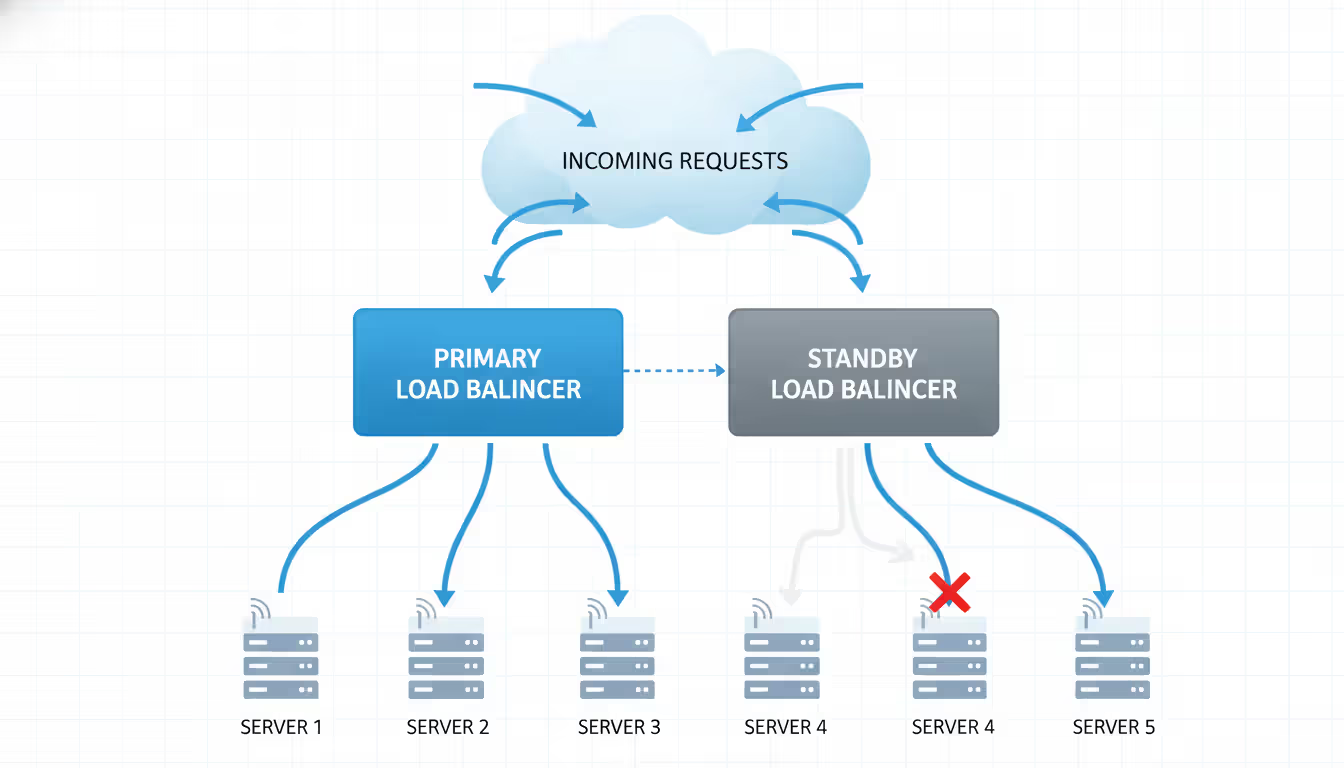
Your load balancer sits in front of your server fleet, spreading incoming requests across all available machines. This prevents any single server from getting overwhelmed while simultaneously creating redundancy—if one server fails, traffic simply flows to the others.
Layer 4 balancers make routing decisions at the network transport level, looking only at IP addresses and port numbers. They're blazingly fast but completely unaware of what your application is actually doing with those requests.
Layer 7 balancers dig into the application level, examining HTTP headers, cookie values, and request content before deciding where to send traffic. This enables smart routing—maybe your mobile users get directed to specialized servers, or your API calls get handled differently than webpage requests.
Your load balancer must constantly verify that backend servers are actually working. Simple network pings just confirm the machine is reachable. Better health checks actually test application functionality—running a test database query or requesting a specific monitoring URL. When a server fails these checks, it gets removed from the rotation until it recovers.
Session persistence (sometimes called sticky sessions) ensures users keep talking to the same backend server throughout their visit. Without this, your shopping cart exists on server A, but your next click routes to server B which has no idea what you've been doing. Persistence mechanisms include cookies, source IP tracking, or unique session identifiers.
Don't forget: load balancers themselves can fail. Deploy them in pairs using active-passive or active-active configurations. Protocols like VRRP (Virtual Router Redundancy Protocol) let paired balancers share a virtual IP address. When your primary balancer dies, the secondary instantly assumes that IP and keeps traffic flowing.
Author: Trevor Langford;
Source: milkandchocolate.net
Data Replication and Failover Mechanisms
Applications can restart in seconds, but losing customer data destroys any availability guarantee you've made. Replication keeps multiple synchronized data copies spread across different locations.
Synchronous replication writes information to multiple storage locations simultaneously before confirming success to the application. You get zero data loss, but every write operation waits for all replicas to acknowledge—which adds latency. Reserve this approach for scenarios where losing data is catastrophic: financial transactions, medical records, legal documents.
Asynchronous replication updates the primary storage first, then copies changes to secondary locations in the background. This delivers better performance but creates a window where recent writes might vanish if your primary fails before replication catches up. Many applications tolerate losing a few seconds of data for the performance benefit.
Recovery Point Objective (RPO) quantifies how much data loss you can stomach, measured in time. Setting an RPO of one hour means you've decided that losing up to one hour's worth of transactions during a disaster is acceptable for your business.
Recovery Time Objective (RTO) specifies your maximum tolerable downtime. An RTO of 15 minutes means you've committed to restoring service within a quarter-hour of any failure event.
Automated failover cuts human reaction time out of the equation. Monitoring systems spot failures and execute predefined recovery procedures without waiting for an engineer to wake up, read alerts, and manually intervene. Manual failover might take 30 minutes if you're lucky. Automated processes complete in seconds.
What Is High Availability in Cloud Computing
Cloud computing fundamentally changed high availability by distributing infrastructure across dozens of physically separated locations—creating reliability that traditional data centers simply can't match.
Cloud providers operate multiple availability zones in each geographic region. These zones are essentially isolated data centers with completely separate power grids, cooling systems, and network connectivity. Deploy your application across three zones, and when zone A loses power, zones B and C keep serving your customers without interruption.
Author: Trevor Langford;
Source: milkandchocolate.net
Multi-region deployments take geographic distribution even further. Your application runs simultaneously in data centers across different states or countries. This protects against regional disasters—think hurricanes, earthquakes, massive network outages—while also reducing latency by serving users from nearby locations.
The high availability cloud approach differs fundamentally from building your own data center. Traditional infrastructure requires you to purchase servers, install them in racks, configure redundant networking, and maintain everything yourself. Cloud services let you enable redundancy through configuration settings—check a box for multi-zone deployment, and the provider handles the underlying complexity.
Managed services shift operational responsibility to the cloud vendor. A managed database service automatically handles replication, failover, backup schedules, and patch management. You define your availability targets; they guarantee their infrastructure meets those requirements.
Auto-scaling dynamically adjusts capacity based on actual demand. Traffic surges don't overwhelm your servers because the system automatically launches additional instances. When traffic drops, excess capacity shuts down, controlling your costs. Try doing that with physical hardware requiring weeks for procurement and installation.
Cloud providers publish Service Level Agreements (SLAs) promising specific uptime percentages, often with financial credits when they miss targets. Read the fine print carefully—those SLAs typically require you to architect applications correctly across multiple zones. Deploy everything in one zone? You've just voided the availability guarantee.
How to Design a High Availability Architecture
Building systems that actually stay online requires methodical planning, not just throwing redundant components at the problem and hoping for the best.
Step 1: Define Your Availability Requirements
Start with cold, hard business analysis. Calculate exactly how much revenue you lose for every hour of downtime. Factor in reputation damage, regulatory penalties, and customers who'll never come back. A financial trading platform hemorrhaging $500,000 hourly can justify massive infrastructure spending. An internal company wiki? Probably not.
Set realistic uptime targets based on actual business impact. Five nines sounds impressive in meetings but might require 24/7 staffing, infrastructure spanning multiple continents, and extensive automation—easily costing north of $100,000 monthly. Plenty of successful businesses run at 99.9% and sleep just fine.
Step 2: Identify Single Points of Failure
Document every component in your current architecture. For each one, ask yourself: "If this specific piece fails right now, does my entire system become unreachable?" Answering yes means you've found a single point of failure.
Common culprits you'll discover:
Database servers running alone without any replicas
One load balancer with zero backup
Applications deployed exclusively in a single availability zone
Shared storage that has no redundant alternative
Network connections lacking alternative routing paths
DNS services hosted with just one provider
Author: Trevor Langford;
Source: milkandchocolate.net
Step 3: Implement Redundancy Strategically
Not every component deserves identical redundancy investment. Prioritize based on how likely each component is to fail and how badly that failure impacts your business.
Stateless application servers scale horizontally with minimal fuss. Run multiple identical copies behind a load balancer. Adding or removing instances stays simple because they don't store any local state that needs preservation.
Stateful components like databases demand careful architectural planning. Master-replica configurations provide read scaling and failover capability. Multi-master setups allow writes to any database node but introduce complex conflict resolution challenges.
Storage redundancy typically uses RAID configurations or distributed filesystems. RAID 10 delivers both performance and protection against drive failures but eats significant disk capacity. Cloud object storage automatically replicates your data across multiple physical facilities without requiring manual configuration.
Step 4: Implement Monitoring and Alerting
You can't fix problems you don't know exist—and you definitely can't fix them before they impact customers without comprehensive monitoring. Track these metrics religiously:
Server vital signs (CPU usage, memory consumption, disk space)
Database health (query execution times, replication lag)
Network status (connectivity, bandwidth utilization, packet loss)
Actual user experience (synthetic transaction monitoring, real user metrics)
Configure alerts thoughtfully to avoid alarm fatigue. Sending notifications for every minor blip trains engineers to ignore alerts because most are false positives. Only alert on conditions that actually require human intervention.
Step 5: Test Failover Regularly
Untested failover procedures fail spectacularly when you actually need them. Schedule regular chaos engineering exercises where you deliberately break components just to verify your recovery mechanisms work as designed.
Begin testing in non-production environments, then gradually introduce controlled failures during production low-traffic periods. Document what worked, what didn't, and exactly how long each recovery took.
Netflix built Chaos Monkey specifically to randomly terminate production instances, forcing their engineers to build genuinely resilient systems. You don't need that level of controlled chaos, but quarterly failover testing should be non-negotiable standard practice.
Common Mistakes When Implementing High Availability Systems
High availability isn't really about having redundant servers—it's about designing every layer of your technology stack to handle failure gracefully. The most reliable systems assume failure is the normal state and build recovery mechanisms into their fundamental DNA rather than treating failure as some exceptional edge case
— Werner Vogels
Even experienced engineering teams make these predictable errors when building systems meant to stay online.
Overlooking Network Redundancy
Teams obsess over server redundancy while completely ignoring network infrastructure. Redundant servers connected through a single network switch gain exactly nothing when that switch fails and takes everything down with it.
Build diverse network paths into your architecture. Contract with multiple internet service providers, ensuring their physical fiber cables enter your facility through different conduits. Construction crews accidentally severing your single fiber connection defeats every other redundancy measure you've implemented.
BGP (Border Gateway Protocol) routing enables automatic failover between network providers. When one connection dies, traffic automatically reroutes through surviving paths without manual intervention.
Inadequate Monitoring and Observability
Basic uptime monitoring tells you when systems are already down—too late to prevent customer impact. Modern observability tracks leading indicators that predict failures before they happen.
Watch replication lag between your database primary and replicas. Growing lag suggests the replica can't keep pace, risking significant data loss during failover. Monitor disk space growth rates to predict capacity problems before they cause outages.
Distributed tracing follows individual requests as they bounce through multiple microservices, pinpointing bottlenecks and failures in complex architectures.
Ignoring Disaster Recovery Planning
High availability handles routine component failures like crashed servers or failed hard drives. It doesn't protect against catastrophic disasters. Your carefully architected multi-zone deployment provides zero protection when the entire region becomes inaccessible.
Maintain comprehensive backups in geographically distant locations—ideally different states or countries. Test restoration procedures regularly. Too many organizations discover their backups are corrupted or incomplete only during actual emergencies when it's too late to fix anything.
Create detailed recovery runbooks documenting step-by-step procedures. During crisis situations, stressed engineers make stupid mistakes. Detailed checklists reduce errors and accelerate recovery.
Underestimating Costs and Complexity
Redundancy doubles or triples your infrastructure costs—minimum. Running three application servers instead of one means paying for three servers, plus the load balancer, monitoring systems, backup storage, and operational overhead managing everything.
Complexity grows exponentially, not linearly. Managing a single server is straightforward. Managing a multi-region, auto-scaling cluster with automated failover demands specialized expertise for design, implementation, and ongoing operations.
Start with simpler solutions addressing your most critical failure scenarios. Add architectural sophistication gradually as business requirements justify the investment and complexity.
Neglecting Application-Level Design
Infrastructure redundancy can't compensate for application design flaws. If your application stores session data locally on each server, failover breaks every active user session. Applications must be designed from the ground up for distributed operation.
Build graceful degradation into application logic. When your recommendation engine fails, your e-commerce site should still process purchases rather than displaying error pages. Core revenue-generating functionality continues while less critical features temporarily disable.
Implement circuit breakers preventing cascading failures. When a downstream service becomes unresponsive, the circuit breaker stops sending requests—allowing the struggling service time to recover rather than overwhelming it with retry attempts that make things worse.
High Availability Tiers Comparison
Uptime %
Annual Downtime
Monthly Downtime
Common Use Cases
Infrastructure Needed
99.9% (three nines)
8.76 hours
43.8 minutes
Internal business tools, marketing websites, development/staging environments
Single availability zone, basic health monitoring, manual intervention for failures
99.95%
4.38 hours
21.9 minutes
E-commerce platforms, SaaS applications, corporate business systems
Multi-region active-active architecture, full automation, substantial ongoing operational investment
Frequently Asked Questions About High Availability Systems
What is the difference between high availability and disaster recovery?
High availability keeps you online by maintaining redundant systems that automatically assume responsibility when individual components fail. It addresses everyday failures—crashed servers, buggy software deployments, network connectivity issues. Disaster recovery focuses on recovering from catastrophic events that destroy entire facilities or geographic regions, relying on backups to restore operations after substantial data loss. Think of HA as preventing downtime in the first place, while DR is about recovering after something truly terrible happens. You really need both strategies, not just one.
How much does it cost to implement high availability systems?
Costs vary wildly depending on your specific requirements and scale. A straightforward multi-zone cloud deployment might increase infrastructure spending by 50-100%—essentially running two servers instead of one, plus paying for load balancer services. Reaching 99.99% availability across multiple geographic regions can triple or quadruple expenses when you account for redundant infrastructure, specialized engineering talent, and operational tooling. Small applications might spend $500-2,000 monthly for basic HA implementation. Enterprise-scale systems easily exceed $50,000 monthly. Calculate how much each hour of downtime actually costs your business, then determine what you can afford to invest in preventing it.
Can small businesses benefit from high availability solutions?
Absolutely—small businesses just need proportional, cost-effective solutions rather than enterprise-grade complexity. A small e-commerce operation doesn't need five nines of availability, but you definitely want to avoid obvious single points of failure. Running two application servers in different availability zones behind a simple load balancer provides substantial reliability improvement at reasonable cost. Modern cloud managed services deliver enterprise-grade availability features without requiring large operations teams to maintain everything. Focus protection on revenue-generating systems first—your customer-facing storefront deserves higher availability than your internal blog.
What uptime percentage should my business target?
Calculate how much each hour of downtime actually costs in lost revenue, then compare that against the infrastructure investment required for each availability tier. If one hour of downtime costs $5,000 and you typically experience five outages annually, that's $25,000 in total losses. Spending $15,000 yearly for infrastructure that prevents those outages makes clear financial sense. Most businesses operate successfully somewhere between 99.9% and 99.99%. Five nines rarely proves cost-effective except for systems where downtime literally risks human lives, violates regulatory requirements, or causes catastrophic financial losses.
How do high availability clusters prevent downtime?
Clusters spread workload across multiple servers while continuously monitoring whether each member remains healthy and responsive. When one server fails—whether from hardware problems, software crashes, or scheduled maintenance—the cluster immediately redistributes that server's workload to healthy members. Your users experience zero interruption because alternative servers were already running and ready to accept traffic. Cluster management software handles failure detection and recovery in seconds, dramatically faster than any human operator could manually respond. This approach works equally well for planned maintenance (upgrading servers one at a time) and completely unexpected failures.
Do I need a high availability load balancer for my application?
If you're running applications across multiple servers specifically for redundancy purposes, you absolutely need load balancing to distribute traffic among them. Whether you need a highly available load balancer depends on whether it becomes a single point of failure itself. Using one load balancer completely defeats the purpose of maintaining redundant application servers—when that load balancer fails, everything behind it becomes unreachable regardless of server redundancy. Implement load balancer redundancy through paired devices with automatic failover capability, or use cloud-native load balancing services that provide built-in high availability by design. Your load balancer represents critical infrastructure requiring the same availability level as the systems it protects.
High availability systems protect business continuity by systematically eliminating single points of failure through redundancy, automated recovery, and distributed architecture. Your specific implementation depends entirely on your actual availability requirements, budget constraints, and internal technical capabilities.
Begin by understanding what downtime genuinely costs your specific organization in real dollars, then design solutions addressing your most critical failure scenarios first. Cloud computing has democratized access to sophisticated high availability through managed services and geographic distribution that would cost prohibitive amounts to build in traditional on-premises data centers.
Remember that high availability isn't a product you purchase once and forget about—it's an ongoing architectural approach requiring continuous attention. Regular testing, comprehensive monitoring, and constant improvement ensure your systems actually deliver the reliability your business operations demand. The goal was never perfect uptime (that's impossible), but rather minimizing business disruption through thoughtful design and disciplined operational practices.
Ethernet remains the backbone of reliable network connectivity in homes, offices, and data centers. This guide explains how wired connections work, compares Ethernet vs WiFi performance, covers cable types and speeds, and provides practical troubleshooting advice for common connection problems
Out-of-band management provides independent administrative access to critical infrastructure when primary networks fail. This guide covers implementation strategies, technology options, security considerations, and best practices for deploying reliable out-of-band access across distributed IT environments
Network segmentation divides networks into isolated zones with controlled access, limiting lateral movement during breaches. This guide covers implementation strategies, tools comparison, design approaches, and common mistakes to help organizations improve security and performance through proper segmentation
Network discovery automates the process of identifying and cataloging devices connected to your infrastructure. This guide covers discovery methods, compares leading tools, and provides practical solutions to common challenges IT teams face when implementing network visibility
The content on this website is provided for general informational purposes only. It is intended to offer insights, commentary, and analysis on cloud computing, network infrastructure, cybersecurity, and IT solutions, and should not be considered professional, technical, or legal advice.
All information, articles, and materials presented on this website are for general informational purposes only. Technologies, standards, and best practices may vary depending on specific environments and may change over time. The application of any technical concepts depends on individual systems, configurations, and requirements.
This website is not responsible for any errors or omissions in the content, or for any actions taken based on the information provided. Users are encouraged to seek qualified professional advice tailored to their specific IT infrastructure, security, and business needs before making decisions.