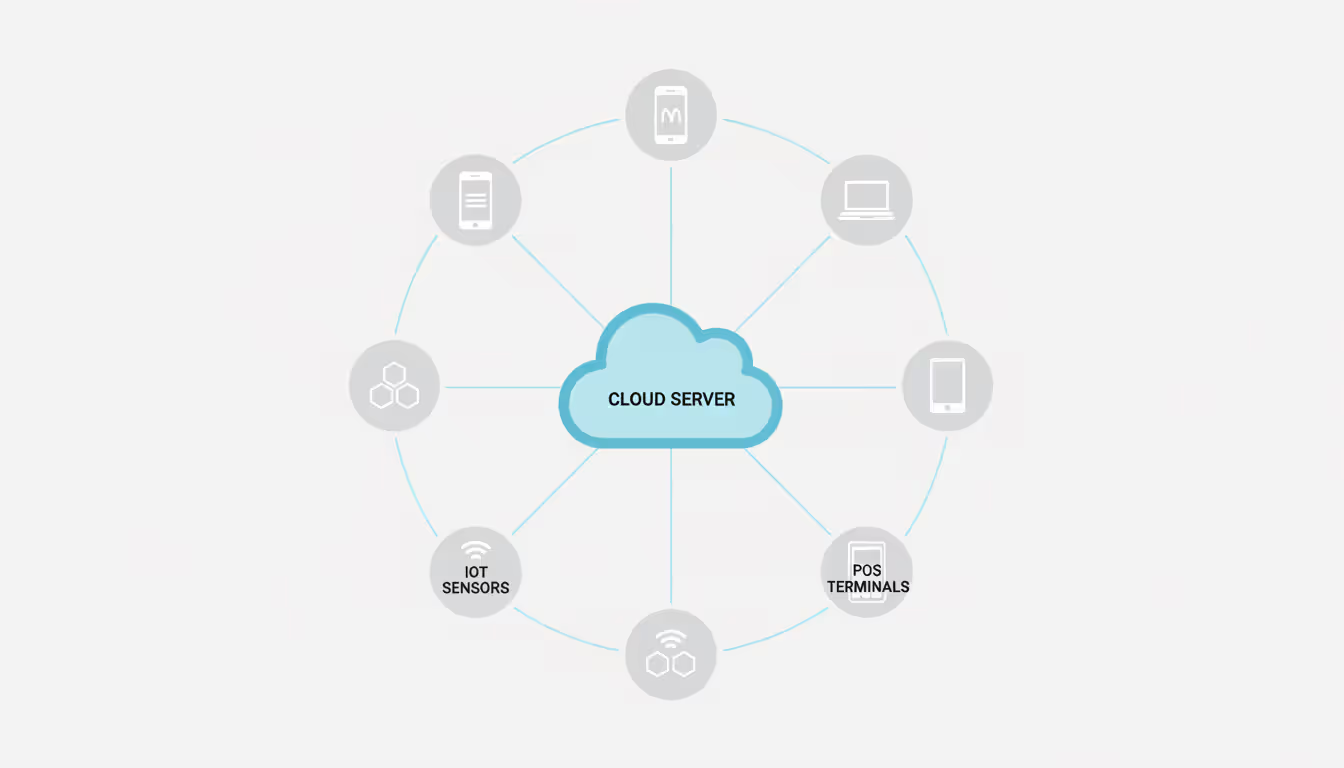
Look, nobody runs a business in 2025 with five devices anymore. Hospitals juggle 2,000+ tablets for their nursing staff. Logistics companies track sensors on 15,000 shipping containers bouncing between continents. Even that "small" accounting firm down the street? They're managing dozens of laptops, phones, and—yeah—IoT gadgets nobody asked for but marketing insists they need.
Managing that manually? You'll burn half your week pushing updates one device at a time. The other half gets wasted explaining to compliance auditors why seventeen devices still run software from 2022 with known security holes.
Device management platforms do the grunt work—enforcing security rules, distributing software updates, monitoring compliance—across every phone, tablet, sensor, and laptop touching your network. Get it right and you'll actually have time for projects that matter instead of playing digital babysitter.
Device Management Definition and Core Functions
What is device management? It's software that gives you centralized oversight of every computing device your organization owns—phones, tablets, laptops, servers, IoT sensors, industrial machinery—from one dashboard instead of running around with a screwdriver and USB stick.
This isn't about fancy spreadsheets tracking serial numbers. Real device management handles:
Provisioning and enrollment runs itself. Those new iPhones? They power on and grab your corporate email settings, approved apps, security configurations—zero IT handholding. Device hits the network, pings your management server, downloads its marching orders, ready to work in minutes rather than the two hours your guy used to spend per device.
Security enforcement patches vulnerabilities before attackers exploit them. Your platform demands 256-bit encryption on every hard drive, requires face or fingerprint authentication for banking apps, blocks any device running ancient antivirus from touching sensitive files, remotely nukes stolen hardware before thieves crack the password.
Software distribution happens while everyone sleeps. Microsoft drops an emergency patch Tuesday night for a nasty Windows vulnerability? You're pushing it to 3,000 laptops by Wednesday morning. Nobody gets nagged. No compliance gaps magically appearing.
Compliance monitoring never stops. Healthcare devices get HIPAA compliance checks every hour. Retail point-of-sale terminals verify PCI-DSS requirements constantly. Someone disables encryption or installs sketchy software? Alert hits your phone instantly.
Remote troubleshooting beats walking across campus. That employee struggling with VPN settings? You fix it from your desk in thirty seconds instead of trekking to their office.
One manufacturing plant standardized firmware across 800 barcode scanners using device management. Before? Mixed firmware versions caused random failures that literally stopped production lines. After? Uniform setup, zero barcode problems.
Retail chains remotely shut down payment terminals at closed stores, blocking after-hours intrusions through unattended hardware sitting in the dark.
Author: Evan Crossfield;
Source: milkandchocolate.net
This tech splits into three worlds: traditional computers (desktops, laptops running Windows, macOS, Linux), mobile gear (iOS and Android phones and tablets), IoT hardware (sensors, industrial controllers, smart building systems). Each needs different handling—a smartphone with constant internet versus a battery-powered soil sensor that wakes once daily to transmit moisture data.
How Device Management Platforms Operate
Think client-server architecture. Your centralized console (server side) communicates with agent software running on every managed device (client side).
Enrollment starts the relationship. New corporate iPhone powers on fresh from the box. Through Apple's Device Enrollment Program, it immediately phones home to your management server, downloads agent software, receives its policy package—which apps install automatically, which websites get blocked, check-in frequency. IoT sensors often get enrolled at the factory, where manufacturers burn server addresses and authentication certificates straight into firmware.
After enrollment, policies define what's acceptable. You might configure:
Instagram blocked on company tablets, LinkedIn and Slack allowed
Devices can't touch public Wi-Fi when accessing financial systems
Passwords need twelve characters minimum plus biometric backup
All storage encrypted with AES-256
Cameras automatically disable when devices enter R&D facilities (geofencing does this)
The server doesn't hover constantly. Devices check in periodically—usually every fifteen minutes to couple hours—reporting battery status, installed apps, security posture, GPS coordinates, compliance state. Your dashboard aggregates these check-ins, flagging issues like thirty tablets still running last month's Android build or five phones with disabled antivirus attempting email access.
Remote access lets you act without touching physical hardware. Common scenarios:
Critical OpenSSL vulnerability drops Tuesday morning? Force immediate updates across 5,000 devices before lunch. Employee's laptop stolen at a conference? Wipe it within five minutes of getting the theft report. Field technicians complaining about connectivity problems? Remotely adjust network settings and restart services without dispatching anyone.
A logistics operation manages tablets for 5,000 delivery drivers. Every night at 2 AM, routing software updates push across the fleet. By 6 AM when shifts begin, every driver has fresh maps and traffic algorithms. Tablet gets stolen? Remote wipe erases customer addresses and payment data before the thief unlocks the screen.
Reporting dashboards show fleet health instantly. Which devices need security patches? Which apps eat the most bandwidth? Which users keep violating policies by installing unauthorized software? These insights drive hardware refresh cycles, training programs, policy tweaks.
Author: Evan Crossfield;
Source: milkandchocolate.net
Why Device Management and the Internet of Things Matter for Businesses
IoT devices create a massive security and operational headache that device management solves.
Device management and the internet of things is important because every unmanaged IoT device becomes an open door for attackers. That internet-connected thermostat in your office? Attacker compromised it using the factory default password, then pivoted through your network straight into the customer database.
The 2025 Mirai variant infected 800,000 security cameras—all running factory-default passwords, all unmanaged—turning them into a botnet that hammered major e-commerce sites offline during Black Friday. Cost to retailers? Millions per hour in lost sales.
IoT manufacturers ship devices with awful security. Default admin passwords like "admin123". Firmware from eighteen months ago full of known bugs. Zero automatic update capability. Device management fixes this disaster by:
Forcing credential changes the second devices join your network. Automatically applying firmware patches—testing on a few devices first, then rolling fleet-wide. Isolating IoT devices onto separate network segments so compromised sensors can't reach file servers. Monitoring traffic patterns to catch compromised devices suddenly connecting to IP addresses in countries where you don't operate.
Consider a hotel chain with 30,000 smart door locks across 200 properties. Without management? Firmware vulnerability lets attackers unlock every room simultaneously. With proper device management? Security patches deploy within 48 hours of release. IT tests them on one property first, validates everything works, then pushes to all 200 hotels.
Scalability becomes impossible past certain fleet sizes. Agriculture company monitoring soil sensors across 50,000 acres can't manually verify each sensor's battery level. Device management automatically alerts technicians when sensors go offline or report weird readings suggesting calibration drift, preventing crop losses from undetected irrigation failures.
Operational efficiency multiplies fast. Hospital with 3,000 infusion pumps remotely verifies every device runs FDA-cleared firmware before Joint Commission audits. Instead of three weeks sending technicians to physically inspect each pump, they generate compliance reports in two days.
Compliance requirements increasingly demand technical controls only device management provides. HIPAA requires tracking all devices accessing protected health information. PCI-DSS demands current antivirus on payment systems. GDPR requires demonstrable technical safeguards protecting personal data. Device management platforms generate audit logs regulators expect during investigations.
Organizations treating IoT devices as unmanaged 'shadow IT' face breach costs averaging 3.2 times higher than those with comprehensive device management. The real question isn't whether you can afford device management—it's whether you can afford the breach that inevitably happens without it
— Sarah Chen
Types of Device Management Services Available
Device management service options evolved for different device types and organizational needs.
Mobile Device Management (MDM) focuses exclusively on smartphones and tablets. These platforms excel at iOS and Android—enforcing app restrictions, password requirements, remote wipe capabilities. Perfect for organizations where phones and tablets represent 90% of endpoints. Sales team with 200 iPads? MDM works, no need for complexity.
Enterprise Mobility Management (EMM) builds on MDM by adding mobile application management (securing specific apps rather than whole devices), mobile content management (controlling how documents get accessed and shared), identity management (integrating with corporate authentication systems). EMM fits scenarios where employees access sensitive data through mobile apps but you don't want total device control. Financial services firms use EMM to secure mobile banking apps on employee devices without dictating every phone setting.
Unified Endpoint Management (UEM) consolidates everything—mobile devices, laptops, desktops, sometimes IoT—into one platform. Instead of juggling separate tools for Windows laptops, MacBooks, iPads, and Android phones, your IT team uses a single console. University managing 10,000 student laptops, 2,000 faculty tablets, and 500 staff desktops avoids learning three different management systems.
IoT Device Management platforms specialize in connected hardware—sensors, industrial equipment, smart building systems, embedded controllers. These handle challenges unique to IoT: intermittent connectivity (devices checking weekly instead of hourly), resource constraints (sensors with 64KB memory can't run heavyweight agents), massive scale (millions of devices, not thousands). Utility monitoring 500,000 smart electric meters needs IoT-specific tools, not platforms built for smartphones.
Solution Category
Main Business Problem It Solves
Compatible Hardware
Common Fleet Size
Core Capabilities
Ideal Customer Profile
MDM
Secure and manage employee phones/tablets
iOS, Android, some Windows Mobile
50–10,000 endpoints
App restriction, remote data wipe, password enforcement
Sales forces, mobile-first companies
EMM
Protect corporate apps on mobile devices without full control
Small footprint agents, edge computing, sporadic connection support
Manufacturers, utilities, smart infrastructure
Mobile vs. IoT Device Management
Mobile and IoT device management tackle completely different challenges despite looking similar on paper.
Mobile device management assumes devices have reliable cellular or Wi-Fi (they're online most of the time), substantial processing power (multi-core processors, 2GB+ RAM), user interfaces for displaying notifications (screens showing policy warnings), regular user interaction (people notice and report problems), relatively short lifecycles (two-to-four-year replacement cycles).
Mobile platforms prioritize user experience. Pushing updates? Avoid disrupting active calls or draining batteries right before important meetings. They support BYOD scenarios where personal devices access corporate resources, requiring containerization that separates work data from personal photos and messages.
IoT device management handles devices with intermittent connectivity (sensors waking hourly to transmit readings, then sleeping to conserve power), minimal hardware (8-bit microcontrollers, kilobytes of RAM), no user interfaces (zero screens for error messages), autonomous operation (no users reporting malfunctions), extended lifecycles (industrial sensors installed in 2020 might operate until 2040).
IoT platforms emphasize efficiency and resilience. Updates must fit tiny memory footprints. Management traffic must minimize bandwidth for cellular-connected devices with data caps. Systems must gracefully handle devices going offline for weeks during network maintenance or natural disasters.
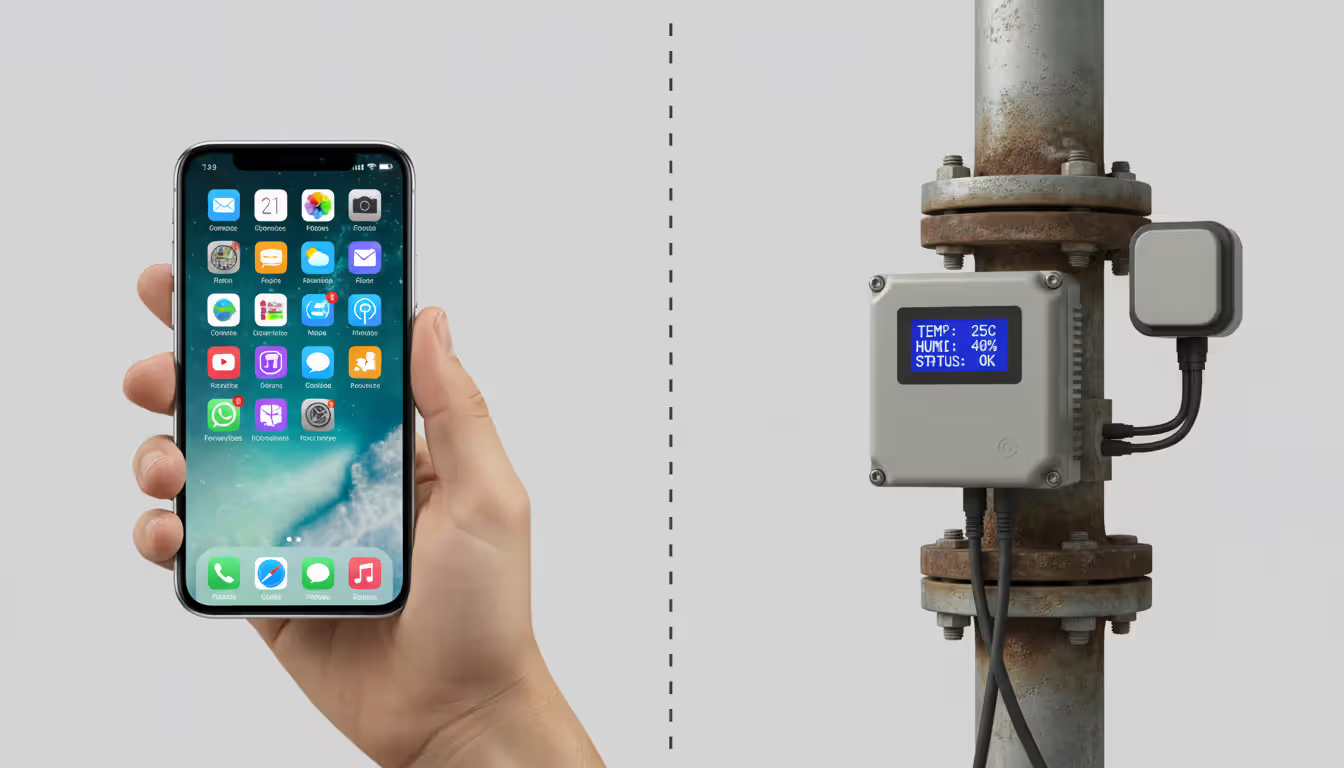
Building management company shows this split clearly: employee smartphones checking HVAC status rely on mobile device management for security and app distribution. The actual thermostats, humidity sensors, and air quality monitors depend on IoT device management for firmware updates and diagnostics. Managing industrial sensors with mobile tools—or smartphones with IoT platforms—creates capability mismatches and unnecessary headaches.
Author: Evan Crossfield;
Source: milkandchocolate.net
Key Features to Look for in Device Management Platforms
Selecting the right device management platforms means matching capabilities to your specific operational and security requirements.
Security controls form your foundation. Must-have features:
Encryption enforcement requires full-disk encryption (BitLocker for Windows, FileVault for macOS) and transport encryption (TLS 1.3 minimum). Healthcare providers managing devices accessing patient records need platforms automatically blocking access from devices missing encryption or running outdated antivirus—preventing HIPAA violations before they occur.
Authentication requirements mandate biometric authentication, passwordless login, or multi-factor authentication depending on data sensitivity. Financial services firms might require Face ID or fingerprint authentication for every app launch containing customer financial data.
Conditional access blocks compromised devices—jailbroken iPhones, rooted Android devices, laptops running unsupported Windows versions—from touching corporate resources. Device running Windows 7 in 2025? Blocked at the network perimeter.
Threat detection identifies malware, suspicious network connections, policy violations in real-time. When a device suddenly starts connecting to servers in countries where you don't operate, you get immediate alerts.
Integration capabilities determine how well the platform meshes with your existing technology stack:
Identity provider integration enables single sign-on with Azure AD, Okta, Google Workspace. Employees log in once; device management authenticates against your existing user directory.
SIEM connectivity feeds security events to Splunk, QRadar, or other security information and event management systems. Your security team sees device compliance issues alongside firewall logs and authentication attempts in one unified view.
Ticketing system integration creates help desk tickets automatically when devices malfunction. Laptop reports failing hard drive diagnostics? ServiceNow ticket appears automatically, assigned to desktop support, before the user even notices slower performance.
API availability enables custom integrations with proprietary systems. You can build scripts pulling device data into existing dashboards or triggering workflows in internal tools.
Organizations using ServiceNow for IT operations benefit from platforms automatically generating tickets when devices fall out of compliance, rather than someone monitoring dashboards and manually creating tickets.
Automation capabilities eliminate grunt work:
Zero-touch provisioning means devices configure themselves on first power-up. Retail chain deploying 500 new point-of-sale tablets quarterly can't afford staff manually configuring each one. Store managers unbox tablets, power them on, start processing transactions within minutes.
Scheduled maintenance deploys updates during off-hours. Laptops receive Windows updates between 2 AM and 5 AM, finishing before employees arrive.
Self-remediation automatically fixes common issues—resetting network settings when devices can't connect, restarting stuck services, clearing cache when apps misbehave. Cuts help desk tickets by 30–40% in typical deployments.
Policy templates provide pre-built configurations for common scenarios (HIPAA compliance, PCI-DSS requirements, BYOD policies), so you're not building policies from scratch.
User experience impacts adoption rates and support costs:
Platforms should provide clear policy violation explanations ("Your device needs a security update before accessing email. Tap to install.") instead of cryptic error codes. Self-service troubleshooting—password resets, network diagnostics—reduces help desk dependency. Management agents should use minimal resources (<2% CPU, <100MB RAM) to avoid slowing down devices. Offline operation matters—policies should enforce even when devices can't reach your server.
Poor user experience generates help desk tickets and workarounds. When employees find corporate-managed devices frustratingly slow, they start using personal devices for work tasks, creating shadow IT risks that undermine your security posture.
Licensing models matter at scale. Per-device pricing becomes expensive when managing thousands of devices; unlimited plans or tiered pricing (price per device drops at 1,000, 5,000, 10,000+ thresholds) may be more economical.
Performance at scale requires load testing. Can the platform actually handle your five-year device count projection? Some vendors claim scalability but performance degrades noticeably beyond 5,000 devices.
Geographic distribution matters for international deployments. Do you need regional servers in Europe, Asia, Latin America to handle local devices without latency issues or data residency compliance problems?
Multi-tenancy becomes important for organizations with multiple subsidiaries or business units. Can a single platform instance manage devices separately for different entities while maintaining isolation?
Startup managing 100 devices today might manage 10,000 in three years. Choosing a platform that genuinely scales prevents expensive, disruptive migrations.
Cost structure extends well beyond license fees:
Implementation costs include professional services for initial setup, integration with existing systems, policy design, and pilot testing. Enterprise deployments often need $25,000–$500,000+ in professional services.
Training expenses get your IT staff proficient. Budget for initial training, ongoing advanced training, and certification programs if you want deep platform expertise in-house.
Ongoing support means annual maintenance fees (typically 18–22% of license costs) and premium support tiers for faster response times or dedicated support engineers.
Hidden costs include fees for API access beyond certain call volumes, additional storage for extended log retention, advanced analytics features, or integrations with third-party tools.
Platform charging $5/device/month but requiring $50,000 in professional services might actually cost more over three years than a $10/device/month platform with simple self-service setup.
Common Device Management Implementation Challenges
Author: Evan Crossfield;
Source: milkandchocolate.net
Organizations hit predictable obstacles when deploying these systems. Anticipating problems helps develop workarounds.
User resistance emerges when employees perceive management as invasive monitoring. Sales representatives accustomed to unrestricted personal device use resent policies blocking Instagram or requiring complex passcodes. Resistance manifests as:
Deliberately circumventing policies—jailbreaking devices to remove management agents, using VPNs to bypass content filters. Refusing to enroll personal devices in BYOD programs, forcing you to issue corporate-owned hardware. Excessive help desk calls claiming policies prevent legitimate work ("I need TikTok for competitive research!"). Using personal devices for work tasks to avoid management, recreating the shadow IT problem you're trying to solve.
Mitigation requires transparency about what you monitor (device security status, corporate app usage, compliance state) versus what you don't (personal text messages, browsing history outside work apps, location data when not on the clock). Offering device stipends for BYOD participants—$50/month to use personal phones for work—reduces resistance. Demonstrating how management actually protects employees (remote wipe only erases corporate data, not personal photos) builds trust.
Legacy system integration creates technical nightmares. Organizations running decade-old ERP systems or proprietary industrial control software find modern device management platforms don't integrate smoothly:
Authentication systems predating modern protocols (SAML, OAuth, OpenID Connect) can't participate in single sign-on. Network segmentation policies prevent managed devices from accessing legacy servers on isolated subnets. Legacy applications won't run with required security controls—old warehouse management software crashes when full-disk encryption is enabled.
Manufacturing company discovered their 15-year-old production monitoring system couldn't authenticate against their new UEM platform's SSO. The workaround—maintaining separate credentials for legacy systems—undermined security objectives. Eventually they deployed an identity bridge service translating between modern SAML authentication and the legacy system's basic auth, adding complexity and cost.
Policy configuration mistakes disrupt operations. Too restrictive? You block legitimate work. Too permissive? You fail protecting assets. Common errors:
Blocking entire app categories like social media when only specific apps pose risks—marketing teams legitimately need social media access. Requiring authentication so frequently users can't complete tasks—re-entering passwords every five minutes makes devices unusable. Deploying untested policies fleet-wide simultaneously, discovering issues only after thousands of devices malfunction. Failing to account for edge cases—field technicians in rural areas with zero cellular coverage can't check in to verify compliance, getting automatically blocked from network access when they return to coverage.
Best practice involves piloting policies with small user groups first, gradually expanding after validating functionality. Hospital tested new mobile device management policies with a single 30-nurse unit for two weeks before rolling to 2,000 clinical devices, catching problems like policies preventing quick access to patient records during trauma emergencies.
Vendor lock-in concerns arise when proprietary features or data formats make switching platforms difficult:
Custom policies don't translate to other platforms, requiring complete reconfiguration from scratch. Historical compliance data exists only in proprietary formats, complicating audits after migration. Integrations with ticketing systems, SIEM tools, or identity providers use vendor-specific APIs that won't work with replacement platforms.
Minimize lock-in risk by prioritizing platforms supporting open standards (SCIM for identity provisioning, standard REST APIs for integrations) and maintaining independent documentation of policy logic rather than relying solely on platform-specific configurations. When evaluating vendors, explicitly test export capabilities—can you actually extract all device data, policy configurations, and three years of compliance reports in usable formats like CSV or JSON?
Change management failures undermine technical success. Organizations deploy platforms successfully from a technical perspective but fail operationally because:
Help desk staff never receive training on new troubleshooting procedures, leaving them unable to resolve user issues. Documentation still references old manual device setup processes instead of new automated enrollment. Users first learn about new policies when they get blocked from accessing email, generating resentment and help desk floods. Procurement keeps ordering non-compliant hardware because nobody updated purchasing guidelines.
Financial services firm deployed mobile device management flawlessly technically but forgot updating their employee onboarding process. New employees spent their first day locked out of email because onboarding documentation still showed the old manual setup instructions instead of the new automated enrollment workflow. Fixing that documentation gap? Thirty minutes. Discovering the gap? Two weeks of confused new hires and frustrated IT staff.
Frequently Asked Questions About Device Management
What's the difference between MDM and UEM?
MDM focuses exclusively on phones and tablets—managing iOS and Android device configurations, apps, and security policies. UEM expands to laptops, desktops, sometimes IoT devices, providing one platform for all corporate endpoints. If you mainly manage mobile devices, MDM suffices. If you're juggling Windows laptops, MacBooks, iPads, and Android phones, UEM eliminates running separate management tools for each platform. The practical difference shows up in complexity and cost—UEM handles more device types but requires more sophisticated deployment and typically costs $3–7 more per device monthly.
Do small businesses need device management?
Small businesses with even ten devices benefit from basic management, though you need simpler solutions than enterprises deploy. Twenty-person consulting firm issuing laptops to employees should enforce disk encryption, automatic updates, and remote wipe capabilities to protect client data. Many vendors offer small-business tiers with simplified features and lower costs—think $2–4/device/month instead of $10–15. The key consideration is risk exposure: if a lost laptop would expose customer data, intellectual property, or create regulatory violations, you need device management regardless of company size. One compromised device can cost tens of thousands in breach response and lost client trust.
How much does device management software cost?
Pricing varies wildly based on platform type, device count, and features you need. Basic MDM starts at $2–5 per device monthly for small deployments (under 100 devices). Enterprise UEM ranges from $5–15 per device monthly, with volume discounts kicking in at 1,000+ devices. IoT management often uses tiered pricing—maybe $0.50 per device monthly for the first 10,000 devices, dropping to $0.10 per device beyond 100,000. Implementation costs add substantially: professional services for enterprise deployments range from $25,000 to $500,000+ depending on complexity, custom integrations, and training requirements. For a 500-device deployment, expect total first-year costs around $60,000–120,000 including licenses, implementation, and training.
Can device management work with BYOD policies?
Modern platforms specifically support Bring Your Own Device scenarios through containerization that separates work data from personal information. Employees install a management profile or work app creating a secure container for corporate email, documents, and applications without giving IT access to personal photos, messages, or browsing history. When employees leave, you remotely wipe only the corporate container, leaving personal data untouched. This balances security requirements with privacy concerns, though some highly regulated industries (defense contractors, certain healthcare scenarios) prohibit BYOD entirely due to compliance requirements. About 60% of organizations now support some form of BYOD with containerized management.
What happens if a managed device is lost or stolen?
You've got three options through your management console: locate, lock, or wipe. Location tracking (if GPS-enabled and the device has power/connectivity) shows last known position—useful if someone left a tablet in a conference room. Remote lock prevents unauthorized access until recovery—the device becomes a paperweight requiring your unlock code. Remote wipe permanently erases all data, preventing theft of sensitive information. Most platforms let you stage your response: try locating for 24 hours first, lock if recovery fails, wipe after 72 hours. Corporate-owned devices? Most organizations wipe immediately upon receiving loss reports—better safe than breached. BYOD devices? Policies usually allow users 24–48 hours to locate misplaced devices before wiping only the corporate data container.
How long does it take to implement device management?
Implementation timelines range from days to months depending on scope and complexity. Small business deploying basic MDM for 50 iPhones might finish setup in a week: three days configuring policies and testing, two days enrolling devices. Enterprise deploying UEM for 10,000 diverse devices across multiple countries typically needs 3–6 months: planning and policy design (4–6 weeks), pilot deployment and testing (4–6 weeks), phased rollout by department or location (8–12 weeks), and post-deployment optimization (ongoing). Complex integrations with legacy systems, custom policy requirements, or strict compliance mandates extend timelines significantly. Organizations should realistically allocate 20–30% more time than vendor estimates suggest to account for unexpected integration issues, policy refinements based on pilot feedback, and change management activities like training and documentation updates.
Device management transforms from "nice to have" to operational necessity as organizations manage increasingly diverse and distributed device fleets. Whether you're securing 100 employee smartphones or monitoring 100,000 industrial sensors, centralized management provides visibility, control, and automation required to maintain security, ensure compliance, and optimize operations.
Success requires matching platform capabilities to specific organizational needs—understanding whether you need mobile-focused MDM, comprehensive UEM, or specialized IoT management. It demands attention to implementation challenges like user resistance and legacy integration, plus realistic cost assessment beyond license fees.
The organizations thriving in increasingly connected environments treat device management as foundational infrastructure rather than an afterthought, building security and efficiency into device fleets from day one instead of scrambling to retrofit controls after breaches or compliance failures.
Ethernet remains the backbone of reliable network connectivity in homes, offices, and data centers. This guide explains how wired connections work, compares Ethernet vs WiFi performance, covers cable types and speeds, and provides practical troubleshooting advice for common connection problems
Out-of-band management provides independent administrative access to critical infrastructure when primary networks fail. This guide covers implementation strategies, technology options, security considerations, and best practices for deploying reliable out-of-band access across distributed IT environments
Network segmentation divides networks into isolated zones with controlled access, limiting lateral movement during breaches. This guide covers implementation strategies, tools comparison, design approaches, and common mistakes to help organizations improve security and performance through proper segmentation
Network discovery automates the process of identifying and cataloging devices connected to your infrastructure. This guide covers discovery methods, compares leading tools, and provides practical solutions to common challenges IT teams face when implementing network visibility
The content on this website is provided for general informational purposes only. It is intended to offer insights, commentary, and analysis on cloud computing, network infrastructure, cybersecurity, and IT solutions, and should not be considered professional, technical, or legal advice.
All information, articles, and materials presented on this website are for general informational purposes only. Technologies, standards, and best practices may vary depending on specific environments and may change over time. The application of any technical concepts depends on individual systems, configurations, and requirements.
This website is not responsible for any errors or omissions in the content, or for any actions taken based on the information provided. Users are encouraged to seek qualified professional advice tailored to their specific IT infrastructure, security, and business needs before making decisions.